|
|
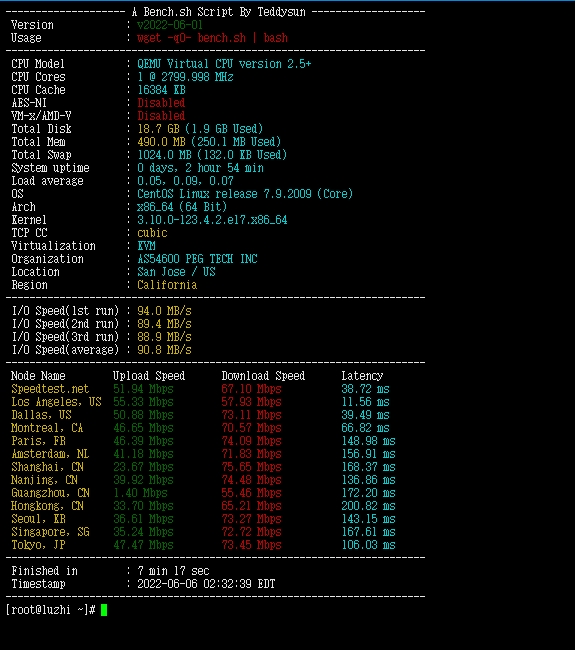
<div><span style="font-family: "Microsoft Yahei"; font-size: 16px; text-align: justify; background-color: rgb(255, 255, 255);">当我们选择</span><span style="font-family:Microsoft Yahei;"><span style="box-sizing: border-box; background: 0px 0px rgb(255, 255, 255); transition: color 0.25s ease 0s, background-color 0.25s ease 0s; font-size: 16px; text-align: justify;">购买到搬瓦工VPS主机</span></span><span style="font-family: "Microsoft Yahei"; font-size: 16px; text-align: justify; background-color: rgb(255, 255, 255);">之</span><span style="color: rgb(85, 85, 85); font-family: "Microsoft Yahei"; font-size: 16px; text-align: justify; background-color: rgb(255, 255, 255);">后第一件事情要做什么呢?当然是要用工具检测看看这台VPS主机的速度和性能参数。在这篇文章中,笔者将会整理几个在搬瓦工VPS主机中可以用于测试速度脚本小工具,当然这个全部可以用到其他Linux服务器。</span><p style="box-sizing: border-box; margin-bottom: 20px; overflow-wrap: break-word; color: rgb(85, 85, 85); font-family: "Microsoft Yahei"; font-size: 16px; text-align: justify; background-color: rgb(255, 255, 255);"></p><div class="wp-block-image" style="box-sizing: border-box; margin: 0px 0px 20px; overflow: hidden; text-align: center; color: rgb(85, 85, 85); font-family: "Microsoft Yahei"; font-size: 16px; background-color: rgb(255, 255, 255);"><figure class="aligncenter size-large" style="box-sizing: border-box; margin: 0px auto; clear: both;"><img class="alignnone size-full wp-image-1637" title="042474a87fc1f5d" src="https://www.cnbanwagong.com/wp-content/uploads/2021/11/042474a87fc1f5d.jpg" alt="042474a87fc1f5d" width="717" height="456" data-tag="bdshare" style="box-sizing: border-box; vertical-align: bottom; max-width: 100%; height: auto; margin: 0px auto; display: block; border-radius: inherit;" /></figure></div><p style="box-sizing: border-box; margin-bottom: 20px; overflow-wrap: break-word; color: rgb(85, 85, 85); font-family: "Microsoft Yahei"; font-size: 16px; text-align: justify; background-color: rgb(255, 255, 255);"><span style="box-sizing: border-box; font-weight: 700;">第一、bench.sh脚本工具</span></p><p style="box-sizing: border-box; margin-bottom: 20px; overflow-wrap: break-word; color: rgb(85, 85, 85); font-family: "Microsoft Yahei"; font-size: 16px; text-align: justify; background-color: rgb(255, 255, 255);">这个脚本工具可以检测当前服务器的基本信息,以及简单的IO读写性能和下载上传测速。</p><div class="code-toolbar" style="box-sizing: border-box; position: relative; color: rgb(85, 85, 85); font-family: "Microsoft Yahei"; font-size: 16px; text-align: justify; background-color: rgb(255, 255, 255);"><pre class="wp-block-code prettyprint language-undefined" style="box-sizing: border-box; overflow: auto; font-variant-numeric: normal; font-variant-east-asian: normal; font-stretch: normal; font-size: 12px; line-height: 20px; font-family: "courier new"; padding: 10px 15px; margin-top: 20px; margin-bottom: 20px; color: rgb(248, 248, 212); word-break: normal; overflow-wrap: break-word; background-color: rgb(39, 40, 34); border-width: initial; border-style: none; border-color: initial; border-radius: 0.5em; max-height: 637px; text-shadow: black 0px -0.1em 0.2em; text-align: left; word-spacing: normal; tab-size: 4; hyphens: none; box-shadow: black 1px 1px 0.5em inset;"><code class="language- language-undefined" style="box-sizing: border-box; font-family: Consolas, Monaco, "Andale Mono", "Ubuntu Mono", monospace; font-size: inherit; padding: 0px; color: white; background: none; border-radius: 0px; display: block; overflow-wrap: normal; text-shadow: black 0px -0.1em 0.2em; word-spacing: normal; word-break: normal; line-height: 1.5; tab-size: 4; hyphens: none;"><span class="pln" style="box-sizing: border-box; color: rgb(102, 217, 239);">wget </span><span class="pun" style="box-sizing: border-box; color: rgb(248, 248, 242);">-</span><span class="pln" style="box-sizing: border-box; color: rgb(102, 217, 239);">qO</span><span class="pun" style="box-sizing: border-box; color: rgb(248, 248, 242);">-</span><span class="pln" style="box-sizing: border-box; color: rgb(102, 217, 239);"> bench</span><span class="pun" style="box-sizing: border-box; color: rgb(248, 248, 242);">.</span><span class="pln" style="box-sizing: border-box; color: rgb(102, 217, 239);">sh </span><span class="pun" style="box-sizing: border-box; color: rgb(248, 248, 242);">|</span><span class="pln" style="box-sizing: border-box; color: rgb(102, 217, 239);"> bash</span></code></pre><div class="toolbar" style="box-sizing: border-box; position: absolute; top: 0.3em; right: 0.2em; transition: opacity 0.3s ease-in-out 0s; opacity: 0;"><div class="toolbar-item" style="box-sizing: border-box; display: inline-block;"><a style="box-sizing: border-box; background: rgba(224, 224, 224, 0.2); color: rgb(187, 187, 187); text-decoration-line: underline; transition: color 0.25s ease 0s, background-color 0.25s ease 0s; cursor: pointer; font-size: 0.8em; padding: 0px 0.5em; box-shadow: rgba(0, 0, 0, 0.2) 0px 2px 0px 0px; border-radius: 0.5em;">Select Code</a></div><div class="toolbar-item" style="box-sizing: border-box; display: inline-block;"><a style="box-sizing: border-box; background: rgba(224, 224, 224, 0.2); color: rgb(187, 187, 187); text-decoration-line: underline; transition: color 0.25s ease 0s, background-color 0.25s ease 0s; cursor: pointer; font-size: 0.8em; padding: 0px 0.5em; box-shadow: rgba(0, 0, 0, 0.2) 0px 2px 0px 0px; border-radius: 0.5em;">Copy</a></div></div></div><p style="box-sizing: border-box; margin-bottom: 20px; overflow-wrap: break-word; color: rgb(85, 85, 85); font-family: "Microsoft Yahei"; font-size: 16px; text-align: justify; background-color: rgb(255, 255, 255);">这里我们直接复制脚本到我们的Linux服务器中。</p><div class="wp-block-image" style="box-sizing: border-box; margin: 0px 0px 20px; overflow: hidden; text-align: center; color: rgb(85, 85, 85); font-family: "Microsoft Yahei"; font-size: 16px; background-color: rgb(255, 255, 255);"><figure class="aligncenter size-large" style="box-sizing: border-box; margin: 0px auto; clear: both;"><img loading="lazy" class="alignnone size-full wp-image-1638" title="bf2d77c53a5d2c7" src="https://www.cnbanwagong.com/wp-content/uploads/2021/11/bf2d77c53a5d2c7.jpg" alt="bf2d77c53a5d2c7" width="726" height="520" data-tag="bdshare" style="box-sizing: border-box; vertical-align: bottom; max-width: 100%; height: auto; margin: 0px auto; display: block; border-radius: inherit;" /></figure></div><p style="box-sizing: border-box; margin-bottom: 20px; overflow-wrap: break-word; color: rgb(85, 85, 85); font-family: "Microsoft Yahei"; font-size: 16px; text-align: justify; background-color: rgb(255, 255, 255);"><span style="box-sizing: border-box; font-weight: 700;">第二、superbench.sh脚本工具</span></p><p style="box-sizing: border-box; margin-bottom: 20px; overflow-wrap: break-word; color: rgb(85, 85, 85); font-family: "Microsoft Yahei"; font-size: 16px; text-align: justify; background-color: rgb(255, 255, 255);">这个脚本工具和上面的有些相似,可以测试服务器的配置、IO和上传速率。</p><div class="code-toolbar" style="box-sizing: border-box; position: relative; color: rgb(85, 85, 85); font-family: "Microsoft Yahei"; font-size: 16px; text-align: justify; background-color: rgb(255, 255, 255);"><pre class="wp-block-code prettyprint language-undefined" style="box-sizing: border-box; overflow: auto; font-variant-numeric: normal; font-variant-east-asian: normal; font-stretch: normal; font-size: 12px; line-height: 20px; font-family: "courier new"; padding: 10px 15px; margin-top: 20px; margin-bottom: 20px; color: rgb(248, 248, 212); word-break: normal; overflow-wrap: break-word; background-color: rgb(39, 40, 34); border-width: initial; border-style: none; border-color: initial; border-radius: 0.5em; max-height: 637px; text-shadow: black 0px -0.1em 0.2em; text-align: left; word-spacing: normal; tab-size: 4; hyphens: none; box-shadow: black 1px 1px 0.5em inset;"><code class="language- language-undefined" style="box-sizing: border-box; font-family: Consolas, Monaco, "Andale Mono", "Ubuntu Mono", monospace; font-size: inherit; padding: 0px; color: white; background: none; border-radius: 0px; display: block; overflow-wrap: normal; text-shadow: black 0px -0.1em 0.2em; word-spacing: normal; word-break: normal; line-height: 1.5; tab-size: 4; hyphens: none;"><span class="pln" style="box-sizing: border-box; color: rgb(102, 217, 239);">wget https</span><span class="pun" style="box-sizing: border-box; color: rgb(248, 248, 242);">:</span><span class="com" style="box-sizing: border-box; color: rgb(147, 161, 161);">//raw.githubusercontent.com/oooldking/script/master/superbench.sh</span><span class="pln" style="box-sizing: border-box; color: rgb(102, 217, 239);">
chmod </span><span class="pun" style="box-sizing: border-box; color: rgb(248, 248, 242);">+</span><span class="pln" style="box-sizing: border-box; color: rgb(102, 217, 239);">x superbench</span><span class="pun" style="box-sizing: border-box; color: rgb(248, 248, 242);">.</span><span class="pln" style="box-sizing: border-box; color: rgb(102, 217, 239);">sh
</span><span class="pun" style="box-sizing: border-box; color: rgb(248, 248, 242);">./</span><span class="pln" style="box-sizing: border-box; color: rgb(102, 217, 239);">superbench</span><span class="pun" style="box-sizing: border-box; color: rgb(248, 248, 242);">.</span><span class="pln" style="box-sizing: border-box; color: rgb(102, 217, 239);">sh</span></code></pre><div class="toolbar" style="box-sizing: border-box; position: absolute; top: 0.3em; right: 0.2em; transition: opacity 0.3s ease-in-out 0s; opacity: 0;"><div class="toolbar-item" style="box-sizing: border-box; display: inline-block;"><a style="box-sizing: border-box; background: rgba(224, 224, 224, 0.2); color: rgb(187, 187, 187); text-decoration-line: underline; transition: color 0.25s ease 0s, background-color 0.25s ease 0s; cursor: pointer; font-size: 0.8em; padding: 0px 0.5em; box-shadow: rgba(0, 0, 0, 0.2) 0px 2px 0px 0px; border-radius: 0.5em;">Select Code</a></div><div class="toolbar-item" style="box-sizing: border-box; display: inline-block;"><a style="box-sizing: border-box; background: rgba(224, 224, 224, 0.2); color: rgb(187, 187, 187); text-decoration-line: underline; transition: color 0.25s ease 0s, background-color 0.25s ease 0s; cursor: pointer; font-size: 0.8em; padding: 0px 0.5em; box-shadow: rgba(0, 0, 0, 0.2) 0px 2px 0px 0px; border-radius: 0.5em;">Copy</a></div></div></div><div class="wp-block-image" style="box-sizing: border-box; margin: 0px 0px 20px; overflow: hidden; text-align: center; color: rgb(85, 85, 85); font-family: "Microsoft Yahei"; font-size: 16px; background-color: rgb(255, 255, 255);"><figure class="aligncenter size-large" style="box-sizing: border-box; margin: 0px auto; clear: both;"><img loading="lazy" class="alignnone size-full wp-image-1634" title="fcd5a6eaf864751" src="https://www.cnbanwagong.com/wp-content/uploads/2021/11/fcd5a6eaf864751.jpg" alt="fcd5a6eaf864751" width="728" height="554" data-tag="bdshare" style="box-sizing: border-box; vertical-align: bottom; max-width: 100%; height: auto; margin: 0px auto; display: block; border-radius: inherit;" /></figure></div><p style="box-sizing: border-box; margin-bottom: 20px; overflow-wrap: break-word; color: rgb(85, 85, 85); font-family: "Microsoft Yahei"; font-size: 16px; text-align: justify; background-color: rgb(255, 255, 255);"><span style="box-sizing: border-box; font-weight: 700;">第三、zbench.sh脚本工具</span></p><p style="box-sizing: border-box; margin-bottom: 20px; overflow-wrap: break-word; color: rgb(85, 85, 85); font-family: "Microsoft Yahei"; font-size: 16px; text-align: justify; background-color: rgb(255, 255, 255);">这个脚本工具测试比较多一些,包括PING速度都有。</p><div class="code-toolbar" style="box-sizing: border-box; position: relative; color: rgb(85, 85, 85); font-family: "Microsoft Yahei"; font-size: 16px; text-align: justify; background-color: rgb(255, 255, 255);"><pre class="wp-block-code prettyprint language-undefined" style="box-sizing: border-box; overflow: auto; font-variant-numeric: normal; font-variant-east-asian: normal; font-stretch: normal; font-size: 12px; line-height: 20px; font-family: "courier new"; padding: 10px 15px; margin-top: 20px; margin-bottom: 20px; color: rgb(248, 248, 212); word-break: normal; overflow-wrap: break-word; background-color: rgb(39, 40, 34); border-width: initial; border-style: none; border-color: initial; border-radius: 0.5em; max-height: 637px; text-shadow: black 0px -0.1em 0.2em; text-align: left; word-spacing: normal; tab-size: 4; hyphens: none; box-shadow: black 1px 1px 0.5em inset;"><code class="language- language-undefined" style="box-sizing: border-box; font-family: Consolas, Monaco, "Andale Mono", "Ubuntu Mono", monospace; font-size: inherit; padding: 0px; color: white; background: none; border-radius: 0px; display: block; overflow-wrap: normal; text-shadow: black 0px -0.1em 0.2em; word-spacing: normal; word-break: normal; line-height: 1.5; tab-size: 4; hyphens: none;"><span class="pln" style="box-sizing: border-box; color: rgb(102, 217, 239);">wget </span><span class="pun" style="box-sizing: border-box; color: rgb(248, 248, 242);">-</span><span class="pln" style="box-sizing: border-box; color: rgb(102, 217, 239);">N </span><span class="pun" style="box-sizing: border-box; color: rgb(248, 248, 242);">--</span><span class="kwd" style="box-sizing: border-box; color: rgb(249, 38, 89);">no</span><span class="pun" style="box-sizing: border-box; color: rgb(248, 248, 242);">-</span><span class="pln" style="box-sizing: border-box; color: rgb(102, 217, 239);">check</span><span class="pun" style="box-sizing: border-box; color: rgb(248, 248, 242);">-</span><span class="pln" style="box-sizing: border-box; color: rgb(102, 217, 239);">certificate https</span><span class="pun" style="box-sizing: border-box; color: rgb(248, 248, 242);">:</span><span class="com" style="box-sizing: border-box; color: rgb(147, 161, 161);">//raw.githubusercontent.com/FunctionClub/ZBench/master/ZBench-CN.sh && bash ZBench-CN.sh</span></code></pre><div class="toolbar" style="box-sizing: border-box; position: absolute; top: 0.3em; right: 0.2em; transition: opacity 0.3s ease-in-out 0s; opacity: 0;"><div class="toolbar-item" style="box-sizing: border-box; display: inline-block;"><a style="box-sizing: border-box; background: rgba(224, 224, 224, 0.2); color: rgb(187, 187, 187); text-decoration-line: underline; transition: color 0.25s ease 0s, background-color 0.25s ease 0s; cursor: pointer; font-size: 0.8em; padding: 0px 0.5em; box-shadow: rgba(0, 0, 0, 0.2) 0px 2px 0px 0px; border-radius: 0.5em;">Select Code</a></div><div class="toolbar-item" style="box-sizing: border-box; display: inline-block;"><a style="box-sizing: border-box; background: rgba(224, 224, 224, 0.2); color: rgb(187, 187, 187); text-decoration-line: underline; transition: color 0.25s ease 0s, background-color 0.25s ease 0s; cursor: pointer; font-size: 0.8em; padding: 0px 0.5em; box-shadow: rgba(0, 0, 0, 0.2) 0px 2px 0px 0px; border-radius: 0.5em;">Copy</a></div></div></div><div class="wp-block-image" style="box-sizing: border-box; margin: 0px 0px 20px; overflow: hidden; text-align: center; color: rgb(85, 85, 85); font-family: "Microsoft Yahei"; font-size: 16px; background-color: rgb(255, 255, 255);"><figure class="aligncenter size-large" style="box-sizing: border-box; margin: 0px auto; clear: both;"><img loading="lazy" class="alignnone size-full wp-image-1635" title="7c834c51c51c4a5" src="https://www.cnbanwagong.com/wp-content/uploads/2021/11/7c834c51c51c4a5.jpg" alt="7c834c51c51c4a5" width="717" height="351" data-tag="bdshare" style="box-sizing: border-box; vertical-align: bottom; max-width: 100%; height: auto; margin: 0px auto; display: block; border-radius: inherit;" /></figure></div><p style="box-sizing: border-box; margin-bottom: 20px; overflow-wrap: break-word; color: rgb(85, 85, 85); font-family: "Microsoft Yahei"; font-size: 16px; text-align: justify; background-color: rgb(255, 255, 255);"><span style="box-sizing: border-box; font-weight: 700;">第四、跑分速度测试工具</span></p><p style="box-sizing: border-box; margin-bottom: 20px; overflow-wrap: break-word; color: rgb(85, 85, 85); font-family: "Microsoft Yahei"; font-size: 16px; text-align: justify; background-color: rgb(255, 255, 255);">这里我们可以通过测试跑分测试,这个算是一个综合的跑分。</p><div class="code-toolbar" style="box-sizing: border-box; position: relative; color: rgb(85, 85, 85); font-family: "Microsoft Yahei"; font-size: 16px; text-align: justify; background-color: rgb(255, 255, 255);"><pre class="wp-block-code prettyprint language-undefined" style="box-sizing: border-box; overflow: auto; font-variant-numeric: normal; font-variant-east-asian: normal; font-stretch: normal; font-size: 12px; line-height: 20px; font-family: "courier new"; padding: 10px 15px; margin-top: 20px; margin-bottom: 20px; color: rgb(248, 248, 212); word-break: normal; overflow-wrap: break-word; background-color: rgb(39, 40, 34); border-width: initial; border-style: none; border-color: initial; border-radius: 0.5em; max-height: 637px; text-shadow: black 0px -0.1em 0.2em; text-align: left; word-spacing: normal; tab-size: 4; hyphens: none; box-shadow: black 1px 1px 0.5em inset;"><code class="language- language-undefined" style="box-sizing: border-box; font-family: Consolas, Monaco, "Andale Mono", "Ubuntu Mono", monospace; font-size: inherit; padding: 0px; color: white; background: none; border-radius: 0px; display: block; overflow-wrap: normal; text-shadow: black 0px -0.1em 0.2em; word-spacing: normal; word-break: normal; line-height: 1.5; tab-size: 4; hyphens: none;"><span class="pln" style="box-sizing: border-box; color: rgb(102, 217, 239);">yum </span><span class="pun" style="box-sizing: border-box; color: rgb(248, 248, 242);">-</span><span class="pln" style="box-sizing: border-box; color: rgb(102, 217, 239);">y install gcc automake autoconf libtool make perl</span><span class="pun" style="box-sizing: border-box; color: rgb(248, 248, 242);">-</span><span class="typ" style="box-sizing: border-box; color: rgb(166, 226, 46);">Time</span><span class="pun" style="box-sizing: border-box; color: rgb(248, 248, 242);">-</span><span class="typ" style="box-sizing: border-box; color: rgb(166, 226, 46);">HiRes</span><span class="pln" style="box-sizing: border-box; color: rgb(102, 217, 239);"> perl
wget https</span><span class="pun" style="box-sizing: border-box; color: rgb(248, 248, 242);">:</span><span class="com" style="box-sizing: border-box; color: rgb(147, 161, 161);">//download.laobuluo.com/tools/UnixBench5.1.3.tgz</span><span class="pln" style="box-sizing: border-box; color: rgb(102, 217, 239);">
tar </span><span class="pun" style="box-sizing: border-box; color: rgb(248, 248, 242);">-</span><span class="pln" style="box-sizing: border-box; color: rgb(102, 217, 239);">zxvf </span><span class="typ" style="box-sizing: border-box; color: rgb(166, 226, 46);">UnixBench5</span><span class="pun" style="box-sizing: border-box; color: rgb(248, 248, 242);">.</span><span class="lit" style="box-sizing: border-box; color: rgb(174, 129, 255);">1.3</span><span class="pun" style="box-sizing: border-box; color: rgb(248, 248, 242);">.</span><span class="pln" style="box-sizing: border-box; color: rgb(102, 217, 239);">tgz
cd </span><span class="typ" style="box-sizing: border-box; color: rgb(166, 226, 46);">UnixBench</span><span class="pln" style="box-sizing: border-box; color: rgb(102, 217, 239);">
make
</span><span class="pun" style="box-sizing: border-box; color: rgb(248, 248, 242);">./</span><span class="typ" style="box-sizing: border-box; color: rgb(166, 226, 46);">Run</span></code></pre><div class="toolbar" style="box-sizing: border-box; position: absolute; top: 0.3em; right: 0.2em; transition: opacity 0.3s ease-in-out 0s; opacity: 0;"><div class="toolbar-item" style="box-sizing: border-box; display: inline-block;"><a style="box-sizing: border-box; background: rgba(224, 224, 224, 0.2); color: rgb(187, 187, 187); text-decoration-line: underline; transition: color 0.25s ease 0s, background-color 0.25s ease 0s; cursor: pointer; font-size: 0.8em; padding: 0px 0.5em; box-shadow: rgba(0, 0, 0, 0.2) 0px 2px 0px 0px; border-radius: 0.5em;">Select Code</a></div><div class="toolbar-item" style="box-sizing: border-box; display: inline-block;"><a style="box-sizing: border-box; background: rgba(224, 224, 224, 0.2); color: rgb(187, 187, 187); text-decoration-line: underline; transition: color 0.25s ease 0s, background-color 0.25s ease 0s; cursor: pointer; font-size: 0.8em; padding: 0px 0.5em; box-shadow: rgba(0, 0, 0, 0.2) 0px 2px 0px 0px; border-radius: 0.5em;">Copy</a></div></div></div><p style="box-sizing: border-box; margin-bottom: 20px; overflow-wrap: break-word; color: rgb(85, 85, 85); font-family: "Microsoft Yahei"; font-size: 16px; text-align: justify; background-color: rgb(255, 255, 255);">这里脚本是在CentOS测试的,如果我们是在Ubuntu/Debian,需要将开始的Yum换成apt。跑分不算准确。但是可以作为参考。</p><div class="wp-block-image" style="box-sizing: border-box; margin: 0px 0px 20px; overflow: hidden; text-align: center; color: rgb(85, 85, 85); font-family: "Microsoft Yahei"; font-size: 16px; background-color: rgb(255, 255, 255);"><figure class="aligncenter size-large" style="box-sizing: border-box; margin: 0px auto; clear: both;"><img loading="lazy" class="alignnone size-full wp-image-1636" title="96e285c38ce295e" src="https://www.cnbanwagong.com/wp-content/uploads/2021/11/96e285c38ce295e.jpg" alt="96e285c38ce295e" width="724" height="501" data-tag="bdshare" style="box-sizing: border-box; vertical-align: bottom; max-width: 100%; height: auto; margin: 0px auto; display: block; border-radius: inherit;" /></figure></div><p style="box-sizing: border-box; margin-bottom: 20px; overflow-wrap: break-word; color: rgb(85, 85, 85); font-family: "Microsoft Yahei"; font-size: 16px; text-align: justify; background-color: rgb(255, 255, 255);"><span style="box-sizing: border-box; font-weight: 700;">第五、其他速度测试工具</span></p><p style="box-sizing: border-box; margin-bottom: 20px; overflow-wrap: break-word; color: rgb(85, 85, 85); font-family: "Microsoft Yahei"; font-size: 16px; text-align: justify; background-color: rgb(255, 255, 255);">我们常规的可能用到PING测速工具本地到服务器的速度。</p><div class="code-toolbar" style="box-sizing: border-box; position: relative; color: rgb(85, 85, 85); font-family: "Microsoft Yahei"; font-size: 16px; text-align: justify; background-color: rgb(255, 255, 255);"><pre class="wp-block-code prettyprint language-undefined" style="box-sizing: border-box; overflow: auto; font-variant-numeric: normal; font-variant-east-asian: normal; font-stretch: normal; font-size: 12px; line-height: 20px; font-family: "courier new"; padding: 10px 15px; margin-top: 20px; margin-bottom: 20px; color: rgb(248, 248, 212); word-break: normal; overflow-wrap: break-word; background-color: rgb(39, 40, 34); border-width: initial; border-style: none; border-color: initial; border-radius: 0.5em; max-height: 637px; text-shadow: black 0px -0.1em 0.2em; text-align: left; word-spacing: normal; tab-size: 4; hyphens: none; box-shadow: black 1px 1px 0.5em inset;"><code class="language- language-undefined" style="box-sizing: border-box; font-family: Consolas, Monaco, "Andale Mono", "Ubuntu Mono", monospace; font-size: inherit; padding: 0px; color: white; background: none; border-radius: 0px; display: block; overflow-wrap: normal; text-shadow: black 0px -0.1em 0.2em; word-spacing: normal; word-break: normal; line-height: 1.5; tab-size: 4; hyphens: none;"><span class="lit" style="box-sizing: border-box; color: rgb(174, 129, 255);">1</span><span class="pun" style="box-sizing: border-box; color: rgb(248, 248, 242);">、</span><span class="pln" style="box-sizing: border-box; color: rgb(102, 217, 239);">http</span><span class="pun" style="box-sizing: border-box; color: rgb(248, 248, 242);">:</span><span class="com" style="box-sizing: border-box; color: rgb(147, 161, 161);">//ping.chinaz.com</span><span class="pln" style="box-sizing: border-box; color: rgb(102, 217, 239);">
</span><span class="lit" style="box-sizing: border-box; color: rgb(174, 129, 255);">2</span><span class="pun" style="box-sizing: border-box; color: rgb(248, 248, 242);">、</span><span class="pln" style="box-sizing: border-box; color: rgb(102, 217, 239);">http</span><span class="pun" style="box-sizing: border-box; color: rgb(248, 248, 242);">:</span><span class="com" style="box-sizing: border-box; color: rgb(147, 161, 161);">//www.webkaka.com/Ping.aspx</span></code></pre><div class="toolbar" style="box-sizing: border-box; position: absolute; top: 0.3em; right: 0.2em; transition: opacity 0.3s ease-in-out 0s; opacity: 0;"><div class="toolbar-item" style="box-sizing: border-box; display: inline-block;"><a style="box-sizing: border-box; background: rgba(224, 224, 224, 0.2); color: rgb(187, 187, 187); text-decoration-line: underline; transition: color 0.25s ease 0s, background-color 0.25s ease 0s; cursor: pointer; font-size: 0.8em; padding: 0px 0.5em; box-shadow: rgba(0, 0, 0, 0.2) 0px 2px 0px 0px; border-radius: 0.5em;">Select Code</a></div><div class="toolbar-item" style="box-sizing: border-box; display: inline-block;"><a style="box-sizing: border-box; background: rgba(224, 224, 224, 0.2); color: rgb(187, 187, 187); text-decoration-line: underline; transition: color 0.25s ease 0s, background-color 0.25s ease 0s; cursor: pointer; font-size: 0.8em; padding: 0px 0.5em; box-shadow: rgba(0, 0, 0, 0.2) 0px 2px 0px 0px; border-radius: 0.5em;">Copy</a></div></div></div><p style="box-sizing: border-box; margin-bottom: 20px; overflow-wrap: break-word; color: rgb(85, 85, 85); font-family: "Microsoft Yahei"; font-size: 16px; text-align: justify; background-color: rgb(255, 255, 255);">这里,我们暂时先整理5个常用到搬瓦工VPS主机,也可以用到其他VPS主机的测速服务器脚本工具。</p></div> |
|
 |Archiver|手机版|小黑屋|腾飞在线
( 冀ICP备05002530号 )
|Archiver|手机版|小黑屋|腾飞在线
( 冀ICP备05002530号 )


 发表于 2022-6-6 15:12:23