|
|
楼主 |
发表于 2022-11-16 23:01:17
|
显示全部楼层
给大家发个教程
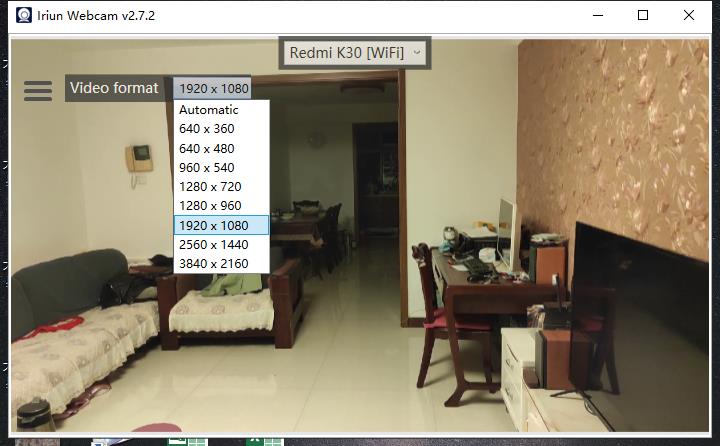
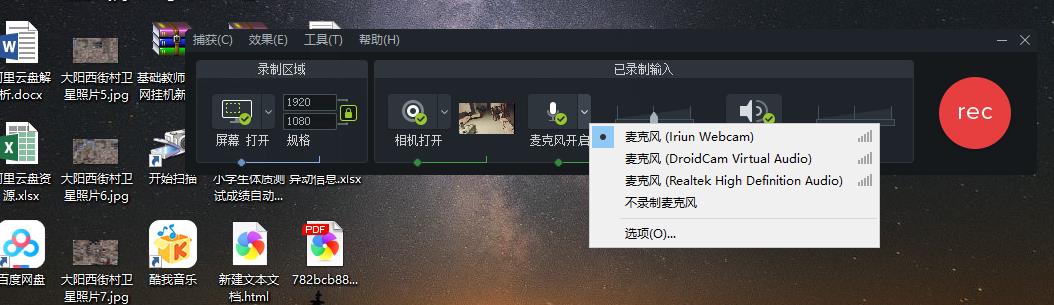
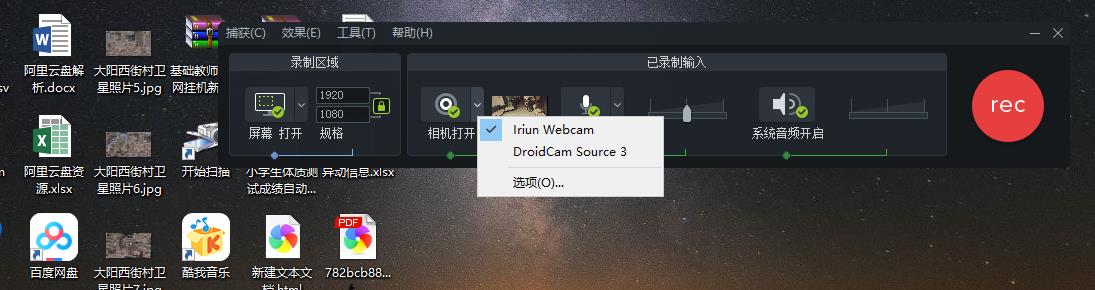
<div><figure class=\"image ss-img-wrapper\" style=\"outline: none; position: relative; text-align: center; margin: 40px auto; max-width: 100%; color: rgb(76, 78, 77); font-family: -apple-system, BlinkMacSystemFont, " ingFang SC", "Hiragino Sans GB", "Microsoft Yahei", Arial, sans-serif; font-size: 16px; background-color: rgb(255, 255, 255);\"><img src=\"https://cdn.sspai.com/2022/06/07/article/bc9234196948caa1e3ec99cc9a574957?imageView2/2/w/1120/q/90/interlace/1/ignore-error/1\" alt=\"black speaker on white table\" srcset=\"https://postimg.aliavv.com/wp-content/uploads/2022/06/eba14775e351d3e25a794f18492a7dd6-624x416.jpg 624w, https://postimg.aliavv.com/wp-content/uploads/2022/06/eba14775e351d3e25a794f18492a7dd6-1024x683.jpg 1024w, https://postimg.aliavv.com/wp-content/uploads/2022/06/eba14775e351d3e25a794f18492a7dd6-768x512.jpg 768w, https://postimg.aliavv.com/wp-content/uploads/2022/06/eba14775e351d3e25a794f18492a7dd6-1536x1024.jpg 1536w, https://postimg.aliavv.com/wp-content/uploads/2022/06/eba14775e351d3e25a794f18492a7dd6.jpg 1600w\" sizes=\"100vw\" width=\"624\" data-original=\"https://cdn.sspai.com/2022/06/07/article/bc9234196948caa1e3ec99cc9a574957\" data-index=\"0\" class=\"lazyLoadEnd\" style=\"outline: none !important; vertical-align: middle; max-width: 100%; position: relative;\" /></figure><h2 id=\"ss-hId-1\" class=\"ss-hId-1\" hid=\"ss-hId-1\" style=\"margin: 60px 0px 26px; color: rgb(41, 37, 37); line-height: 33.6px; font-family: "ingFang SC", "Helvetica Neue", Helvetica, "Hiragino Sans GB", "Microsoft YaHei", 微软雅黑, Arial, sans-serif; font-size: 24px; background-color: rgb(255, 255, 255); outline: none !important;\">为什么要这么做?</h2><p style=\"line-height: 30px; margin-bottom: 20px; color: rgb(76, 78, 77); font-family: -apple-system, BlinkMacSystemFont, "ingFang SC", "Hiragino Sans GB", "Microsoft Yahei", Arial, sans-serif; font-size: 16px; background-color: rgb(255, 255, 255); outline: none !important;\">昨天在推上看到一个视频,注意到他是使用 Sony ZV1 作为直播摄像头的。而作为一个视频制作者,我的不少视频都是以真人 + 教程的形式提供给我的观众的,我突然想起来,或许我可以使用手机来作为摄像头来完成视频的录制。</p><p style=\"line-height: 30px; margin-bottom: 20px; color: rgb(76, 78, 77); font-family: -apple-system, BlinkMacSystemFont, "ingFang SC", "Hiragino Sans GB", "Microsoft Yahei", Arial, sans-serif; font-size: 16px; background-color: rgb(255, 255, 255); outline: none !important;\">和 MBP 自带的摄像头相比,可以让我在视频中更加清晰、更加明亮,让我的视频的观众们可以更好的看到我(没错,就是这么自恋)。于是,我决定用我的备用机 — Pixel 6 来完成这个操作。</p><h2 id=\"ss-hId-2\" class=\"ss-hId-2\" hid=\"ss-hId-2\" style=\"margin: 60px 0px 26px; color: rgb(41, 37, 37); line-height: 33.6px; font-family: "ingFang SC", "Helvetica Neue", Helvetica, "Hiragino Sans GB", "Microsoft YaHei", 微软雅黑, Arial, sans-serif; font-size: 24px; background-color: rgb(255, 255, 255); outline: none !important;\">为什么是 Iriun Webcam</h2><p style=\"line-height: 30px; margin-bottom: 20px; color: rgb(76, 78, 77); font-family: -apple-system, BlinkMacSystemFont, "ingFang SC", "Hiragino Sans GB", "Microsoft Yahei", Arial, sans-serif; font-size: 16px; background-color: rgb(255, 255, 255); outline: none !important;\">Iriun Webcam 的一个好处是免费版可以使用 4K,且免费版的水印也十分的不明显,对于白嫖用户十分友好。如果你需要完全去除水印或更加强大的控制能力,则可以付费获得。不过对于绝大多数场景,免费版足矣。</p><h2 id=\"ss-hId-3\" class=\"ss-hId-3\" hid=\"ss-hId-3\" style=\"margin: 60px 0px 26px; color: rgb(41, 37, 37); line-height: 33.6px; font-family: "ingFang SC", "Helvetica Neue", Helvetica, "Hiragino Sans GB", "Microsoft YaHei", 微软雅黑, Arial, sans-serif; font-size: 24px; background-color: rgb(255, 255, 255); outline: none !important;\">所需软件</h2><ul style=\"padding: 0px 36px; margin: 40px auto; line-height: normal; -webkit-tap-highlight-color: transparent; list-style-position: initial; list-style-image: initial; box-sizing: border-box; color: rgb(76, 78, 77); font-family: -apple-system, BlinkMacSystemFont, "ingFang SC", "Hiragino Sans GB", "Microsoft Yahei", Arial, sans-serif; font-size: 16px; background-color: rgb(255, 255, 255); outline: none !important;\"><li style=\"padding: 0px; margin: 10px 0px; line-height: 31px; -webkit-tap-highlight-color: transparent; outline: none !important;\">macOS 驱动下载:https://iriun.com/</li><li style=\"padding: 0px; margin: 10px 0px; line-height: 31px; -webkit-tap-highlight-color: transparent; outline: none !important;\">Android Play Store 应用:https://play.google.com/store/apps/details?id=com.jacksoftw.webcam</li><li style=\"padding: 0px; margin: 10px 0px; line-height: 31px; -webkit-tap-highlight-color: transparent; outline: none !important;\">iOS App Store 应用:https://itunes.apple.com/us/app/iriun-webcam-for-pc-and-mac/id1439303579?mt=8</li></ul><h2 id=\"ss-hId-4\" class=\"ss-hId-4\" hid=\"ss-hId-4\" style=\"margin: 60px 0px 26px; color: rgb(41, 37, 37); line-height: 33.6px; font-family: "ingFang SC", "Helvetica Neue", Helvetica, "Hiragino Sans GB", "Microsoft YaHei", 微软雅黑, Arial, sans-serif; font-size: 24px; background-color: rgb(255, 255, 255); outline: none !important;\">所需硬件</h2><ul style=\"padding: 0px 36px; margin: 40px auto; line-height: normal; -webkit-tap-highlight-color: transparent; list-style-position: initial; list-style-image: initial; box-sizing: border-box; color: rgb(76, 78, 77); font-family: -apple-system, BlinkMacSystemFont, "ingFang SC", "Hiragino Sans GB", "Microsoft Yahei", Arial, sans-serif; font-size: 16px; background-color: rgb(255, 255, 255); outline: none !important;\"><li style=\"padding: 0px; margin: 10px 0px; line-height: 31px; -webkit-tap-highlight-color: transparent; outline: none !important;\">与手机适配的 USB 数据线:如果本地网络速度足够快,也可以不使用数据线。不过我推荐你使用 USB 数据线,主要是理论上会更加的稳定。</li></ul><h2 id=\"ss-hId-5\" class=\"ss-hId-5\" hid=\"ss-hId-5\" style=\"margin: 60px 0px 26px; color: rgb(41, 37, 37); line-height: 33.6px; font-family: "PingFang SC", "Helvetica Neue", Helvetica, "Hiragino Sans GB", "Microsoft YaHei", 微软雅黑, Arial, sans-serif; font-size: 24px; background-color: rgb(255, 255, 255); outline: none !important;\">操作流程</h2><h3 class=\"ss-hIdChildren-1\" style=\"margin: 60px 0px 16px; color: rgb(41, 37, 37); line-height: 25.2px; font-family: "PingFang SC", "Helvetica Neue", Helvetica, "Hiragino Sans GB", "Microsoft YaHei", 微软雅黑, Arial, sans-serif; font-size: 18px; background-color: rgb(255, 255, 255); outline: none !important;\">安装软件</h3><h4 style=\"margin: 40px 0px 16px; color: rgb(41, 37, 37); line-height: 22.4px; font-family: "PingFang SC", "Helvetica Neue", Helvetica, "Hiragino Sans GB", "Microsoft YaHei", 微软雅黑, Arial, sans-serif; font-size: 16px; background-color: rgb(255, 255, 255); outline: none !important;\">PC 端</h4><p style=\"line-height: 30px; margin-bottom: 20px; color: rgb(76, 78, 77); font-family: -apple-system, BlinkMacSystemFont, "PingFang SC", "Hiragino Sans GB", "Microsoft Yahei", Arial, sans-serif; font-size: 16px; background-color: rgb(255, 255, 255); outline: none !important;\">想要实现软件连接,需要先下载安装相应的软件。Iriun Webcam 支持 WIndows 、 macOS 和 Ubuntu ,你只需要访问其<a href=\"https://iriun.com/\" target=\"_blank\" style=\"text-decoration-line: none; color: rgb(41, 37, 37); -webkit-tap-highlight-color: transparent; border-bottom: 1px solid rgb(215, 26, 27); transition: all 0.2s ease 0s; outline: none !important;\">官网</a>,并下载对应的软件,并在本地进行安装即可</p><figure class=\"image ss-img-wrapper\" style=\"outline: none; position: relative; text-align: center; margin: 40px auto; max-width: 100%; color: rgb(76, 78, 77); font-family: -apple-system, BlinkMacSystemFont, "PingFang SC", "Hiragino Sans GB", "Microsoft Yahei", Arial, sans-serif; font-size: 16px; background-color: rgb(255, 255, 255);\"><img src=\"https://cdn.sspai.com/2022/06/07/article/0a4a1adcf87090a78f657ffa96988377?imageView2/2/w/1120/q/90/interlace/1/ignore-error/1\" alt=\"\" srcset=\"https://postimg.aliavv.com/wp-content/uploads/2022/06/d2b5ca33bd970f64a6301fa75ae2eb22-16-1024x496.png 1024w, https://postimg.aliavv.com/wp-content/uploads/2022/06/d2b5ca33bd970f64a6301fa75ae2eb22-16-624x302.png 624w, https://postimg.aliavv.com/wp-content/uploads/2022/06/d2b5ca33bd970f64a6301fa75ae2eb22-16-768x372.png 768w, https://postimg.aliavv.com/wp-content/uploads/2022/06/d2b5ca33bd970f64a6301fa75ae2eb22-16-1536x743.png 1536w, https://postimg.aliavv.com/wp-content/uploads/2022/06/d2b5ca33bd970f64a6301fa75ae2eb22-16-2048x991.png 2048w\" sizes=\"100vw\" width=\"1024\" data-original=\"https://cdn.sspai.com/2022/06/07/article/0a4a1adcf87090a78f657ffa96988377\" data-index=\"1\" class=\"lazyLoadEnd\" style=\"outline: none !important; vertical-align: middle; max-width: 100%; position: relative;\" /></figure><h4 style=\"margin: 40px 0px 16px; color: rgb(41, 37, 37); line-height: 22.4px; font-family: "PingFang SC", "Helvetica Neue", Helvetica, "Hiragino Sans GB", "Microsoft YaHei", 微软雅黑, Arial, sans-serif; font-size: 16px; background-color: rgb(255, 255, 255); outline: none !important;\">手机端</h4><p style=\"line-height: 30px; margin-bottom: 20px; color: rgb(76, 78, 77); font-family: -apple-system, BlinkMacSystemFont, "PingFang SC", "Hiragino Sans GB", "Microsoft Yahei", Arial, sans-serif; font-size: 16px; background-color: rgb(255, 255, 255); outline: none !important;\">手机端则可以在你的手机上搜索 Irirun webcam,并进行安装。</p><figure class=\"image ss-img-wrapper\" style=\"outline: none; position: relative; text-align: center; margin: 40px auto; max-width: 100%; color: rgb(76, 78, 77); font-family: -apple-system, BlinkMacSystemFont, "PingFang SC", "Hiragino Sans GB", "Microsoft Yahei", Arial, sans-serif; font-size: 16px; background-color: rgb(255, 255, 255);\"><img src=\"https://cdn.sspai.com/2022/06/07/article/e9f7ce3f9f5574458a878411279a7b80?imageView2/2/w/1120/q/90/interlace/1/ignore-error/1\" alt=\"\" srcset=\"https://postimg.aliavv.com/wp-content/uploads/2022/06/d2b5ca33bd970f64a6301fa75ae2eb22-17-1024x553.png 1024w, https://postimg.aliavv.com/wp-content/uploads/2022/06/d2b5ca33bd970f64a6301fa75ae2eb22-17-624x337.png 624w, https://postimg.aliavv.com/wp-content/uploads/2022/06/d2b5ca33bd970f64a6301fa75ae2eb22-17-768x414.png 768w, https://postimg.aliavv.com/wp-content/uploads/2022/06/d2b5ca33bd970f64a6301fa75ae2eb22-17-1536x829.png 1536w, https://postimg.aliavv.com/wp-content/uploads/2022/06/d2b5ca33bd970f64a6301fa75ae2eb22-17-2048x1105.png 2048w\" sizes=\"100vw\" width=\"1024\" data-original=\"https://cdn.sspai.com/2022/06/07/article/e9f7ce3f9f5574458a878411279a7b80\" data-index=\"2\" class=\"lazyLoadEnd\" style=\"outline: none !important; vertical-align: middle; max-width: 100%; position: relative;\" /></figure><h3 class=\"ss-hIdChildren-2\" style=\"margin: 60px 0px 16px; color: rgb(41, 37, 37); line-height: 25.2px; font-family: "PingFang SC", "Helvetica Neue", Helvetica, "Hiragino Sans GB", "Microsoft YaHei", 微软雅黑, Arial, sans-serif; font-size: 18px; background-color: rgb(255, 255, 255); outline: none !important;\">配置设备连接</h3><p style=\"line-height: 30px; margin-bottom: 20px; color: rgb(76, 78, 77); font-family: -apple-system, BlinkMacSystemFont, "PingFang SC", "Hiragino Sans GB", "Microsoft Yahei", Arial, sans-serif; font-size: 16px; background-color: rgb(255, 255, 255); outline: none !important;\">安装完成后,在 macOS 上打开 Iriun Webcam 会看到如下的界面,此时说明你的 PC 已经准备好了。</p><figure class=\"image ss-img-wrapper\" style=\"outline: none; position: relative; text-align: center; margin: 40px auto; max-width: 100%; color: rgb(76, 78, 77); font-family: -apple-system, BlinkMacSystemFont, "PingFang SC", "Hiragino Sans GB", "Microsoft Yahei", Arial, sans-serif; font-size: 16px; background-color: rgb(255, 255, 255);\"><img src=\"https://cdn.sspai.com/2022/06/07/article/ed1453366656f49fa87798ed6c1df99c?imageView2/2/w/1120/q/90/interlace/1/ignore-error/1\" alt=\"\" data-original=\"https://cdn.sspai.com/2022/06/07/article/ed1453366656f49fa87798ed6c1df99c\" data-index=\"3\" class=\"lazyLoadEnd\" style=\"outline: none !important; vertical-align: middle; max-width: 100%; position: relative;\" /></figure><p style=\"line-height: 30px; margin-bottom: 20px; color: rgb(76, 78, 77); font-family: -apple-system, BlinkMacSystemFont, "PingFang SC", "Hiragino Sans GB", "Microsoft Yahei", Arial, sans-serif; font-size: 16px; background-color: rgb(255, 255, 255); outline: none !important;\"><em style=\"-webkit-tap-highlight-color: transparent; outline: none !important;\">未连接状态的效果</em></p><p style=\"line-height: 30px; margin-bottom: 20px; color: rgb(76, 78, 77); font-family: -apple-system, BlinkMacSystemFont, "PingFang SC", "Hiragino Sans GB", "Microsoft Yahei", Arial, sans-serif; font-size: 16px; background-color: rgb(255, 255, 255); outline: none !important;\">在手机上打开同样的软件,稍等片刻,二者就会自动连接到一起</p><figure class=\"image ss-img-wrapper\" style=\"outline: none; position: relative; text-align: center; margin: 40px auto; max-width: 100%; color: rgb(76, 78, 77); font-family: -apple-system, BlinkMacSystemFont, "PingFang SC", "Hiragino Sans GB", "Microsoft Yahei", Arial, sans-serif; font-size: 16px; background-color: rgb(255, 255, 255);\"><img src=\"https://cdn.sspai.com/2022/06/07/article/87b473845f96f0fdcd28787a0e7e2f82?imageView2/2/w/1120/q/90/interlace/1/ignore-error/1\" alt=\"\" data-original=\"https://cdn.sspai.com/2022/06/07/article/87b473845f96f0fdcd28787a0e7e2f82\" data-index=\"4\" class=\"lazyLoadEnd\" style=\"outline: none !important; vertical-align: middle; max-width: 100%; position: relative;\" /></figure><p style=\"line-height: 30px; margin-bottom: 20px; color: rgb(76, 78, 77); font-family: -apple-system, BlinkMacSystemFont, "PingFang SC", "Hiragino Sans GB", "Microsoft Yahei", Arial, sans-serif; font-size: 16px; background-color: rgb(255, 255, 255); outline: none !important;\"><em style=\"-webkit-tap-highlight-color: transparent; outline: none !important;\">已连接状态的效果</em></p><h3 class=\"ss-hIdChildren-3\" style=\"margin: 60px 0px 16px; color: rgb(41, 37, 37); line-height: 25.2px; font-family: "PingFang SC", "Helvetica Neue", Helvetica, "Hiragino Sans GB", "Microsoft YaHei", 微软雅黑, Arial, sans-serif; font-size: 18px; background-color: rgb(255, 255, 255); outline: none !important;\">换用 USB 连接</h3><p style=\"line-height: 30px; margin-bottom: 20px; color: rgb(76, 78, 77); font-family: -apple-system, BlinkMacSystemFont, "PingFang SC", "Hiragino Sans GB", "Microsoft Yahei", Arial, sans-serif; font-size: 16px; background-color: rgb(255, 255, 255); outline: none !important;\">使用 Wi-Fi 连接的最大的问题是不稳定,以及延迟高。因此,你可以选择改用 USB 数据线进行连接,从而获得一个更低的延迟和更稳定的视频效果。</p><p style=\"line-height: 30px; margin-bottom: 20px; color: rgb(76, 78, 77); font-family: -apple-system, BlinkMacSystemFont, "PingFang SC", "Hiragino Sans GB", "Microsoft Yahei", Arial, sans-serif; font-size: 16px; background-color: rgb(255, 255, 255); outline: none !important;\">你需要先将自己的手机开启开发者选项,并开启「USB 调试」,随后将手机与电脑连接(如果有授权窗口,则授权 PC 进行调试)。</p><figure class=\"image ss-img-wrapper\" style=\"outline: none; position: relative; text-align: center; margin: 40px auto; max-width: 100%; color: rgb(76, 78, 77); font-family: -apple-system, BlinkMacSystemFont, "PingFang SC", "Hiragino Sans GB", "Microsoft Yahei", Arial, sans-serif; font-size: 16px; background-color: rgb(255, 255, 255);\"><img src=\"https://cdn.sspai.com/2022/06/07/article/46990fc08feb14fef337f37a9335b297?imageView2/2/w/1120/q/90/interlace/1/ignore-error/1\" alt=\"\" data-original=\"https://cdn.sspai.com/2022/06/07/article/46990fc08feb14fef337f37a9335b297\" data-index=\"5\" class=\"lazyLoadEnd\" style=\"outline: none !important; vertical-align: middle; max-width: 100%; position: relative;\" /></figure><p style=\"line-height: 30px; margin-bottom: 20px; color: rgb(76, 78, 77); font-family: -apple-system, BlinkMacSystemFont, "PingFang SC", "Hiragino Sans GB", "Microsoft Yahei", Arial, sans-serif; font-size: 16px; background-color: rgb(255, 255, 255); outline: none !important;\">授权完成后,稍等片刻软件就会自动刷新,手机后的「Wi-Fi」变为「USB」,则说明你已经成功切换为使用 USB 连接。</p><figure class=\"image ss-img-wrapper\" style=\"outline: none; position: relative; text-align: center; margin: 40px auto; max-width: 100%; color: rgb(76, 78, 77); font-family: -apple-system, BlinkMacSystemFont, "PingFang SC", "Hiragino Sans GB", "Microsoft Yahei", Arial, sans-serif; font-size: 16px; background-color: rgb(255, 255, 255);\"><img src=\"https://cdn.sspai.com/2022/06/07/article/a158334770c8922c4d1beafe0e32ae35?imageView2/2/w/1120/q/90/interlace/1/ignore-error/1\" alt=\"\" data-original=\"https://cdn.sspai.com/2022/06/07/article/a158334770c8922c4d1beafe0e32ae35\" data-index=\"6\" class=\"lazyLoadEnd\" style=\"outline: none !important; vertical-align: middle; max-width: 100%; position: relative;\" /></figure><h3 class=\"ss-hIdChildren-4\" style=\"margin: 60px 0px 16px; color: rgb(41, 37, 37); line-height: 25.2px; font-family: "PingFang SC", "Helvetica Neue", Helvetica, "Hiragino Sans GB", "Microsoft YaHei", 微软雅黑, Arial, sans-serif; font-size: 18px; background-color: rgb(255, 255, 255); outline: none !important;\">配置软件摄像头</h3><p style=\"line-height: 30px; margin-bottom: 20px; color: rgb(76, 78, 77); font-family: -apple-system, BlinkMacSystemFont, "PingFang SC", "Hiragino Sans GB", "Microsoft Yahei", Arial, sans-serif; font-size: 16px; background-color: rgb(255, 255, 255); outline: none !important;\">当你配置完成 Iriun 的 Webcam 之后,就可以在你日常使用的软件当中切换具体使用的摄像头为 Iriun Webcam 来获得从手机取得的视频画面。</p><figure class=\"image ss-img-wrapper\" style=\"outline: none; position: relative; text-align: center; margin: 40px auto; max-width: 100%; color: rgb(76, 78, 77); font-family: -apple-system, BlinkMacSystemFont, "PingFang SC", "Hiragino Sans GB", "Microsoft Yahei", Arial, sans-serif; font-size: 16px; background-color: rgb(255, 255, 255);\"><img src=\"https://cdn.sspai.com/2022/06/07/article/86ae0143ce511b1363f0bc4d854c65c1?imageView2/2/w/1120/q/90/interlace/1/ignore-error/1\" alt=\"\" srcset=\"https://postimg.aliavv.com/wp-content/uploads/2022/06/d2b5ca33bd970f64a6301fa75ae2eb22-14.png 594w, https://postimg.aliavv.com/wp-content/uploads/2022/06/d2b5ca33bd970f64a6301fa75ae2eb22-14-448x416.png 448w\" sizes=\"100vw\" width=\"594\" data-original=\"https://cdn.sspai.com/2022/06/07/article/86ae0143ce511b1363f0bc4d854c65c1\" data-index=\"7\" class=\"lazyLoadEnd\" style=\"outline: none !important; vertical-align: middle; max-width: 100%; position: relative;\" /></figure><p style=\"line-height: 30px; margin-bottom: 20px; margin-left: auto; color: rgb(76, 78, 77); font-family: -apple-system, BlinkMacSystemFont, "PingFang SC", "Hiragino Sans GB", "Microsoft Yahei", Arial, sans-serif; font-size: 16px; background-color: rgb(255, 255, 255); outline: none !important;\"><em style=\"-webkit-tap-highlight-color: transparent; outline: none !important;\">腾讯会议的摄像头选择框</em></p><p style=\"line-height: 30px; margin-bottom: 20px; color: rgb(76, 78, 77); font-family: -apple-system, BlinkMacSystemFont, "PingFang SC", "Hiragino Sans GB", "Microsoft Yahei", Arial, sans-serif; font-size: 16px; background-color: rgb(255, 255, 255); outline: none !important;\">如果你使用 OBS 的话,还可以将音频输入修改为 Iriun Webcam audio (腾讯会议并不支持),来获取手机当中传递过来的音频信号。</p><figure class=\"image ss-img-wrapper\" style=\"outline: none; position: relative; text-align: center; margin: 40px auto; max-width: 100%; color: rgb(76, 78, 77); font-family: -apple-system, BlinkMacSystemFont, "PingFang SC", "Hiragino Sans GB", "Microsoft Yahei", Arial, sans-serif; font-size: 16px; background-color: rgb(255, 255, 255);\"><img src=\"https://cdn.sspai.com/2022/06/07/article/14b4a8a5acf95e4105035f7041ecb987?imageView2/2/w/1120/q/90/interlace/1/ignore-error/1\" alt=\"\" srcset=\"https://postimg.aliavv.com/wp-content/uploads/2022/06/d2b5ca33bd970f64a6301fa75ae2eb22-15-1024x732.png 1024w, https://postimg.aliavv.com/wp-content/uploads/2022/06/d2b5ca33bd970f64a6301fa75ae2eb22-15-582x416.png 582w, https://postimg.aliavv.com/wp-content/uploads/2022/06/d2b5ca33bd970f64a6301fa75ae2eb22-15-768x549.png 768w, https://postimg.aliavv.com/wp-content/uploads/2022/06/d2b5ca33bd970f64a6301fa75ae2eb22-15-1536x1098.png 1536w, https://postimg.aliavv.com/wp-content/uploads/2022/06/d2b5ca33bd970f64a6301fa75ae2eb22-15-2048x1465.png 2048w, https://postimg.aliavv.com/wp-content/uploads/2022/06/d2b5ca33bd970f64a6301fa75ae2eb22-15-624x446.png 624w\" sizes=\"100vw\" width=\"1024\" data-original=\"https://cdn.sspai.com/2022/06/07/article/14b4a8a5acf95e4105035f7041ecb987\" data-index=\"8\" class=\"lazyLoadEnd\" style=\"outline: none !important; vertical-align: middle; max-width: 100%; position: relative;\" /></figure><h2 id=\"ss-hId-6\" class=\"ss-hId-6\" hid=\"ss-hId-6\" style=\"margin: 60px 0px 26px; color: rgb(41, 37, 37); line-height: 33.6px; font-family: "PingFang SC", "Helvetica Neue", Helvetica, "Hiragino Sans GB", "Microsoft YaHei", 微软雅黑, Arial, sans-serif; font-size: 24px; background-color: rgb(255, 255, 255); outline: none !important;\">总结</h2><p style=\"line-height: 30px; margin-bottom: 20px; color: rgb(76, 78, 77); font-family: -apple-system, BlinkMacSystemFont, "PingFang SC", "Hiragino Sans GB", "Microsoft Yahei", Arial, sans-serif; font-size: 16px; background-color: rgb(255, 255, 255); outline: none !important;\">使用手机摄像头来替代 Mac Book Pro 上自带的摄像头可以帮助我们获得一个更好的画质和视频观看体验。相比于购买一个全新的摄像头,不妨用上你的旧手机来完成你的直播诉求。而你所需要的,不过是一款免费软件 + 一根 USB 数据线。</p></div> ingFang SC", "Hiragino Sans GB", "Microsoft Yahei", Arial, sans-serif; font-size: 16px; background-color: rgb(255, 255, 255);\"><img src=\"https://cdn.sspai.com/2022/06/07/article/bc9234196948caa1e3ec99cc9a574957?imageView2/2/w/1120/q/90/interlace/1/ignore-error/1\" alt=\"black speaker on white table\" srcset=\"https://postimg.aliavv.com/wp-content/uploads/2022/06/eba14775e351d3e25a794f18492a7dd6-624x416.jpg 624w, https://postimg.aliavv.com/wp-content/uploads/2022/06/eba14775e351d3e25a794f18492a7dd6-1024x683.jpg 1024w, https://postimg.aliavv.com/wp-content/uploads/2022/06/eba14775e351d3e25a794f18492a7dd6-768x512.jpg 768w, https://postimg.aliavv.com/wp-content/uploads/2022/06/eba14775e351d3e25a794f18492a7dd6-1536x1024.jpg 1536w, https://postimg.aliavv.com/wp-content/uploads/2022/06/eba14775e351d3e25a794f18492a7dd6.jpg 1600w\" sizes=\"100vw\" width=\"624\" data-original=\"https://cdn.sspai.com/2022/06/07/article/bc9234196948caa1e3ec99cc9a574957\" data-index=\"0\" class=\"lazyLoadEnd\" style=\"outline: none !important; vertical-align: middle; max-width: 100%; position: relative;\" /></figure><h2 id=\"ss-hId-1\" class=\"ss-hId-1\" hid=\"ss-hId-1\" style=\"margin: 60px 0px 26px; color: rgb(41, 37, 37); line-height: 33.6px; font-family: "ingFang SC", "Helvetica Neue", Helvetica, "Hiragino Sans GB", "Microsoft YaHei", 微软雅黑, Arial, sans-serif; font-size: 24px; background-color: rgb(255, 255, 255); outline: none !important;\">为什么要这么做?</h2><p style=\"line-height: 30px; margin-bottom: 20px; color: rgb(76, 78, 77); font-family: -apple-system, BlinkMacSystemFont, "ingFang SC", "Hiragino Sans GB", "Microsoft Yahei", Arial, sans-serif; font-size: 16px; background-color: rgb(255, 255, 255); outline: none !important;\">昨天在推上看到一个视频,注意到他是使用 Sony ZV1 作为直播摄像头的。而作为一个视频制作者,我的不少视频都是以真人 + 教程的形式提供给我的观众的,我突然想起来,或许我可以使用手机来作为摄像头来完成视频的录制。</p><p style=\"line-height: 30px; margin-bottom: 20px; color: rgb(76, 78, 77); font-family: -apple-system, BlinkMacSystemFont, "ingFang SC", "Hiragino Sans GB", "Microsoft Yahei", Arial, sans-serif; font-size: 16px; background-color: rgb(255, 255, 255); outline: none !important;\">和 MBP 自带的摄像头相比,可以让我在视频中更加清晰、更加明亮,让我的视频的观众们可以更好的看到我(没错,就是这么自恋)。于是,我决定用我的备用机 — Pixel 6 来完成这个操作。</p><h2 id=\"ss-hId-2\" class=\"ss-hId-2\" hid=\"ss-hId-2\" style=\"margin: 60px 0px 26px; color: rgb(41, 37, 37); line-height: 33.6px; font-family: "ingFang SC", "Helvetica Neue", Helvetica, "Hiragino Sans GB", "Microsoft YaHei", 微软雅黑, Arial, sans-serif; font-size: 24px; background-color: rgb(255, 255, 255); outline: none !important;\">为什么是 Iriun Webcam</h2><p style=\"line-height: 30px; margin-bottom: 20px; color: rgb(76, 78, 77); font-family: -apple-system, BlinkMacSystemFont, "ingFang SC", "Hiragino Sans GB", "Microsoft Yahei", Arial, sans-serif; font-size: 16px; background-color: rgb(255, 255, 255); outline: none !important;\">Iriun Webcam 的一个好处是免费版可以使用 4K,且免费版的水印也十分的不明显,对于白嫖用户十分友好。如果你需要完全去除水印或更加强大的控制能力,则可以付费获得。不过对于绝大多数场景,免费版足矣。</p><h2 id=\"ss-hId-3\" class=\"ss-hId-3\" hid=\"ss-hId-3\" style=\"margin: 60px 0px 26px; color: rgb(41, 37, 37); line-height: 33.6px; font-family: "ingFang SC", "Helvetica Neue", Helvetica, "Hiragino Sans GB", "Microsoft YaHei", 微软雅黑, Arial, sans-serif; font-size: 24px; background-color: rgb(255, 255, 255); outline: none !important;\">所需软件</h2><ul style=\"padding: 0px 36px; margin: 40px auto; line-height: normal; -webkit-tap-highlight-color: transparent; list-style-position: initial; list-style-image: initial; box-sizing: border-box; color: rgb(76, 78, 77); font-family: -apple-system, BlinkMacSystemFont, "ingFang SC", "Hiragino Sans GB", "Microsoft Yahei", Arial, sans-serif; font-size: 16px; background-color: rgb(255, 255, 255); outline: none !important;\"><li style=\"padding: 0px; margin: 10px 0px; line-height: 31px; -webkit-tap-highlight-color: transparent; outline: none !important;\">macOS 驱动下载:https://iriun.com/</li><li style=\"padding: 0px; margin: 10px 0px; line-height: 31px; -webkit-tap-highlight-color: transparent; outline: none !important;\">Android Play Store 应用:https://play.google.com/store/apps/details?id=com.jacksoftw.webcam</li><li style=\"padding: 0px; margin: 10px 0px; line-height: 31px; -webkit-tap-highlight-color: transparent; outline: none !important;\">iOS App Store 应用:https://itunes.apple.com/us/app/iriun-webcam-for-pc-and-mac/id1439303579?mt=8</li></ul><h2 id=\"ss-hId-4\" class=\"ss-hId-4\" hid=\"ss-hId-4\" style=\"margin: 60px 0px 26px; color: rgb(41, 37, 37); line-height: 33.6px; font-family: "ingFang SC", "Helvetica Neue", Helvetica, "Hiragino Sans GB", "Microsoft YaHei", 微软雅黑, Arial, sans-serif; font-size: 24px; background-color: rgb(255, 255, 255); outline: none !important;\">所需硬件</h2><ul style=\"padding: 0px 36px; margin: 40px auto; line-height: normal; -webkit-tap-highlight-color: transparent; list-style-position: initial; list-style-image: initial; box-sizing: border-box; color: rgb(76, 78, 77); font-family: -apple-system, BlinkMacSystemFont, "ingFang SC", "Hiragino Sans GB", "Microsoft Yahei", Arial, sans-serif; font-size: 16px; background-color: rgb(255, 255, 255); outline: none !important;\"><li style=\"padding: 0px; margin: 10px 0px; line-height: 31px; -webkit-tap-highlight-color: transparent; outline: none !important;\">与手机适配的 USB 数据线:如果本地网络速度足够快,也可以不使用数据线。不过我推荐你使用 USB 数据线,主要是理论上会更加的稳定。</li></ul><h2 id=\"ss-hId-5\" class=\"ss-hId-5\" hid=\"ss-hId-5\" style=\"margin: 60px 0px 26px; color: rgb(41, 37, 37); line-height: 33.6px; font-family: "PingFang SC", "Helvetica Neue", Helvetica, "Hiragino Sans GB", "Microsoft YaHei", 微软雅黑, Arial, sans-serif; font-size: 24px; background-color: rgb(255, 255, 255); outline: none !important;\">操作流程</h2><h3 class=\"ss-hIdChildren-1\" style=\"margin: 60px 0px 16px; color: rgb(41, 37, 37); line-height: 25.2px; font-family: "PingFang SC", "Helvetica Neue", Helvetica, "Hiragino Sans GB", "Microsoft YaHei", 微软雅黑, Arial, sans-serif; font-size: 18px; background-color: rgb(255, 255, 255); outline: none !important;\">安装软件</h3><h4 style=\"margin: 40px 0px 16px; color: rgb(41, 37, 37); line-height: 22.4px; font-family: "PingFang SC", "Helvetica Neue", Helvetica, "Hiragino Sans GB", "Microsoft YaHei", 微软雅黑, Arial, sans-serif; font-size: 16px; background-color: rgb(255, 255, 255); outline: none !important;\">PC 端</h4><p style=\"line-height: 30px; margin-bottom: 20px; color: rgb(76, 78, 77); font-family: -apple-system, BlinkMacSystemFont, "PingFang SC", "Hiragino Sans GB", "Microsoft Yahei", Arial, sans-serif; font-size: 16px; background-color: rgb(255, 255, 255); outline: none !important;\">想要实现软件连接,需要先下载安装相应的软件。Iriun Webcam 支持 WIndows 、 macOS 和 Ubuntu ,你只需要访问其<a href=\"https://iriun.com/\" target=\"_blank\" style=\"text-decoration-line: none; color: rgb(41, 37, 37); -webkit-tap-highlight-color: transparent; border-bottom: 1px solid rgb(215, 26, 27); transition: all 0.2s ease 0s; outline: none !important;\">官网</a>,并下载对应的软件,并在本地进行安装即可</p><figure class=\"image ss-img-wrapper\" style=\"outline: none; position: relative; text-align: center; margin: 40px auto; max-width: 100%; color: rgb(76, 78, 77); font-family: -apple-system, BlinkMacSystemFont, "PingFang SC", "Hiragino Sans GB", "Microsoft Yahei", Arial, sans-serif; font-size: 16px; background-color: rgb(255, 255, 255);\"><img src=\"https://cdn.sspai.com/2022/06/07/article/0a4a1adcf87090a78f657ffa96988377?imageView2/2/w/1120/q/90/interlace/1/ignore-error/1\" alt=\"\" srcset=\"https://postimg.aliavv.com/wp-content/uploads/2022/06/d2b5ca33bd970f64a6301fa75ae2eb22-16-1024x496.png 1024w, https://postimg.aliavv.com/wp-content/uploads/2022/06/d2b5ca33bd970f64a6301fa75ae2eb22-16-624x302.png 624w, https://postimg.aliavv.com/wp-content/uploads/2022/06/d2b5ca33bd970f64a6301fa75ae2eb22-16-768x372.png 768w, https://postimg.aliavv.com/wp-content/uploads/2022/06/d2b5ca33bd970f64a6301fa75ae2eb22-16-1536x743.png 1536w, https://postimg.aliavv.com/wp-content/uploads/2022/06/d2b5ca33bd970f64a6301fa75ae2eb22-16-2048x991.png 2048w\" sizes=\"100vw\" width=\"1024\" data-original=\"https://cdn.sspai.com/2022/06/07/article/0a4a1adcf87090a78f657ffa96988377\" data-index=\"1\" class=\"lazyLoadEnd\" style=\"outline: none !important; vertical-align: middle; max-width: 100%; position: relative;\" /></figure><h4 style=\"margin: 40px 0px 16px; color: rgb(41, 37, 37); line-height: 22.4px; font-family: "PingFang SC", "Helvetica Neue", Helvetica, "Hiragino Sans GB", "Microsoft YaHei", 微软雅黑, Arial, sans-serif; font-size: 16px; background-color: rgb(255, 255, 255); outline: none !important;\">手机端</h4><p style=\"line-height: 30px; margin-bottom: 20px; color: rgb(76, 78, 77); font-family: -apple-system, BlinkMacSystemFont, "PingFang SC", "Hiragino Sans GB", "Microsoft Yahei", Arial, sans-serif; font-size: 16px; background-color: rgb(255, 255, 255); outline: none !important;\">手机端则可以在你的手机上搜索 Irirun webcam,并进行安装。</p><figure class=\"image ss-img-wrapper\" style=\"outline: none; position: relative; text-align: center; margin: 40px auto; max-width: 100%; color: rgb(76, 78, 77); font-family: -apple-system, BlinkMacSystemFont, "PingFang SC", "Hiragino Sans GB", "Microsoft Yahei", Arial, sans-serif; font-size: 16px; background-color: rgb(255, 255, 255);\"><img src=\"https://cdn.sspai.com/2022/06/07/article/e9f7ce3f9f5574458a878411279a7b80?imageView2/2/w/1120/q/90/interlace/1/ignore-error/1\" alt=\"\" srcset=\"https://postimg.aliavv.com/wp-content/uploads/2022/06/d2b5ca33bd970f64a6301fa75ae2eb22-17-1024x553.png 1024w, https://postimg.aliavv.com/wp-content/uploads/2022/06/d2b5ca33bd970f64a6301fa75ae2eb22-17-624x337.png 624w, https://postimg.aliavv.com/wp-content/uploads/2022/06/d2b5ca33bd970f64a6301fa75ae2eb22-17-768x414.png 768w, https://postimg.aliavv.com/wp-content/uploads/2022/06/d2b5ca33bd970f64a6301fa75ae2eb22-17-1536x829.png 1536w, https://postimg.aliavv.com/wp-content/uploads/2022/06/d2b5ca33bd970f64a6301fa75ae2eb22-17-2048x1105.png 2048w\" sizes=\"100vw\" width=\"1024\" data-original=\"https://cdn.sspai.com/2022/06/07/article/e9f7ce3f9f5574458a878411279a7b80\" data-index=\"2\" class=\"lazyLoadEnd\" style=\"outline: none !important; vertical-align: middle; max-width: 100%; position: relative;\" /></figure><h3 class=\"ss-hIdChildren-2\" style=\"margin: 60px 0px 16px; color: rgb(41, 37, 37); line-height: 25.2px; font-family: "PingFang SC", "Helvetica Neue", Helvetica, "Hiragino Sans GB", "Microsoft YaHei", 微软雅黑, Arial, sans-serif; font-size: 18px; background-color: rgb(255, 255, 255); outline: none !important;\">配置设备连接</h3><p style=\"line-height: 30px; margin-bottom: 20px; color: rgb(76, 78, 77); font-family: -apple-system, BlinkMacSystemFont, "PingFang SC", "Hiragino Sans GB", "Microsoft Yahei", Arial, sans-serif; font-size: 16px; background-color: rgb(255, 255, 255); outline: none !important;\">安装完成后,在 macOS 上打开 Iriun Webcam 会看到如下的界面,此时说明你的 PC 已经准备好了。</p><figure class=\"image ss-img-wrapper\" style=\"outline: none; position: relative; text-align: center; margin: 40px auto; max-width: 100%; color: rgb(76, 78, 77); font-family: -apple-system, BlinkMacSystemFont, "PingFang SC", "Hiragino Sans GB", "Microsoft Yahei", Arial, sans-serif; font-size: 16px; background-color: rgb(255, 255, 255);\"><img src=\"https://cdn.sspai.com/2022/06/07/article/ed1453366656f49fa87798ed6c1df99c?imageView2/2/w/1120/q/90/interlace/1/ignore-error/1\" alt=\"\" data-original=\"https://cdn.sspai.com/2022/06/07/article/ed1453366656f49fa87798ed6c1df99c\" data-index=\"3\" class=\"lazyLoadEnd\" style=\"outline: none !important; vertical-align: middle; max-width: 100%; position: relative;\" /></figure><p style=\"line-height: 30px; margin-bottom: 20px; color: rgb(76, 78, 77); font-family: -apple-system, BlinkMacSystemFont, "PingFang SC", "Hiragino Sans GB", "Microsoft Yahei", Arial, sans-serif; font-size: 16px; background-color: rgb(255, 255, 255); outline: none !important;\"><em style=\"-webkit-tap-highlight-color: transparent; outline: none !important;\">未连接状态的效果</em></p><p style=\"line-height: 30px; margin-bottom: 20px; color: rgb(76, 78, 77); font-family: -apple-system, BlinkMacSystemFont, "PingFang SC", "Hiragino Sans GB", "Microsoft Yahei", Arial, sans-serif; font-size: 16px; background-color: rgb(255, 255, 255); outline: none !important;\">在手机上打开同样的软件,稍等片刻,二者就会自动连接到一起</p><figure class=\"image ss-img-wrapper\" style=\"outline: none; position: relative; text-align: center; margin: 40px auto; max-width: 100%; color: rgb(76, 78, 77); font-family: -apple-system, BlinkMacSystemFont, "PingFang SC", "Hiragino Sans GB", "Microsoft Yahei", Arial, sans-serif; font-size: 16px; background-color: rgb(255, 255, 255);\"><img src=\"https://cdn.sspai.com/2022/06/07/article/87b473845f96f0fdcd28787a0e7e2f82?imageView2/2/w/1120/q/90/interlace/1/ignore-error/1\" alt=\"\" data-original=\"https://cdn.sspai.com/2022/06/07/article/87b473845f96f0fdcd28787a0e7e2f82\" data-index=\"4\" class=\"lazyLoadEnd\" style=\"outline: none !important; vertical-align: middle; max-width: 100%; position: relative;\" /></figure><p style=\"line-height: 30px; margin-bottom: 20px; color: rgb(76, 78, 77); font-family: -apple-system, BlinkMacSystemFont, "PingFang SC", "Hiragino Sans GB", "Microsoft Yahei", Arial, sans-serif; font-size: 16px; background-color: rgb(255, 255, 255); outline: none !important;\"><em style=\"-webkit-tap-highlight-color: transparent; outline: none !important;\">已连接状态的效果</em></p><h3 class=\"ss-hIdChildren-3\" style=\"margin: 60px 0px 16px; color: rgb(41, 37, 37); line-height: 25.2px; font-family: "PingFang SC", "Helvetica Neue", Helvetica, "Hiragino Sans GB", "Microsoft YaHei", 微软雅黑, Arial, sans-serif; font-size: 18px; background-color: rgb(255, 255, 255); outline: none !important;\">换用 USB 连接</h3><p style=\"line-height: 30px; margin-bottom: 20px; color: rgb(76, 78, 77); font-family: -apple-system, BlinkMacSystemFont, "PingFang SC", "Hiragino Sans GB", "Microsoft Yahei", Arial, sans-serif; font-size: 16px; background-color: rgb(255, 255, 255); outline: none !important;\">使用 Wi-Fi 连接的最大的问题是不稳定,以及延迟高。因此,你可以选择改用 USB 数据线进行连接,从而获得一个更低的延迟和更稳定的视频效果。</p><p style=\"line-height: 30px; margin-bottom: 20px; color: rgb(76, 78, 77); font-family: -apple-system, BlinkMacSystemFont, "PingFang SC", "Hiragino Sans GB", "Microsoft Yahei", Arial, sans-serif; font-size: 16px; background-color: rgb(255, 255, 255); outline: none !important;\">你需要先将自己的手机开启开发者选项,并开启「USB 调试」,随后将手机与电脑连接(如果有授权窗口,则授权 PC 进行调试)。</p><figure class=\"image ss-img-wrapper\" style=\"outline: none; position: relative; text-align: center; margin: 40px auto; max-width: 100%; color: rgb(76, 78, 77); font-family: -apple-system, BlinkMacSystemFont, "PingFang SC", "Hiragino Sans GB", "Microsoft Yahei", Arial, sans-serif; font-size: 16px; background-color: rgb(255, 255, 255);\"><img src=\"https://cdn.sspai.com/2022/06/07/article/46990fc08feb14fef337f37a9335b297?imageView2/2/w/1120/q/90/interlace/1/ignore-error/1\" alt=\"\" data-original=\"https://cdn.sspai.com/2022/06/07/article/46990fc08feb14fef337f37a9335b297\" data-index=\"5\" class=\"lazyLoadEnd\" style=\"outline: none !important; vertical-align: middle; max-width: 100%; position: relative;\" /></figure><p style=\"line-height: 30px; margin-bottom: 20px; color: rgb(76, 78, 77); font-family: -apple-system, BlinkMacSystemFont, "PingFang SC", "Hiragino Sans GB", "Microsoft Yahei", Arial, sans-serif; font-size: 16px; background-color: rgb(255, 255, 255); outline: none !important;\">授权完成后,稍等片刻软件就会自动刷新,手机后的「Wi-Fi」变为「USB」,则说明你已经成功切换为使用 USB 连接。</p><figure class=\"image ss-img-wrapper\" style=\"outline: none; position: relative; text-align: center; margin: 40px auto; max-width: 100%; color: rgb(76, 78, 77); font-family: -apple-system, BlinkMacSystemFont, "PingFang SC", "Hiragino Sans GB", "Microsoft Yahei", Arial, sans-serif; font-size: 16px; background-color: rgb(255, 255, 255);\"><img src=\"https://cdn.sspai.com/2022/06/07/article/a158334770c8922c4d1beafe0e32ae35?imageView2/2/w/1120/q/90/interlace/1/ignore-error/1\" alt=\"\" data-original=\"https://cdn.sspai.com/2022/06/07/article/a158334770c8922c4d1beafe0e32ae35\" data-index=\"6\" class=\"lazyLoadEnd\" style=\"outline: none !important; vertical-align: middle; max-width: 100%; position: relative;\" /></figure><h3 class=\"ss-hIdChildren-4\" style=\"margin: 60px 0px 16px; color: rgb(41, 37, 37); line-height: 25.2px; font-family: "PingFang SC", "Helvetica Neue", Helvetica, "Hiragino Sans GB", "Microsoft YaHei", 微软雅黑, Arial, sans-serif; font-size: 18px; background-color: rgb(255, 255, 255); outline: none !important;\">配置软件摄像头</h3><p style=\"line-height: 30px; margin-bottom: 20px; color: rgb(76, 78, 77); font-family: -apple-system, BlinkMacSystemFont, "PingFang SC", "Hiragino Sans GB", "Microsoft Yahei", Arial, sans-serif; font-size: 16px; background-color: rgb(255, 255, 255); outline: none !important;\">当你配置完成 Iriun 的 Webcam 之后,就可以在你日常使用的软件当中切换具体使用的摄像头为 Iriun Webcam 来获得从手机取得的视频画面。</p><figure class=\"image ss-img-wrapper\" style=\"outline: none; position: relative; text-align: center; margin: 40px auto; max-width: 100%; color: rgb(76, 78, 77); font-family: -apple-system, BlinkMacSystemFont, "PingFang SC", "Hiragino Sans GB", "Microsoft Yahei", Arial, sans-serif; font-size: 16px; background-color: rgb(255, 255, 255);\"><img src=\"https://cdn.sspai.com/2022/06/07/article/86ae0143ce511b1363f0bc4d854c65c1?imageView2/2/w/1120/q/90/interlace/1/ignore-error/1\" alt=\"\" srcset=\"https://postimg.aliavv.com/wp-content/uploads/2022/06/d2b5ca33bd970f64a6301fa75ae2eb22-14.png 594w, https://postimg.aliavv.com/wp-content/uploads/2022/06/d2b5ca33bd970f64a6301fa75ae2eb22-14-448x416.png 448w\" sizes=\"100vw\" width=\"594\" data-original=\"https://cdn.sspai.com/2022/06/07/article/86ae0143ce511b1363f0bc4d854c65c1\" data-index=\"7\" class=\"lazyLoadEnd\" style=\"outline: none !important; vertical-align: middle; max-width: 100%; position: relative;\" /></figure><p style=\"line-height: 30px; margin-bottom: 20px; margin-left: auto; color: rgb(76, 78, 77); font-family: -apple-system, BlinkMacSystemFont, "PingFang SC", "Hiragino Sans GB", "Microsoft Yahei", Arial, sans-serif; font-size: 16px; background-color: rgb(255, 255, 255); outline: none !important;\"><em style=\"-webkit-tap-highlight-color: transparent; outline: none !important;\">腾讯会议的摄像头选择框</em></p><p style=\"line-height: 30px; margin-bottom: 20px; color: rgb(76, 78, 77); font-family: -apple-system, BlinkMacSystemFont, "PingFang SC", "Hiragino Sans GB", "Microsoft Yahei", Arial, sans-serif; font-size: 16px; background-color: rgb(255, 255, 255); outline: none !important;\">如果你使用 OBS 的话,还可以将音频输入修改为 Iriun Webcam audio (腾讯会议并不支持),来获取手机当中传递过来的音频信号。</p><figure class=\"image ss-img-wrapper\" style=\"outline: none; position: relative; text-align: center; margin: 40px auto; max-width: 100%; color: rgb(76, 78, 77); font-family: -apple-system, BlinkMacSystemFont, "PingFang SC", "Hiragino Sans GB", "Microsoft Yahei", Arial, sans-serif; font-size: 16px; background-color: rgb(255, 255, 255);\"><img src=\"https://cdn.sspai.com/2022/06/07/article/14b4a8a5acf95e4105035f7041ecb987?imageView2/2/w/1120/q/90/interlace/1/ignore-error/1\" alt=\"\" srcset=\"https://postimg.aliavv.com/wp-content/uploads/2022/06/d2b5ca33bd970f64a6301fa75ae2eb22-15-1024x732.png 1024w, https://postimg.aliavv.com/wp-content/uploads/2022/06/d2b5ca33bd970f64a6301fa75ae2eb22-15-582x416.png 582w, https://postimg.aliavv.com/wp-content/uploads/2022/06/d2b5ca33bd970f64a6301fa75ae2eb22-15-768x549.png 768w, https://postimg.aliavv.com/wp-content/uploads/2022/06/d2b5ca33bd970f64a6301fa75ae2eb22-15-1536x1098.png 1536w, https://postimg.aliavv.com/wp-content/uploads/2022/06/d2b5ca33bd970f64a6301fa75ae2eb22-15-2048x1465.png 2048w, https://postimg.aliavv.com/wp-content/uploads/2022/06/d2b5ca33bd970f64a6301fa75ae2eb22-15-624x446.png 624w\" sizes=\"100vw\" width=\"1024\" data-original=\"https://cdn.sspai.com/2022/06/07/article/14b4a8a5acf95e4105035f7041ecb987\" data-index=\"8\" class=\"lazyLoadEnd\" style=\"outline: none !important; vertical-align: middle; max-width: 100%; position: relative;\" /></figure><h2 id=\"ss-hId-6\" class=\"ss-hId-6\" hid=\"ss-hId-6\" style=\"margin: 60px 0px 26px; color: rgb(41, 37, 37); line-height: 33.6px; font-family: "PingFang SC", "Helvetica Neue", Helvetica, "Hiragino Sans GB", "Microsoft YaHei", 微软雅黑, Arial, sans-serif; font-size: 24px; background-color: rgb(255, 255, 255); outline: none !important;\">总结</h2><p style=\"line-height: 30px; margin-bottom: 20px; color: rgb(76, 78, 77); font-family: -apple-system, BlinkMacSystemFont, "PingFang SC", "Hiragino Sans GB", "Microsoft Yahei", Arial, sans-serif; font-size: 16px; background-color: rgb(255, 255, 255); outline: none !important;\">使用手机摄像头来替代 Mac Book Pro 上自带的摄像头可以帮助我们获得一个更好的画质和视频观看体验。相比于购买一个全新的摄像头,不妨用上你的旧手机来完成你的直播诉求。而你所需要的,不过是一款免费软件 + 一根 USB 数据线。</p></div> |
|
 |Archiver|手机版|小黑屋|腾飞在线
( 冀ICP备05002530号 )
|Archiver|手机版|小黑屋|腾飞在线
( 冀ICP备05002530号 )


 发表于 2022-4-12 01:16:17
 发表于 2022-4-14 14:28:49