VirtualBox| – 免费轻量级的开源虚拟机软件!原先是德国一家软件公司InnoTek所开发的虚拟系统软件(已被SUN收购,而SUN已被Oracle收购后改名为Oracle VM VirtualBox),它不仅具有 丰富的特色,而且性能 也很优异。可以在 Linux 和 Windows 主机中运行,并支持在其中安装 Windows (NT 4.0、2000、XP、Server 2003、Vista、 |
Win7Win10Windows Server 2016Windows Server 2019| )、DOS/Windows 3.x、Linux (2.4 和 2.6)、OpenBSD 等系列的客户操作系统。 |
面向Linux,Windows和Mac系统的开源和跨平台虚拟化软件VirtualBox于今天发布了6.0.10正式版,允许用户在相同或者不同主机上,通过虚拟机来运行各种操作系统。VirtualBox 6.0历时数月开发,亮点包括将虚拟机导出至Oracle Cloud架构,大幅改善对高端显示器的HiDPI和扩展支持,包括更优秀的显示器检测,为Windows 10 Version 1909用户支持环绕立体声,在Windows主机上为Hyper-V支持提供更强悍的性能。
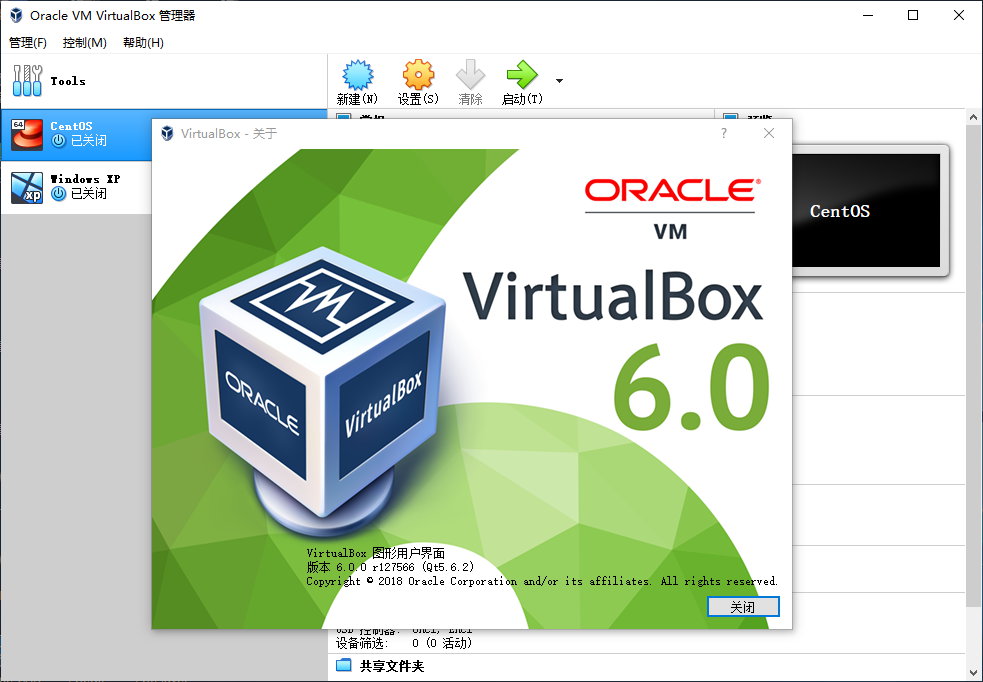
VirtualBox 6.0同时还对用户界面进行了较大调整,为用户提供了更简单直观的图形界面,基本上可以无障碍在短短几分钟内就完成虚拟机的设置。这些改进中还引入了全新的的资源管理器,让用户对来宾文件系统进行控制,在虚拟机和主机操作系统之间轻松复制文件。
其他值得关注的改进还包括对即将发布的Linux Kernel 4.20内核的支持,对Windows客户端的3D图形支持,在Linux和基于Solaris的客户机上对VMSVGA 3D图形设备模拟的支持,初步支持macOS Guest Additions,以及用于macOS客户端的全新vboximg-mount工具。
VirtualBox 6.0还带来了更好的音频和录制,改进了对连接和分离远程桌面连接的支持,更好的串行端口仿真,网络和iSCSI修复,VirtualBox Manager中对DHCP选项的支持,共享文件夹的性能改进以及对初始共享文件夹的支持OS / 2访客添加。
VirtualBox 6.0.10 (released July 16 2019)
This is a maintenance release. The following items were fixed and/or added:
[li]User interface: fix issue inputing controller names (bug #11579)[/li][li]User interface: fix resize problems with recent Linux hosts (bug #18677)[/li][li]Serial: fixed guru meditation when raw mode is enabled (bug #18632)[/li][li]Serial: fixed possible VM crash under certain circumstances[/li][li]USB: Fixed “unrecoverable error” problems in OHCI emulation (bug #18593, 6.0.6 regression)[/li][li]USB: improve captured device identification[/li][li]VBoxManage: fix reversed reporting of audio input and output (thank you Socratis Kalogrianitis)[/li][li]VBoxManage: fix controlling recording for running machine (bug #18723)[/li][li]Guest control service: various fixes[/li][li]Windows hosts: fix problems copying files from shared folders (bug #18569)[/li][li]Linux hosts: kernel module build fixes for various kernels (bug #18316)[/li][li]Linux hosts: support UEFI secure boot driver signing on Ubuntu and Debian hosts (bug #11577)[/li][li]Linux hosts: fix focus grabbing problems with recent Qt versions (builds from source only; thank you Fabian Vogt (SUSE) and Larry Finger; bug #18745)[/li][li]Windows guests: many shared folders fixes[/li][li]Windows guests: fix other services failing if seamless mode was not available[/li][li]Linux guests: kernel module build fixes for various kernels (bugs #18677 and #18697; fixes by Larry Finger and Gianfranco Costamagna)[/li][li]Linux guests: do not try to load old versions of libcrypt on recent guests in Guest Additions tools (bug #18682)[/li][li]Linux guests: udev rules for guest kernel modules did not always take effect in time[/li][li]Linux guests/VMSVGA: do not forget the guest screen size after a guest reboot[/li][li]OS/2 guests: various shared folder fixes[/li] VirtualBox 6.0.8 (released May 13 2019)
This is a maintenance release. The following items were fixed and/or added:
[li]Core: fix saved state resume failures (bugs #18265 and #18331)[/li][li]User interface: show full file location in New Medium window.[/li][li]User interface: fix mouse click pass-through problems in multi-screen virtual machines (6.0.6 regression, bug #18567)[/li][li]Graphics: fixed a crash when powering off a VM without graphics controller (bug #18570)[/li][li]API: partial fix for dealing with VM config conflicting with other VMs related to medium UUIDs, now correctly flags VM as inaccessible (bug #17908)[/li][li]Windows hosts: Support paths longer than 4096 characters on in shared folders[/li][li]Linux hosts: fix kernel module build breakage in non-default build set-ups (bug #18620, thank you Ambroz Bizjak)[/li][li]Linux hosts: fix kernel module build breakage in debug build set-ups (bug #18621, thank you Ambroz Bizjak)[/li][li]Windows guests: notice file size increases in shared folders which were missed in certain cases[/li][li]Linux guests: make shared folders work with Linux 3.16.35[/li][li]Linux guests: fix incorrectly read-only shared folders (bug #18345)[/li] VirtualBox 6.0.6 (released April 17 2019)
This is a maintenance release. The following items were fixed and/or added:
[li]Virtualization core: nested AMD virtualization fixes[/li][li]User interface: fixed copying directories in file manager[/li][li]User interface: fixed operation progress in file manager when copying content[/li][li]User interface: fixed operation progress when deleting snapshots[/li][li]User interface: fixed unattended installation of recent Ubuntu guests[/li][li]User interface: new virtual disk sector sizes should be divisible by 512 (bug #18177)[/li][li]User interface: various additional improvements[/li][li]Storage: fixed loading saved states for LsiLogic devices (6.0.0 regression; bug #18263)[/li][li]Storage: fixed fixed reading certain QCOW2 images and support version 3 of the format readonly[/li][li]Storage: Improved IDE PCI emulation to allow NetWare IDE drivers to use bus-mastering[/li][li]Graphics: Improved VMSVGA support to work with old X servers which previously showed only a badly scrambled screen[/li][li]Graphics: fixed invisible mouse cursor with VMSVGA emulation and without mouse integration (bug #18239)[/li][li]Graphics: make EFI work with VMSVGA emulation (bug #18282)[/li][li]Graphics: remember last guest screen size VMSVGA emulation (bug #18408)[/li][li]Graphics: fix RDP to guests using VMSVGA emulation (bug #18518)[/li][li]Graphics: various additional VMSVGA emulation fixes[/li][li]Audio: implemented audio device enumeration for the DirectSound backend[/li][li]Network: fixed unwanted padding bytes in Windows host adaptor network packets (bug #18202 and bug #18355)[/li][li]Serial: fixed possible crash on Windows when using a host device (6.0.0 regression; bug #18319)[/li][li]Serial: fixed loopback handling in the emulation causing garbage to be sent during boot with Linux guests (6.0.0 regression; bug #18319)[/li][li]Shared folders: fixed duplicate folders after restoring a saved state (bug #18373)[/li][li]Shared folders: fixed hangs inside guest (bug #18151)[/li][li]Drag and drop: fixed copying files from guest host (bug #18305)[/li][li]Recording: fixed modifying settings via VBoxManage (bug #18494)[/li][li]Fixed invalid Extra Data characters making machines inaccessible[/li][li]VBoxManage: crash fix (bug #18341)[/li][li]Fixed hangs during failed virtual machine start-up[/li][li]Windows host: fix unwanted wake-ups from standby, thank you Daniel Karsubka (bug #18549)[/li][li]Windows host: disallow Pause as a host key (bug #18482)[/li][li]Linux host and guest: support Linux 5.0 and 5.1, thank you Valdis Kletnieks (see also bug #18515)[/li][li]Linux host: support kernel 4.4.169 (bug #18315)[/li][li]Linux host: fix logging when building Linux kernel modules (bug #18226)[/li][li]Linux host: clarified building Linux host drivers with secure boot (bug #18312)[/li][li]FreeBSD host: compilation fixes[/li][li]Installers: reduced size of packages[/li][li]Web services: work with Java 11[/li][li]LibreSSL compilation fix, thank you Stefan Strogin[/li][li]Windows guests: fixed running applications which use complex display topologies with WDDM driver, fixed Skype for Business hangs (bug #17092)[/li][li]Windows guests: fixed an occasional guest crash with WDDM driver and VBoxSVGA adapter (bug #18369)[/li][li]Windows guests: shared folder file creation detection issue (bug #9276)[/li][li]Windows guests: fixed “mismatched pool allocation/free” error with checked builds of Windows and ReactOS (bug #18187, thank you Adam Stachowicz)[/li][li]Linux guests: shared folder performance and reliability improvements and missing features (bugs #17360, #819)[/li][li]Linux guests: fixed a NULL pointer dereference in vboxvideo (bug #18443)[/li][li]Solaris guests: fix an error message from VBoxClient (bug #18428)[/li] 官网地址:https://www.virtualbox.org/
官网更新记录: https://www.virtualbox.org/wiki/Changelog
VirtualBox 官方最新下载地址:
for Windows版:https://download.virtualbox.org/ ... 0.10-132072-Win.exe
for Mac版:https://download.virtualbox.org/ ... 0.10-132072-OSX.dmg
for Linux版: https://www.virtualbox.org/wiki/Linux_Downloads
for Solaris版: https://download.virtualbox.org/ ... 132072-SunOS.tar.gz
VirtualBox 6.0.10 Oracle VM VirtualBox Extension Pack:
https://download.virtualbox.org/ ... 6.0.10.vbox-extpack
VirtualBox 5.1.30 Build 118389 支持XP版本
for Windows版:http://download.virtualbox.org/v ... 1.30-118389-Win.exe
for Mac版: http://download.virtualbox.org/v ... 1.30-118389-OSX.dmg
for Linux版: https://www.virtualbox.org/wiki/Linux_Downloads
for Solaris版: http://download.virtualbox.org/v ... 118389-SunOS.tar.gz |
 |Archiver|手机版|小黑屋|腾飞在线
( 冀ICP备05002530号 )
|Archiver|手机版|小黑屋|腾飞在线
( 冀ICP备05002530号 )


 发表于 2019-7-19 00:15:59