找回密码
 立即注册
搜索
热搜: 活动 交友 discuz
查看: 2083|回复: 1

[系统工具] PyCharm Professional v2022.2.3 破解版+附教程及补丁

[复制链接]
发表于 2022-12-18 02:55:22 | 显示全部楼层 |阅读模式
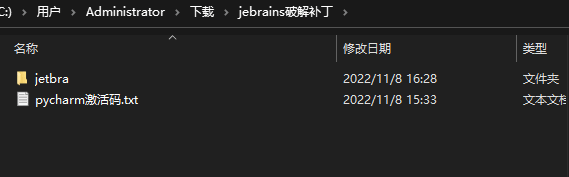
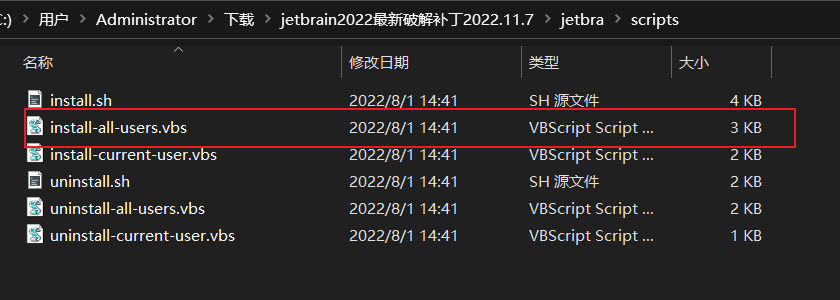
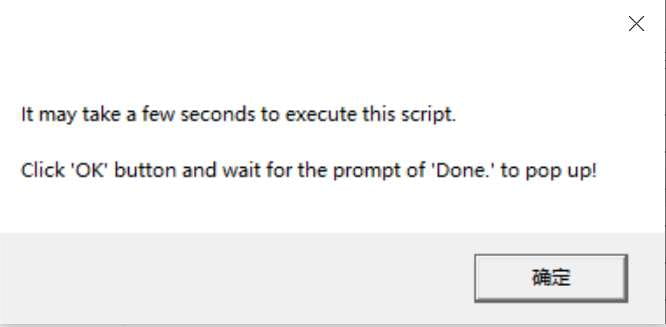
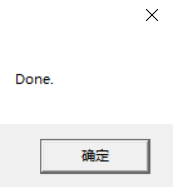
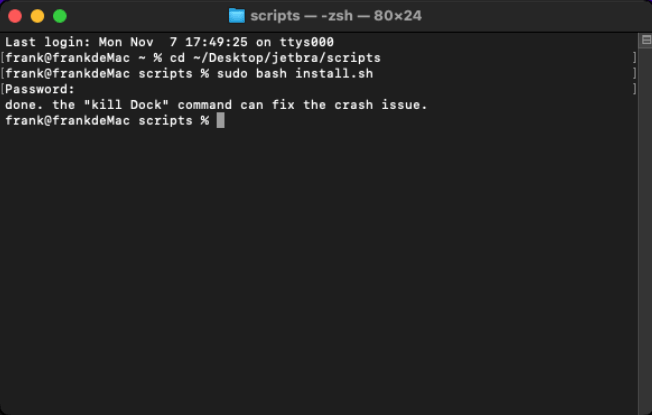
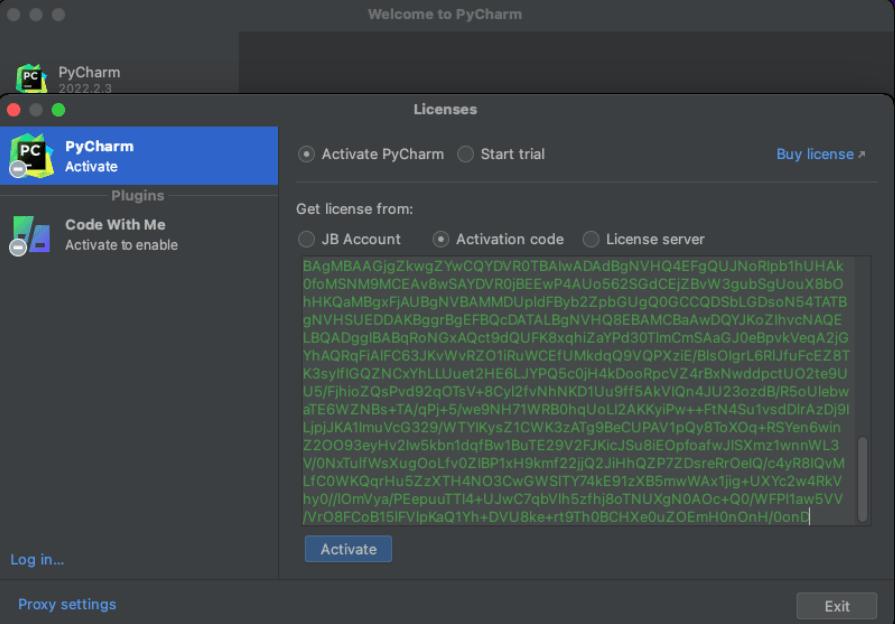
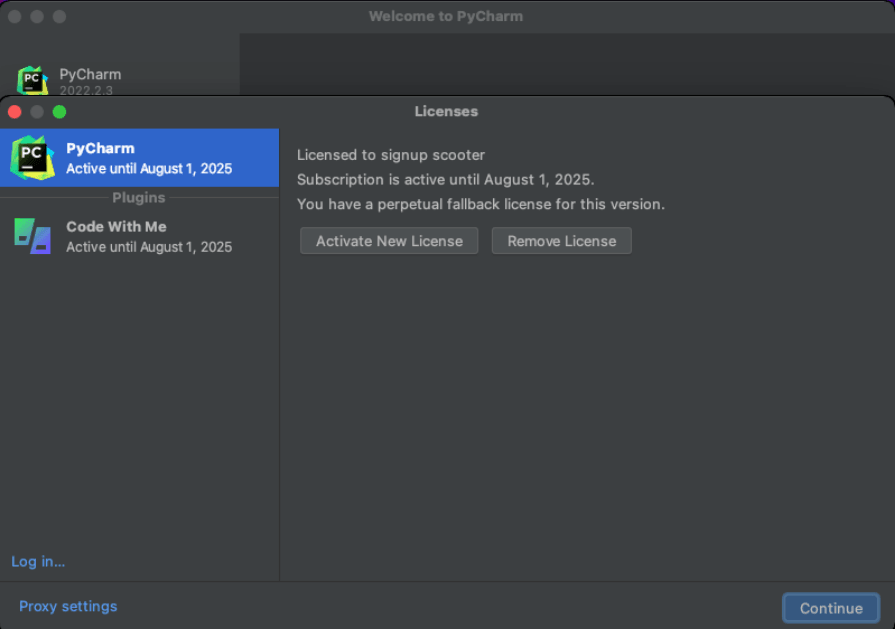
<div><h2 id="h2-u524Du8A00" style="margin-right: 0px; margin-bottom: 16px; margin-left: 0px; padding: 0px 0px 0&#46;3em; box-sizing: border-box; line-height: 1&#46;225; font-size: 1&#46;75em; position: relative; border-bottom: 1px solid rgb(238, 238, 238); color: rgb(51, 51, 51); font-family: &quot;Microsoft YaHei&quot;, Helvetica, &quot;Meiryo UI&quot;, &quot;Malgun Gothic&quot;, &quot;Segoe UI&quot;, &quot;Trebuchet MS&quot;, Monaco, monospace, Tahoma, STXihei, 华文细黑, STHeiti, &quot;Helvetica Neue&quot;, &quot;Droid Sans&quot;, &quot;wenquanyi micro hei&quot;, FreeSans, Arimo, Arial, SimSun, 宋体, Heiti, 黑体, sans-serif; margin-top: 0px !important;">前言</h2><p style="margin-bottom: 16px; padding: 0px; box-sizing: border-box; color: rgb(51, 51, 51); font-family: &quot;Microsoft YaHei&quot;, Helvetica, &quot;Meiryo UI&quot;, &quot;Malgun Gothic&quot;, &quot;Segoe UI&quot;, &quot;Trebuchet MS&quot;, Monaco, monospace, Tahoma, STXihei, 华文细黑, STHeiti, &quot;Helvetica Neue&quot;, &quot;Droid Sans&quot;, &quot;wenquanyi micro hei&quot;, FreeSans, Arimo, Arial, SimSun, 宋体, Heiti, 黑体, sans-serif;">此教程为PyCharm 2022&#46;2&#46;3 破解教程,且此教程以及下面提供的破解补丁适用与2022&#46;2以后的新版本。<br style="margin: 0px; padding: 0px; box-sizing: border-box;" />2022年11月8日亲测有效,mac与windows均测试完美破解</p><h2 id="h2-pycharm-" style="margin: 1em 0px 16px; padding: 0px 0px 0&#46;3em; box-sizing: border-box; line-height: 1&#46;225; font-size: 1&#46;75em; position: relative; border-bottom: 1px solid rgb(238, 238, 238); color: rgb(51, 51, 51); font-family: &quot;Microsoft YaHei&quot;, Helvetica, &quot;Meiryo UI&quot;, &quot;Malgun Gothic&quot;, &quot;Segoe UI&quot;, &quot;Trebuchet MS&quot;, Monaco, monospace, Tahoma, STXihei, 华文细黑, STHeiti, &quot;Helvetica Neue&quot;, &quot;Droid Sans&quot;, &quot;wenquanyi micro hei&quot;, FreeSans, Arimo, Arial, SimSun, 宋体, Heiti, 黑体, sans-serif;"><a name="yCharm 下载" class="reference-link" style="margin: 0px; padding: 0px; box-sizing: border-box; background-image: initial; background-position: initial; background-size: initial; background-repeat: initial; background-attachment: initial; background-origin: initial; background-clip: initial; color: rgb(65, 131, 196);"></a>yCharm 下载</h2><p style="margin-bottom: 16px; padding: 0px; box-sizing: border-box; color: rgb(51, 51, 51); font-family: &quot;Microsoft YaHei&quot;, Helvetica, &quot;Meiryo UI&quot;, &quot;Malgun Gothic&quot;, &quot;Segoe UI&quot;, &quot;Trebuchet MS&quot;, Monaco, monospace, Tahoma, STXihei, 华文细黑, STHeiti, &quot;Helvetica Neue&quot;, &quot;Droid Sans&quot;, &quot;wenquanyi micro hei&quot;, FreeSans, Arimo, Arial, SimSun, 宋体, Heiti, 黑体, sans-serif;"><strong style="margin: 0px; padding: 0px; box-sizing: border-box;">下载直通车</strong>:<a href="https://www&#46;hereitis&#46;cn/soft/pycharm" title="立即下载" style="margin: 0px; padding: 0px; box-sizing: border-box; background-image: initial; background-position: initial; background-size: initial; background-repeat: initial; background-attachment: initial; background-origin: initial; background-clip: initial; color: rgb(65, 131, 196); text-decoration-line: none;">立即下载</a><br style="margin: 0px; padding: 0px; box-sizing: border-box;" /><strong style="margin: 0px; padding: 0px; box-sizing: border-box;">官网下载</strong>:<a href="https://www&#46;jetbrains&#46;com&#46;cn/pycharm/download/#section=windows" style="margin: 0px; padding: 0px; box-sizing: border-box; background-image: initial; background-position: initial; background-size: initial; background-repeat: initial; background-attachment: initial; background-origin: initial; background-clip: initial; color: rgb(65, 131, 196); text-decoration-line: none;">https://www&#46;jetbrains&am ... ad/#section=windows</a></p><p style="margin-bottom: 16px; padding: 0px; box-sizing: border-box; color: rgb(51, 51, 51); font-family: &quot;Microsoft YaHei&quot;, Helvetica, &quot;Meiryo UI&quot;, &quot;Malgun Gothic&quot;, &quot;Segoe UI&quot;, &quot;Trebuchet MS&quot;, Monaco, monospace, Tahoma, STXihei, 华文细黑, STHeiti, &quot;Helvetica Neue&quot;, &quot;Droid Sans&quot;, &quot;wenquanyi micro hei&quot;, FreeSans, Arimo, Arial, SimSun, 宋体, Heiti, 黑体, sans-serif;">只要下载最新的就可以了。</p><h2 id="h2-u5B89u88C5" style="margin: 1em 0px 16px; padding: 0px 0px 0&#46;3em; box-sizing: border-box; line-height: 1&#46;225; font-size: 1&#46;75em; position: relative; border-bottom: 1px solid rgb(238, 238, 238); color: rgb(51, 51, 51); font-family: &quot;Microsoft YaHei&quot;, Helvetica, &quot;Meiryo UI&quot;, &quot;Malgun Gothic&quot;, &quot;Segoe UI&quot;, &quot;Trebuchet MS&quot;, Monaco, monospace, Tahoma, STXihei, 华文细黑, STHeiti, &quot;Helvetica Neue&quot;, &quot;Droid Sans&quot;, &quot;wenquanyi micro hei&quot;, FreeSans, Arimo, Arial, SimSun, 宋体, Heiti, 黑体, sans-serif;"><a name="安装" class="reference-link" style="margin: 0px; padding: 0px; box-sizing: border-box; background-image: initial; background-position: initial; background-size: initial; background-repeat: initial; background-attachment: initial; background-origin: initial; background-clip: initial; color: rgb(65, 131, 196);"></a>安装</h2><p style="margin-bottom: 16px; padding: 0px; box-sizing: border-box; color: rgb(51, 51, 51); font-family: &quot;Microsoft YaHei&quot;, Helvetica, &quot;Meiryo UI&quot;, &quot;Malgun Gothic&quot;, &quot;Segoe UI&quot;, &quot;Trebuchet MS&quot;, Monaco, monospace, Tahoma, STXihei, 华文细黑, STHeiti, &quot;Helvetica Neue&quot;, &quot;Droid Sans&quot;, &quot;wenquanyi micro hei&quot;, FreeSans, Arimo, Arial, SimSun, 宋体, Heiti, 黑体, sans-serif;">直接上面的地址下载安装即可,安装完后记得不要打开,打开后也要先关闭,这里步骤就忽略了,安装很简单。</p><ul style="margin: 0px 0px 16px; padding: 0px 0px 0px 2em; box-sizing: border-box; color: rgb(51, 51, 51); font-family: &quot;Microsoft YaHei&quot;, Helvetica, &quot;Meiryo UI&quot;, &quot;Malgun Gothic&quot;, &quot;Segoe UI&quot;, &quot;Trebuchet MS&quot;, Monaco, monospace, Tahoma, STXihei, 华文细黑, STHeiti, &quot;Helvetica Neue&quot;, &quot;Droid Sans&quot;, &quot;wenquanyi micro hei&quot;, FreeSans, Arimo, Arial, SimSun, 宋体, Heiti, 黑体, sans-serif;"><li style="margin: 0px; padding: 0px; box-sizing: border-box;"><strong style="margin: 0px; padding: 0px; box-sizing: border-box;">卸载老版本 PyCharm(未安装则不用管,跳过看下面步骤)</strong><br style="margin: 0px; padding: 0px; box-sizing: border-box;" />注意,安装新版本之前,如果本机安装过老版本的, 需要先彻底卸载,以免两者冲突,导致破解失败。<br style="margin: 0px; padding: 0px; box-sizing: border-box;" /><strong style="margin: 0px; padding: 0px; box-sizing: border-box;">安装太简单了,步骤就忽略了。</strong></li></ul><h2 id="h2-u7834u89E3u8865u4E01u4E0Bu8F7D" style="margin: 1em 0px 16px; padding: 0px 0px 0&#46;3em; box-sizing: border-box; line-height: 1&#46;225; font-size: 1&#46;75em; position: relative; border-bottom: 1px solid rgb(238, 238, 238); color: rgb(51, 51, 51); font-family: &quot;Microsoft YaHei&quot;, Helvetica, &quot;Meiryo UI&quot;, &quot;Malgun Gothic&quot;, &quot;Segoe UI&quot;, &quot;Trebuchet MS&quot;, Monaco, monospace, Tahoma, STXihei, 华文细黑, STHeiti, &quot;Helvetica Neue&quot;, &quot;Droid Sans&quot;, &quot;wenquanyi micro hei&quot;, FreeSans, Arimo, Arial, SimSun, 宋体, Heiti, 黑体, sans-serif;"><a name="破解补丁下载" class="reference-link" style="margin: 0px; padding: 0px; box-sizing: border-box; background-image: initial; background-position: initial; background-size: initial; background-repeat: initial; background-attachment: initial; background-origin: initial; background-clip: initial; color: rgb(65, 131, 196);"></a>破解补丁下载</h2><p style="margin-bottom: 16px; padding: 0px; box-sizing: border-box; color: rgb(51, 51, 51); font-family: &quot;Microsoft YaHei&quot;, Helvetica, &quot;Meiryo UI&quot;, &quot;Malgun Gothic&quot;, &quot;Segoe UI&quot;, &quot;Trebuchet MS&quot;, Monaco, monospace, Tahoma, STXihei, 华文细黑, STHeiti, &quot;Helvetica Neue&quot;, &quot;Droid Sans&quot;, &quot;wenquanyi micro hei&quot;, FreeSans, Arimo, Arial, SimSun, 宋体, Heiti, 黑体, sans-serif;"><code style="margin: 0px 4px 0px 5px; padding: 3px; box-sizing: border-box; font-family: &quot;YaHei Consolas Hybrid&quot;, Consolas, &quot;Meiryo UI&quot;, &quot;Malgun Gothic&quot;, &quot;Segoe UI&quot;, &quot;Trebuchet MS&quot;, Helvetica, monospace, monospace; background: rgb(246, 246, 246); border-radius: 3px; border: 1px solid rgb(221, 221, 221);">破解补丁下载地址在 文章底部 的 附件 中</code></p><h2 id="h2-u7834u89E3" style="margin: 1em 0px 16px; padding: 0px 0px 0&#46;3em; box-sizing: border-box; line-height: 1&#46;225; font-size: 1&#46;75em; position: relative; border-bottom: 1px solid rgb(238, 238, 238); color: rgb(51, 51, 51); font-family: &quot;Microsoft YaHei&quot;, Helvetica, &quot;Meiryo UI&quot;, &quot;Malgun Gothic&quot;, &quot;Segoe UI&quot;, &quot;Trebuchet MS&quot;, Monaco, monospace, Tahoma, STXihei, 华文细黑, STHeiti, &quot;Helvetica Neue&quot;, &quot;Droid Sans&quot;, &quot;wenquanyi micro hei&quot;, FreeSans, Arimo, Arial, SimSun, 宋体, Heiti, 黑体, sans-serif;"><a name="破解" class="reference-link" style="margin: 0px; padding: 0px; box-sizing: border-box; background-image: initial; background-position: initial; background-size: initial; background-repeat: initial; background-attachment: initial; background-origin: initial; background-clip: initial; color: rgb(65, 131, 196);"></a>破解</h2><h3 id="h3-windows-" style="margin: 1em 0px 16px; padding: 0px; box-sizing: border-box; line-height: 1&#46;43; font-size: 1&#46;5em; position: relative; color: rgb(51, 51, 51); font-family: &quot;Microsoft YaHei&quot;, Helvetica, &quot;Meiryo UI&quot;, &quot;Malgun Gothic&quot;, &quot;Segoe UI&quot;, &quot;Trebuchet MS&quot;, Monaco, monospace, Tahoma, STXihei, 华文细黑, STHeiti, &quot;Helvetica Neue&quot;, &quot;Droid Sans&quot;, &quot;wenquanyi micro hei&quot;, FreeSans, Arimo, Arial, SimSun, 宋体, Heiti, 黑体, sans-serif;"><a name="windows版破解" class="reference-link" style="margin: 0px; padding: 0px; box-sizing: border-box; background-image: initial; background-position: initial; background-size: initial; background-repeat: initial; background-attachment: initial; background-origin: initial; background-clip: initial; color: rgb(65, 131, 196);"></a>windows版破解</h3><p style="margin-bottom: 16px; padding: 0px; box-sizing: border-box; color: rgb(51, 51, 51); font-family: &quot;Microsoft YaHei&quot;, Helvetica, &quot;Meiryo UI&quot;, &quot;Malgun Gothic&quot;, &quot;Segoe UI&quot;, &quot;Trebuchet MS&quot;, Monaco, monospace, Tahoma, STXihei, 华文细黑, STHeiti, &quot;Helvetica Neue&quot;, &quot;Droid Sans&quot;, &quot;wenquanyi micro hei&quot;, FreeSans, Arimo, Arial, SimSun, 宋体, Heiti, 黑体, sans-serif;">下载破解补丁后,解压得到,如下图:<br style="margin: 0px; padding: 0px; box-sizing: border-box;" /><img src="https://www&#46;hereitis&#46;cn/profile/editor/2022/11/08/3ed09bdf707a46eabb15a5544c8bb4f7&#46;png" alt="" style="margin: 0px; padding: 0px; box-sizing: border-box; max-width: 100%;" /></p><p style="margin-bottom: 16px; padding: 0px; box-sizing: border-box; color: rgb(51, 51, 51); font-family: &quot;Microsoft YaHei&quot;, Helvetica, &quot;Meiryo UI&quot;, &quot;Malgun Gothic&quot;, &quot;Segoe UI&quot;, &quot;Trebuchet MS&quot;, Monaco, monospace, Tahoma, STXihei, 华文细黑, STHeiti, &quot;Helvetica Neue&quot;, &quot;Droid Sans&quot;, &quot;wenquanyi micro hei&quot;, FreeSans, Arimo, Arial, SimSun, 宋体, Heiti, 黑体, sans-serif;">将上面图示的补丁的所属文件夹 <code style="margin: 0px 4px 0px 5px; padding: 3px; box-sizing: border-box; font-family: &quot;YaHei Consolas Hybrid&quot;, Consolas, &quot;Meiryo UI&quot;, &quot;Malgun Gothic&quot;, &quot;Segoe UI&quot;, &quot;Trebuchet MS&quot;, Helvetica, monospace, monospace; background: rgb(246, 246, 246); border-radius: 3px; border: 1px solid rgb(221, 221, 221);">/jetbra</code> 复制电脑某个位置,小编这里放置到了 默认的下载目录下(不推荐,自己选个D盘目录或者其他位置),<br style="margin: 0px; padding: 0px; box-sizing: border-box;" />点击进入<code style="margin: 0px 4px 0px 5px; padding: 3px; box-sizing: border-box; font-family: &quot;YaHei Consolas Hybrid&quot;, Consolas, &quot;Meiryo UI&quot;, &quot;Malgun Gothic&quot;, &quot;Segoe UI&quot;, &quot;Trebuchet MS&quot;, Helvetica, monospace, monospace; background: rgb(246, 246, 246); border-radius: 3px; border: 1px solid rgb(221, 221, 221);">/jetbra</code> 补丁目录,再点击进入<code style="margin: 0px 4px 0px 5px; padding: 3px; box-sizing: border-box; font-family: &quot;YaHei Consolas Hybrid&quot;, Consolas, &quot;Meiryo UI&quot;, &quot;Malgun Gothic&quot;, &quot;Segoe UI&quot;, &quot;Trebuchet MS&quot;, Helvetica, monospace, monospace; background: rgb(246, 246, 246); border-radius: 3px; border: 1px solid rgb(221, 221, 221);">/scripts</code> 文件夹,双击执行 <code style="margin: 0px 4px 0px 5px; padding: 3px; box-sizing: border-box; font-family: &quot;YaHei Consolas Hybrid&quot;, Consolas, &quot;Meiryo UI&quot;, &quot;Malgun Gothic&quot;, &quot;Segoe UI&quot;, &quot;Trebuchet MS&quot;, Helvetica, monospace, monospace; background: rgb(246, 246, 246); border-radius: 3px; border: 1px solid rgb(221, 221, 221);">install-all-user&#46;vbs</code> 破解脚本:<br style="margin: 0px; padding: 0px; box-sizing: border-box;" /><img src="https://www&#46;hereitis&#46;cn/profile/editor/2022/11/07/c020f6f653c44a0d8a35b5d55520fc02&#46;png" alt="" style="margin: 0px; padding: 0px; box-sizing: border-box; max-width: 100%;" /></p><p style="margin-bottom: 16px; padding: 0px; box-sizing: border-box; color: rgb(51, 51, 51); font-family: &quot;Microsoft YaHei&quot;, Helvetica, &quot;Meiryo UI&quot;, &quot;Malgun Gothic&quot;, &quot;Segoe UI&quot;, &quot;Trebuchet MS&quot;, Monaco, monospace, Tahoma, STXihei, 华文细黑, STHeiti, &quot;Helvetica Neue&quot;, &quot;Droid Sans&quot;, &quot;wenquanyi micro hei&quot;, FreeSans, Arimo, Arial, SimSun, 宋体, Heiti, 黑体, sans-serif;"><strong style="margin: 0px; padding: 0px; box-sizing: border-box;">注意:如果执行脚本被安全软件提示有风险拦截,允许执行即可。</strong><br style="margin: 0px; padding: 0px; box-sizing: border-box;" /><img src="https://www&#46;hereitis&#46;cn/profile/editor/2022/11/07/b68fe40d83e649ecbd13f4056e4ec756&#46;jpg" alt="" style="margin: 0px; padding: 0px; box-sizing: border-box; max-width: 100%;" /></p><p style="margin-bottom: 16px; padding: 0px; box-sizing: border-box; color: rgb(51, 51, 51); font-family: &quot;Microsoft YaHei&quot;, Helvetica, &quot;Meiryo UI&quot;, &quot;Malgun Gothic&quot;, &quot;Segoe UI&quot;, &quot;Trebuchet MS&quot;, Monaco, monospace, Tahoma, STXihei, 华文细黑, STHeiti, &quot;Helvetica Neue&quot;, &quot;Droid Sans&quot;, &quot;wenquanyi micro hei&quot;, FreeSans, Arimo, Arial, SimSun, 宋体, Heiti, 黑体, sans-serif;">会提示安装补丁需要等待数秒。点击<strong style="margin: 0px; padding: 0px; box-sizing: border-box;">【确定】</strong>按钮后,过程大概 10 - 30 秒,如看到弹框提示 Done 时,表示激活破解成功:<br style="margin: 0px; padding: 0px; box-sizing: border-box;" /><img src="https://www&#46;hereitis&#46;cn/profile/upload/2022/09/06/735a2208-e98f-48f4-904d-ef26300b75c5&#46;png" alt="" style="margin: 0px; padding: 0px; box-sizing: border-box; max-width: 100%;" /></p><h3 id="h3-mac-" style="margin: 1em 0px 16px; padding: 0px; box-sizing: border-box; line-height: 1&#46;43; font-size: 1&#46;5em; position: relative; color: rgb(51, 51, 51); font-family: &quot;Microsoft YaHei&quot;, Helvetica, &quot;Meiryo UI&quot;, &quot;Malgun Gothic&quot;, &quot;Segoe UI&quot;, &quot;Trebuchet MS&quot;, Monaco, monospace, Tahoma, STXihei, 华文细黑, STHeiti, &quot;Helvetica Neue&quot;, &quot;Droid Sans&quot;, &quot;wenquanyi micro hei&quot;, FreeSans, Arimo, Arial, SimSun, 宋体, Heiti, 黑体, sans-serif;"><a name="mac版破解" class="reference-link" style="margin: 0px; padding: 0px; box-sizing: border-box; background-image: initial; background-position: initial; background-size: initial; background-repeat: initial; background-attachment: initial; background-origin: initial; background-clip: initial; color: rgb(65, 131, 196);"></a>mac版破解</h3><p style="margin-bottom: 16px; padding: 0px; box-sizing: border-box; color: rgb(51, 51, 51); font-family: &quot;Microsoft YaHei&quot;, Helvetica, &quot;Meiryo UI&quot;, &quot;Malgun Gothic&quot;, &quot;Segoe UI&quot;, &quot;Trebuchet MS&quot;, Monaco, monospace, Tahoma, STXihei, 华文细黑, STHeiti, &quot;Helvetica Neue&quot;, &quot;Droid Sans&quot;, &quot;wenquanyi micro hei&quot;, FreeSans, Arimo, Arial, SimSun, 宋体, Heiti, 黑体, sans-serif;"><strong style="margin: 0px; padding: 0px; box-sizing: border-box;">Mac / Linux </strong>系统与上面 Windows 系统一样,需将补丁所属文件<code style="margin: 0px 4px 0px 5px; padding: 3px; box-sizing: border-box; font-family: &quot;YaHei Consolas Hybrid&quot;, Consolas, &quot;Meiryo UI&quot;, &quot;Malgun Gothic&quot;, &quot;Segoe UI&quot;, &quot;Trebuchet MS&quot;, Helvetica, monospace, monospace; background: rgb(246, 246, 246); border-radius: 3px; border: 1px solid rgb(221, 221, 221);">/jetbra</code> 复制到某个路径,且<strong style="margin: 0px; padding: 0px; box-sizing: border-box;">路径不能包含空格与中文</strong>。</p><p style="margin-bottom: 16px; padding: 0px; box-sizing: border-box; color: rgb(51, 51, 51); font-family: &quot;Microsoft YaHei&quot;, Helvetica, &quot;Meiryo UI&quot;, &quot;Malgun Gothic&quot;, &quot;Segoe UI&quot;, &quot;Trebuchet MS&quot;, Monaco, monospace, Tahoma, STXihei, 华文细黑, STHeiti, &quot;Helvetica Neue&quot;, &quot;Droid Sans&quot;, &quot;wenquanyi micro hei&quot;, FreeSans, Arimo, Arial, SimSun, 宋体, Heiti, 黑体, sans-serif;">之后,打开终端,进入到<code style="margin: 0px 4px 0px 5px; padding: 3px; box-sizing: border-box; font-family: &quot;YaHei Consolas Hybrid&quot;, Consolas, &quot;Meiryo UI&quot;, &quot;Malgun Gothic&quot;, &quot;Segoe UI&quot;, &quot;Trebuchet MS&quot;, Helvetica, monospace, monospace; background: rgb(246, 246, 246); border-radius: 3px; border: 1px solid rgb(221, 221, 221);">/jetbra/scripts</code> 文件夹, 执行 <code style="margin: 0px 4px 0px 5px; padding: 3px; box-sizing: border-box; font-family: &quot;YaHei Consolas Hybrid&quot;, Consolas, &quot;Meiryo UI&quot;, &quot;Malgun Gothic&quot;, &quot;Segoe UI&quot;, &quot;Trebuchet MS&quot;, Helvetica, monospace, monospace; background: rgb(246, 246, 246); border-radius: 3px; border: 1px solid rgb(221, 221, 221);">install&#46;sh</code>脚本, 命令如下:</p><pre class="prettyprint linenums prettyprinted" style="margin-top: 0px; margin-bottom: 16px; padding: 10px; box-sizing: border-box; overflow: auto; font-variant-numeric: normal; font-variant-east-asian: normal; font-stretch: normal; font-size: 12px; line-height: 1&#46;6; font-family: &quot;YaHei Consolas Hybrid&quot;, Consolas, &quot;Meiryo UI&quot;, &quot;Malgun Gothic&quot;, &quot;Segoe UI&quot;, &quot;Trebuchet MS&quot;, Helvetica, monospace, monospace; background-color: rgb(246, 246, 246); border-radius: 3px; overflow-wrap: break-word; border-style: solid; border-color: rgb(221, 221, 221); white-space: pre-wrap; color: rgb(51, 51, 51);"><ol class="linenums" style="margin: 0px; padding: 0px 0px 0px 2&#46;5em; box-sizing: border-box; color: rgb(153, 153, 153);"><li class="L0" style="margin: 0px; padding: 0px; box-sizing: border-box; list-style-type: decimal;"><code class="lang-shell" style="margin: 0px; padding: 0px; box-sizing: border-box; font-family: &quot;YaHei Consolas Hybrid&quot;, Consolas, &quot;Meiryo UI&quot;, &quot;Malgun Gothic&quot;, &quot;Segoe UI&quot;, &quot;Trebuchet MS&quot;, Helvetica, monospace, monospace; font-size: 14px; background: none; border-radius: 3px; border: none; display: inline; max-width: initial; overflow: initial; line-height: inherit; overflow-wrap: normal;"><span class="pln" style="margin: 0px; padding: 0px; box-sizing: border-box; color: rgb(0, 0, 0);">sudo bash install</span><span class="pun" style="margin: 0px; padding: 0px; box-sizing: border-box; color: rgb(102, 102, 0);">&#46;</span><span class="pln" style="margin: 0px; padding: 0px; box-sizing: border-box; color: rgb(0, 0, 0);">sh</span></code></li></ol></pre><p style="margin-bottom: 16px; padding: 0px; box-sizing: border-box; color: rgb(51, 51, 51); font-family: &quot;Microsoft YaHei&quot;, Helvetica, &quot;Meiryo UI&quot;, &quot;Malgun Gothic&quot;, &quot;Segoe UI&quot;, &quot;Trebuchet MS&quot;, Monaco, monospace, Tahoma, STXihei, 华文细黑, STHeiti, &quot;Helvetica Neue&quot;, &quot;Droid Sans&quot;, &quot;wenquanyi micro hei&quot;, FreeSans, Arimo, Arial, SimSun, 宋体, Heiti, 黑体, sans-serif;">看到提示 Done , 表示激活成功。<br style="margin: 0px; padding: 0px; box-sizing: border-box;" /><img src="https://www&#46;hereitis&#46;cn/profile/editor/2022/11/08/58a40dc732cb41eb8e8c90c5e931920e&#46;png" alt="" style="margin: 0px; padding: 0px; box-sizing: border-box; max-width: 100%;" /><br style="margin: 0px; padding: 0px; box-sizing: border-box;" /><strong style="margin: 0px; padding: 0px; box-sizing: border-box;">Mac / Linux</strong> 用户执行脚本后,脚本会自动在当期用户环境变量文件中添加了相关参数文件,<strong style="margin: 0px; padding: 0px; box-sizing: border-box;">Mac / Linux 需重启系统</strong>,以确保环境变量生效。</p><h3 id="h3-linux-" style="margin: 1em 0px 16px; padding: 0px; box-sizing: border-box; line-height: 1&#46;43; font-size: 1&#46;5em; position: relative; color: rgb(51, 51, 51); font-family: &quot;Microsoft YaHei&quot;, Helvetica, &quot;Meiryo UI&quot;, &quot;Malgun Gothic&quot;, &quot;Segoe UI&quot;, &quot;Trebuchet MS&quot;, Monaco, monospace, Tahoma, STXihei, 华文细黑, STHeiti, &quot;Helvetica Neue&quot;, &quot;Droid Sans&quot;, &quot;wenquanyi micro hei&quot;, FreeSans, Arimo, Arial, SimSun, 宋体, Heiti, 黑体, sans-serif;"><a name="linux版破解" class="reference-link" style="margin: 0px; padding: 0px; box-sizing: border-box; background-image: initial; background-position: initial; background-size: initial; background-repeat: initial; background-attachment: initial; background-origin: initial; background-clip: initial; color: rgb(65, 131, 196);"></a>linux版破解</h3><p style="margin-bottom: 16px; padding: 0px; box-sizing: border-box; color: rgb(51, 51, 51); font-family: &quot;Microsoft YaHei&quot;, Helvetica, &quot;Meiryo UI&quot;, &quot;Malgun Gothic&quot;, &quot;Segoe UI&quot;, &quot;Trebuchet MS&quot;, Monaco, monospace, Tahoma, STXihei, 华文细黑, STHeiti, &quot;Helvetica Neue&quot;, &quot;Droid Sans&quot;, &quot;wenquanyi micro hei&quot;, FreeSans, Arimo, Arial, SimSun, 宋体, Heiti, 黑体, sans-serif;">和mac版一样,参考mac,这里就不做介绍了。</p><h2 id="h2--pycharm" style="margin: 1em 0px 16px; padding: 0px 0px 0&#46;3em; box-sizing: border-box; line-height: 1&#46;225; font-size: 1&#46;75em; position: relative; border-bottom: 1px solid rgb(238, 238, 238); color: rgb(51, 51, 51); font-family: &quot;Microsoft YaHei&quot;, Helvetica, &quot;Meiryo UI&quot;, &quot;Malgun Gothic&quot;, &quot;Segoe UI&quot;, &quot;Trebuchet MS&quot;, Monaco, monospace, Tahoma, STXihei, 华文细黑, STHeiti, &quot;Helvetica Neue&quot;, &quot;Droid Sans&quot;, &quot;wenquanyi micro hei&quot;, FreeSans, Arimo, Arial, SimSun, 宋体, Heiti, 黑体, sans-serif;"><a name="重启 PyCharm" class="reference-link" style="margin: 0px; padding: 0px; box-sizing: border-box; background-image: initial; background-position: initial; background-size: initial; background-repeat: initial; background-attachment: initial; background-origin: initial; background-clip: initial; color: rgb(65, 131, 196);"></a>重启 PyCharm</h2><p style="margin-bottom: 16px; padding: 0px; box-sizing: border-box; color: rgb(51, 51, 51); font-family: &quot;Microsoft YaHei&quot;, Helvetica, &quot;Meiryo UI&quot;, &quot;Malgun Gothic&quot;, &quot;Segoe UI&quot;, &quot;Trebuchet MS&quot;, Monaco, monospace, Tahoma, STXihei, 华文细黑, STHeiti, &quot;Helvetica Neue&quot;, &quot;Droid Sans&quot;, &quot;wenquanyi micro hei&quot;, FreeSans, Arimo, Arial, SimSun, 宋体, Heiti, 黑体, sans-serif;"><strong style="margin: 0px; padding: 0px; box-sizing: border-box;">脚本执行成功后,一定要重启 PyCharm</strong></p><p style="margin-bottom: 16px; padding: 0px; box-sizing: border-box; color: rgb(51, 51, 51); font-family: &quot;Microsoft YaHei&quot;, Helvetica, &quot;Meiryo UI&quot;, &quot;Malgun Gothic&quot;, &quot;Segoe UI&quot;, &quot;Trebuchet MS&quot;, Monaco, monospace, Tahoma, STXihei, 华文细黑, STHeiti, &quot;Helvetica Neue&quot;, &quot;Droid Sans&quot;, &quot;wenquanyi micro hei&quot;, FreeSans, Arimo, Arial, SimSun, 宋体, Heiti, 黑体, sans-serif;"><strong style="margin: 0px; padding: 0px; box-sizing: border-box;">脚本执行成功后,一定要重启 PyCharm</strong></p><h2 id="h2-u586Bu5165u6307u5B9Au6FC0u6D3Bu7801u5B8Cu6210u6FC0u6D3B" style="margin: 1em 0px 16px; padding: 0px 0px 0&#46;3em; box-sizing: border-box; line-height: 1&#46;225; font-size: 1&#46;75em; position: relative; border-bottom: 1px solid rgb(238, 238, 238); color: rgb(51, 51, 51); font-family: &quot;Microsoft YaHei&quot;, Helvetica, &quot;Meiryo UI&quot;, &quot;Malgun Gothic&quot;, &quot;Segoe UI&quot;, &quot;Trebuchet MS&quot;, Monaco, monospace, Tahoma, STXihei, 华文细黑, STHeiti, &quot;Helvetica Neue&quot;, &quot;Droid Sans&quot;, &quot;wenquanyi micro hei&quot;, FreeSans, Arimo, Arial, SimSun, 宋体, Heiti, 黑体, sans-serif;"><a name="填入指定激活码完成激活" class="reference-link" style="margin: 0px; padding: 0px; box-sizing: border-box; background-image: initial; background-position: initial; background-size: initial; background-repeat: initial; background-attachment: initial; background-origin: initial; background-clip: initial; color: rgb(65, 131, 196);"></a>填入指定激活码完成激活</h2><p style="margin-bottom: 16px; padding: 0px; box-sizing: border-box; color: rgb(51, 51, 51); font-family: &quot;Microsoft YaHei&quot;, Helvetica, &quot;Meiryo UI&quot;, &quot;Malgun Gothic&quot;, &quot;Segoe UI&quot;, &quot;Trebuchet MS&quot;, Monaco, monospace, Tahoma, STXihei, 华文细黑, STHeiti, &quot;Helvetica Neue&quot;, &quot;Droid Sans&quot;, &quot;wenquanyi micro hei&quot;, FreeSans, Arimo, Arial, SimSun, 宋体, Heiti, 黑体, sans-serif;">重新打开后,复制 <code style="margin: 0px 4px 0px 5px; padding: 3px; box-sizing: border-box; font-family: &quot;YaHei Consolas Hybrid&quot;, Consolas, &quot;Meiryo UI&quot;, &quot;Malgun Gothic&quot;, &quot;Segoe UI&quot;, &quot;Trebuchet MS&quot;, Helvetica, monospace, monospace; background: rgb(246, 246, 246); border-radius: 3px; border: 1px solid rgb(221, 221, 221);">文章底部 附件 中的激活码</code></p><p style="margin-bottom: 16px; padding: 0px; box-sizing: border-box; color: rgb(51, 51, 51); font-family: &quot;Microsoft YaHei&quot;, Helvetica, &quot;Meiryo UI&quot;, &quot;Malgun Gothic&quot;, &quot;Segoe UI&quot;, &quot;Trebuchet MS&quot;, Monaco, monospace, Tahoma, STXihei, 华文细黑, STHeiti, &quot;Helvetica Neue&quot;, &quot;Droid Sans&quot;, &quot;wenquanyi micro hei&quot;, FreeSans, Arimo, Arial, SimSun, 宋体, Heiti, 黑体, sans-serif;">粘贴到输入框内,点击 <code style="margin: 0px 4px 0px 5px; padding: 3px; box-sizing: border-box; font-family: &quot;YaHei Consolas Hybrid&quot;, Consolas, &quot;Meiryo UI&quot;, &quot;Malgun Gothic&quot;, &quot;Segoe UI&quot;, &quot;Trebuchet MS&quot;, Helvetica, monospace, monospace; background: rgb(246, 246, 246); border-radius: 3px; border: 1px solid rgb(221, 221, 221);">Activate</code> 按钮,就激活成功了。<br style="margin: 0px; padding: 0px; box-sizing: border-box;" /><img src="https://www&#46;hereitis&#46;cn/profile/editor/2022/11/08/f25a71299eaa4deaaf784ec3fbfa8552&#46;png" alt="" style="margin: 0px; padding: 0px; box-sizing: border-box; max-width: 100%;" /></p><p style="padding: 0px; box-sizing: border-box; color: rgb(51, 51, 51); font-family: &quot;Microsoft YaHei&quot;, Helvetica, &quot;Meiryo UI&quot;, &quot;Malgun Gothic&quot;, &quot;Segoe UI&quot;, &quot;Trebuchet MS&quot;, Monaco, monospace, Tahoma, STXihei, 华文细黑, STHeiti, &quot;Helvetica Neue&quot;, &quot;Droid Sans&quot;, &quot;wenquanyi micro hei&quot;, FreeSans, Arimo, Arial, SimSun, 宋体, Heiti, 黑体, sans-serif;">激活成功后,又可以开心的 coding 了 ~<br style="margin: 0px; padding: 0px; box-sizing: border-box;" /><img src="https://www&#46;hereitis&#46;cn/profile/editor/2022/11/08/1d89294278644ad0af410329089d0a48&#46;png" alt="" style="margin: 0px; padding: 0px; box-sizing: border-box; max-width: 100%;" /></p><p style="padding: 0px; box-sizing: border-box; color: rgb(51, 51, 51); font-family: &quot;Microsoft YaHei&quot;, Helvetica, &quot;Meiryo UI&quot;, &quot;Malgun Gothic&quot;, &quot;Segoe UI&quot;, &quot;Trebuchet MS&quot;, Monaco, monospace, Tahoma, STXihei, 华文细黑, STHeiti, &quot;Helvetica Neue&quot;, &quot;Droid Sans&quot;, &quot;wenquanyi micro hei&quot;, FreeSans, Arimo, Arial, SimSun, 宋体, Heiti, 黑体, sans-serif;"><br /></p><p style="padding: 0px; box-sizing: border-box; color: rgb(51, 51, 51); font-family: &quot;Microsoft YaHei&quot;, Helvetica, &quot;Meiryo UI&quot;, &quot;Malgun Gothic&quot;, &quot;Segoe UI&quot;, &quot;Trebuchet MS&quot;, Monaco, monospace, Tahoma, STXihei, 华文细黑, STHeiti, &quot;Helvetica Neue&quot;, &quot;Droid Sans&quot;, &quot;wenquanyi micro hei&quot;, FreeSans, Arimo, Arial, SimSun, 宋体, Heiti, 黑体, sans-serif;"><br /></p></div><div><br /></div>

本帖子中包含更多资源

您需要 登录 才可以下载或查看,没有账号?立即注册

×
回复

使用道具 举报

发表于 2022-12-18 18:46:39 | 显示全部楼层
感谢楼主分享
回复

使用道具 举报

您需要登录后才可以回帖 登录 | 立即注册

本版积分规则

QQ|Archiver|手机版|小黑屋|腾飞在线 ( 冀ICP备05002530号 )

GMT+8, 2026-2-13 07:13 , Processed in 0.056705 second(s), 17 queries .

Powered by Discuz! X3.5

© 2001-2026 Discuz! Team.

快速回复 返回顶部 返回列表