<p style="box-sizing: border-box; margin-bottom: 20px; overflow-wrap: break-word; color: rgb(51, 51, 51); font-family: "Helvetica Neue", Helvetica, Arial, sans-serif; font-size: 16px; text-align: justify; background-color: rgb(255, 255, 255);"><span style="color:#45b6f7;"><span style="box-sizing: border-box; background-image: initial; background-position: 0px 0px; background-size: initial; background-repeat: initial; background-attachment: initial; background-origin: initial; background-clip: initial; transition: color 0.25s ease 0s, background-color 0.25s ease 0s;">Alist</span></span> 是啥?是一款支持多种存储的目录<span style="color:#45b6f7;"><span style="box-sizing: border-box; background-image: initial; background-position: 0px 0px; background-size: initial; background-repeat: initial; background-attachment: initial; background-origin: initial; background-clip: initial; transition: color 0.25s ease 0s, background-color 0.25s ease 0s;">文件列表程序</span></span>,支持 web 浏览与 webdav,后端基于<code style="box-sizing: border-box; font-family: Menlo, Monaco, Consolas, "Courier New", monospace; font-size: 14.4px; padding: 2px 4px; color: rgb(199, 37, 78); background-color: rgb(249, 242, 244); border-radius: 4px;"><span style="color:#45b6f7;"><span style="box-sizing: border-box; background-image: initial; background-position: 0px 0px; background-size: initial; background-repeat: initial; background-attachment: initial; background-origin: initial; background-clip: initial; transition: color 0.25s ease 0s, background-color 0.25s ease 0s;">gin</span></span></code>,前端使用<code style="box-sizing: border-box; font-family: Menlo, Monaco, Consolas, "Courier New", monospace; font-size: 14.4px; padding: 2px 4px; color: rgb(199, 37, 78); background-color: rgb(249, 242, 244); border-radius: 4px;"><span style="color:#45b6f7;"><span style="box-sizing: border-box; background-image: initial; background-position: 0px 0px; background-size: initial; background-repeat: initial; background-attachment: initial; background-origin: initial; background-clip: initial; transition: color 0.25s ease 0s, background-color 0.25s ease 0s;">react</span></span></code>。</p><figure class="wp-block-image size-full" style="box-sizing: border-box; margin: 0px 0px 20px; overflow: hidden; text-align: center; color: rgb(51, 51, 51); font-family: "Helvetica Neue", Helvetica, Arial, sans-serif; font-size: 16px; background-color: rgb(255, 255, 255);">
 <br /></figure><p style="box-sizing: border-box; margin-bottom: 20px; overflow-wrap: break-word; color: rgb(51, 51, 51); font-family: "Helvetica Neue", Helvetica, Arial, sans-serif; font-size: 16px; text-align: justify; background-color: rgb(255, 255, 255);">官方已经写出了非常详细的教程,可以移步官方使用说明查看:</p><h2 style="box-sizing: border-box; font-family: "Helvetica Neue", Helvetica, Arial, sans-serif; line-height: 1.4; color: rgb(51, 51, 51); margin: 20px 0px; font-size: 22px; padding: 0px; text-align: justify; background-color: rgb(255, 255, 255);">官方使用说明</h2><ul style="box-sizing: border-box; margin: 0px 0px 20px 50px; padding: 0px; list-style-position: initial; list-style-image: initial; color: rgb(51, 51, 51); font-family: "Helvetica Neue", Helvetica, Arial, sans-serif; font-size: 16px; text-align: justify; background-color: rgb(255, 255, 255);"><li style="box-sizing: border-box; margin-bottom: 6px;"><a href="https://alist-doc.nn.ci/docs/intro" target="_blank" rel="nofollow" style="box-sizing: border-box; background: 0px 0px; color: rgb(69, 182, 247); transition: color 0.25s ease 0s, background-color 0.25s ease 0s;">https://alist-doc.nn.ci/docs/intro</a></li></ul><p style="box-sizing: border-box; margin-bottom: 20px; overflow-wrap: break-word; color: rgb(51, 51, 51); font-family: "Helvetica Neue", Helvetica, Arial, sans-serif; font-size: 16px; text-align: justify; background-color: rgb(255, 255, 255);">但是今天,缙哥哥要跟大家分享的是基于<a href="https://www.dujin.org/tag/%e5%ae%9d%e5%a1%94" title="View all posts in 宝塔" target="_blank" style="box-sizing: border-box; background: 0px 0px; color: rgb(69, 182, 247); transition: color 0.25s ease 0s, background-color 0.25s ease 0s;">宝塔</a>面板安装 Alist 程序。</p><div class="content-template" style="box-sizing: border-box; color: rgb(51, 51, 51); font-family: "Helvetica Neue", Helvetica, Arial, sans-serif; font-size: 16px; text-align: justify; background-color: rgb(255, 255, 255);"><h2 style="box-sizing: border-box; font-family: inherit; line-height: 1.4; color: inherit; margin: 20px 0px; font-size: 22px; padding: 0px;">推荐使用宝塔Linux控制面板<span style="box-sizing: border-box; font-size: 8pt;">(<a href="https://www.dujin.org/ad/" target="_blank" rel="noopener noreferrer" style="box-sizing: border-box; background: 0px 0px; color: rgb(69, 182, 247); transition: color 0.25s ease 0s, background-color 0.25s ease 0s;"><span style="box-sizing: border-box; color: rgb(255, 0, 0);">站内AD</span></a>)</span></h2><pre class="prettyprint" style="box-sizing: border-box; overflow: auto; font-family: Menlo, Monaco, Consolas, "Courier New", monospace; font-size: 13px; padding: 10px 15px; margin-top: 20px; margin-bottom: 20px; line-height: 1.42857; color: rgb(248, 248, 212); word-break: break-all; overflow-wrap: break-word; background-color: rgb(39, 40, 34); border-width: initial; border-style: none; border-color: initial; border-radius: 4px; max-height: 637px;"><span class="pun" style="box-sizing: border-box; color: rgb(248, 248, 242);">你还没开始用?缙哥哥推荐使用</span><span style="box-sizing: border-box; font-weight: 700;"><span class="pun" style="box-sizing: border-box; color: rgb(248, 248, 242);">宝塔服务器面板</span></span><span class="pun" style="box-sizing: border-box; color: rgb(248, 248, 242);">,一键全能部署及可视化管理</span><span class="pln" style="box-sizing: border-box; color: rgb(102, 217, 239);"> </span><span class="typ" style="box-sizing: border-box; color: rgb(166, 226, 46);">Linux</span><span class="pln" style="box-sizing: border-box; color: rgb(102, 217, 239);"> </span><span class="pun" style="box-sizing: border-box; color: rgb(248, 248, 242);">服务器,简单快捷!</span><span class="pln" style="box-sizing: border-box; color: rgb(102, 217, 239);">
</span><a href="https://www.bt.cn/?invite_code=MV91dGp3eGQ=" style="box-sizing: border-box; background: 0px 0px; color: rgb(69, 182, 247); transition: color 0.25s ease 0s, background-color 0.25s ease 0s;"><span class="pun" style="box-sizing: border-box; color: rgb(248, 248, 242);">送你</span><span class="lit" style="box-sizing: border-box; color: rgb(174, 129, 255);">3188</span><span class="pun" style="box-sizing: border-box; color: rgb(248, 248, 242);">元礼包</span></a><span class="pun" style="box-sizing: border-box; color: rgb(248, 248, 242);">,点我注册领取</span><span class="pln" style="box-sizing: border-box; color: rgb(102, 217, 239);"> </span><a href="https://www.bt.cn/?invite_code=MV91dGp3eGQ=" style="box-sizing: border-box; background: 0px 0px; color: rgb(69, 182, 247); transition: color 0.25s ease 0s, background-color 0.25s ease 0s;"><span class="pln" style="box-sizing: border-box; color: rgb(102, 217, 239);">https</span><span class="pun" style="box-sizing: border-box; color: rgb(248, 248, 242);">:</span><span class="com" style="box-sizing: border-box; color: rgb(147, 161, 161);">//www.bt.cn/?invite_code=MV91dGp3eGQ=</span></a><span class="pln" style="box-sizing: border-box; color: rgb(102, 217, 239);">
</span><span class="pun" style="box-sizing: border-box; color: rgb(248, 248, 242);">现在</span><a href="https://www.dujin.org/14580.html" target="_blank" rel="noopener noreferrer" style="box-sizing: border-box; background: 0px 0px; color: rgb(69, 182, 247); transition: color 0.25s ease 0s, background-color 0.25s ease 0s;"><span class="pun" style="box-sizing: border-box; color: rgb(248, 248, 242);">托管</span><span class="pln" style="box-sizing: border-box; color: rgb(102, 217, 239);"> </span><span class="typ" style="box-sizing: border-box; color: rgb(166, 226, 46);">WordPress</span><span class="pln" style="box-sizing: border-box; color: rgb(102, 217, 239);"> </span><span class="pun" style="box-sizing: border-box; color: rgb(248, 248, 242);">专用服务器</span></a><span style="box-sizing: border-box; font-weight: 700;"><span style="box-sizing: border-box; color: rgb(255, 0, 0);"><span class="pun" style="box-sizing: border-box; color: rgb(248, 248, 242);">送宝塔专业版</span></span></span><span class="pun" style="box-sizing: border-box; color: rgb(248, 248, 242);">,托管多久送多久,数量有限,有意可联系微信:</span><span class="pln" style="box-sizing: border-box; color: rgb(102, 217, 239);">xyzyysd</span></pre></div><p style="box-sizing: border-box; margin-bottom: 20px; overflow-wrap: break-word; color: rgb(51, 51, 51); font-family: "Helvetica Neue", Helvetica, Arial, sans-serif; font-size: 16px; text-align: justify; background-color: rgb(255, 255, 255);">部署好宝塔面板之后,创建网站。</p><div class="wp-block-image" style="box-sizing: border-box; margin: 0px 0px 20px; overflow: hidden; text-align: center; color: rgb(51, 51, 51); font-family: "Helvetica Neue", Helvetica, Arial, sans-serif; font-size: 16px; background-color: rgb(255, 255, 255);"><figure class="aligncenter size-full" style="box-sizing: border-box; margin: 0px auto; clear: both;">
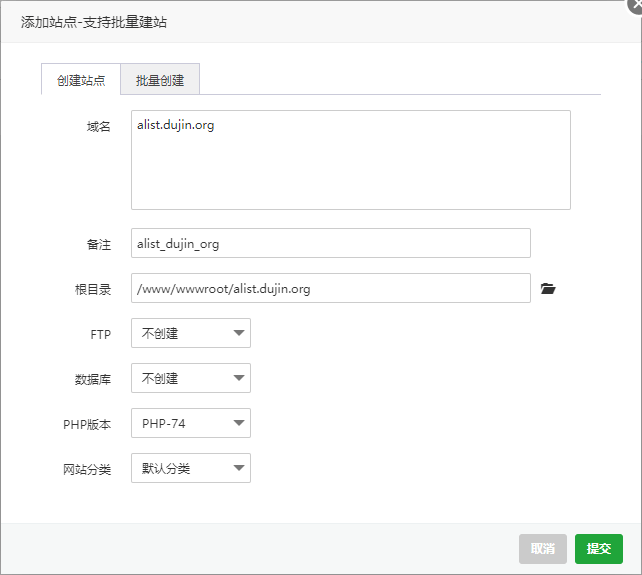 <br /></figure></div><p style="box-sizing: border-box; margin-bottom: 20px; overflow-wrap: break-word; color: rgb(51, 51, 51); font-family: "Helvetica Neue", Helvetica, Arial, sans-serif; font-size: 16px; text-align: justify; background-color: rgb(255, 255, 255);">数据库无需创建,PHP版本可随意,纯静态也可以。这里我们复制一下<code style="box-sizing: border-box; font-family: Menlo, Monaco, Consolas, "Courier New", monospace; font-size: 14.4px; padding: 2px 4px; color: rgb(199, 37, 78); background-color: rgb(249, 242, 244); border-radius: 4px;">根目录</code>地址,后面安装 Alist 程序需要用到。根目录地址为:</p><pre class="wp-block-code prettyprint" style="box-sizing: border-box; overflow: auto; font-family: Menlo, Monaco, Consolas, "Courier New", monospace; font-size: 13px; padding: 10px 15px; margin-top: 20px; margin-bottom: 20px; line-height: 1.42857; color: rgb(248, 248, 212); word-break: break-all; overflow-wrap: break-word; background-color: rgb(39, 40, 34); border-width: initial; border-style: none; border-color: initial; border-radius: 4px; max-height: 637px; text-align: justify;"><code style="box-sizing: border-box; font-family: inherit; font-size: inherit; padding: 0px; color: inherit; background-color: transparent; border-radius: 0px; white-space: pre-wrap; display: block; overflow-wrap: break-word;"><span class="str" style="box-sizing: border-box; color: rgb(230, 219, 116);">/www/</span><span class="pln" style="box-sizing: border-box; color: rgb(102, 217, 239);">wwwroot</span><span class="pun" style="box-sizing: border-box; color: rgb(248, 248, 242);">/</span><span class="pln" style="box-sizing: border-box; color: rgb(102, 217, 239);">alist</span><span class="pun" style="box-sizing: border-box; color: rgb(248, 248, 242);">.</span><span class="pln" style="box-sizing: border-box; color: rgb(102, 217, 239);">dujin</span><span class="pun" style="box-sizing: border-box; color: rgb(248, 248, 242);">.</span><span class="pln" style="box-sizing: border-box; color: rgb(102, 217, 239);">org</span></code></pre><h2 style="box-sizing: border-box; font-family: "Helvetica Neue", Helvetica, Arial, sans-serif; line-height: 1.4; color: rgb(51, 51, 51); margin: 20px 0px; font-size: 22px; padding: 0px; text-align: justify; background-color: rgb(255, 255, 255);">宝塔安装 Alist 程序</h2><p style="box-sizing: border-box; margin-bottom: 20px; overflow-wrap: break-word; color: rgb(51, 51, 51); font-family: "Helvetica Neue", Helvetica, Arial, sans-serif; font-size: 16px; text-align: justify; background-color: rgb(255, 255, 255);">接下来,通过 ssh 连接该服务器,在官方给出的基础上,末尾增加指定目录安装,添加刚刚得到的根目录地址,如下示例。</p><pre class="wp-block-code prettyprint" style="box-sizing: border-box; overflow: auto; font-family: Menlo, Monaco, Consolas, "Courier New", monospace; font-size: 13px; padding: 10px 15px; margin-top: 20px; margin-bottom: 20px; line-height: 1.42857; color: rgb(248, 248, 212); word-break: break-all; overflow-wrap: break-word; background-color: rgb(39, 40, 34); border-width: initial; border-style: none; border-color: initial; border-radius: 4px; max-height: 637px; text-align: justify;"><code style="box-sizing: border-box; font-family: inherit; font-size: inherit; padding: 0px; color: inherit; background-color: transparent; border-radius: 0px; white-space: pre-wrap; display: block; overflow-wrap: break-word;"><span class="pln" style="box-sizing: border-box; color: rgb(102, 217, 239);">curl </span><span class="pun" style="box-sizing: border-box; color: rgb(248, 248, 242);">-</span><span class="pln" style="box-sizing: border-box; color: rgb(102, 217, 239);">fsSL </span><span class="str" style="box-sizing: border-box; color: rgb(230, 219, 116);">"https://nn.ci/alist.sh"</span><span class="pln" style="box-sizing: border-box; color: rgb(102, 217, 239);"> </span><span class="pun" style="box-sizing: border-box; color: rgb(248, 248, 242);">|</span><span class="pln" style="box-sizing: border-box; color: rgb(102, 217, 239);"> bash </span><span class="pun" style="box-sizing: border-box; color: rgb(248, 248, 242);">-</span><span class="pln" style="box-sizing: border-box; color: rgb(102, 217, 239);">s install </span><span class="pun" style="box-sizing: border-box; color: rgb(248, 248, 242);">/</span><span class="pln" style="box-sizing: border-box; color: rgb(102, 217, 239);">www</span><span class="pun" style="box-sizing: border-box; color: rgb(248, 248, 242);">/</span><span class="pln" style="box-sizing: border-box; color: rgb(102, 217, 239);">wwwroot</span><span class="pun" style="box-sizing: border-box; color: rgb(248, 248, 242);">/</span><span class="pln" style="box-sizing: border-box; color: rgb(102, 217, 239);">alist</span><span class="pun" style="box-sizing: border-box; color: rgb(248, 248, 242);">.</span><span class="pln" style="box-sizing: border-box; color: rgb(102, 217, 239);">dujin</span><span class="pun" style="box-sizing: border-box; color: rgb(248, 248, 242);">.</span><span class="pln" style="box-sizing: border-box; color: rgb(102, 217, 239);">org
curl </span><span class="pun" style="box-sizing: border-box; color: rgb(248, 248, 242);">-</span><span class="pln" style="box-sizing: border-box; color: rgb(102, 217, 239);">fsSL </span><span class="str" style="box-sizing: border-box; color: rgb(230, 219, 116);">"https://nn.ci/alist.sh"</span><span class="pln" style="box-sizing: border-box; color: rgb(102, 217, 239);"> </span><span class="pun" style="box-sizing: border-box; color: rgb(248, 248, 242);">|</span><span class="pln" style="box-sizing: border-box; color: rgb(102, 217, 239);"> bash </span><span class="pun" style="box-sizing: border-box; color: rgb(248, 248, 242);">-</span><span class="pln" style="box-sizing: border-box; color: rgb(102, 217, 239);">s update </span><span class="pun" style="box-sizing: border-box; color: rgb(248, 248, 242);">/</span><span class="pln" style="box-sizing: border-box; color: rgb(102, 217, 239);">www</span><span class="pun" style="box-sizing: border-box; color: rgb(248, 248, 242);">/</span><span class="pln" style="box-sizing: border-box; color: rgb(102, 217, 239);">wwwroot</span><span class="pun" style="box-sizing: border-box; color: rgb(248, 248, 242);">/</span><span class="pln" style="box-sizing: border-box; color: rgb(102, 217, 239);">alist</span><span class="pun" style="box-sizing: border-box; color: rgb(248, 248, 242);">.</span><span class="pln" style="box-sizing: border-box; color: rgb(102, 217, 239);">dujin</span><span class="pun" style="box-sizing: border-box; color: rgb(248, 248, 242);">.</span><span class="pln" style="box-sizing: border-box; color: rgb(102, 217, 239);">org
curl </span><span class="pun" style="box-sizing: border-box; color: rgb(248, 248, 242);">-</span><span class="pln" style="box-sizing: border-box; color: rgb(102, 217, 239);">fsSL </span><span class="str" style="box-sizing: border-box; color: rgb(230, 219, 116);">"https://nn.ci/alist.sh"</span><span class="pln" style="box-sizing: border-box; color: rgb(102, 217, 239);"> </span><span class="pun" style="box-sizing: border-box; color: rgb(248, 248, 242);">|</span><span class="pln" style="box-sizing: border-box; color: rgb(102, 217, 239);"> bash </span><span class="pun" style="box-sizing: border-box; color: rgb(248, 248, 242);">-</span><span class="pln" style="box-sizing: border-box; color: rgb(102, 217, 239);">s uninstall </span><span class="pun" style="box-sizing: border-box; color: rgb(248, 248, 242);">/</span><span class="pln" style="box-sizing: border-box; color: rgb(102, 217, 239);">www</span><span class="pun" style="box-sizing: border-box; color: rgb(248, 248, 242);">/</span><span class="pln" style="box-sizing: border-box; color: rgb(102, 217, 239);">wwwroot</span><span class="pun" style="box-sizing: border-box; color: rgb(248, 248, 242);">/</span><span class="pln" style="box-sizing: border-box; color: rgb(102, 217, 239);">alist</span><span class="pun" style="box-sizing: border-box; color: rgb(248, 248, 242);">.</span><span class="pln" style="box-sizing: border-box; color: rgb(102, 217, 239);">dujin</span><span class="pun" style="box-sizing: border-box; color: rgb(248, 248, 242);">.</span><span class="pln" style="box-sizing: border-box; color: rgb(102, 217, 239);">org</span></code></pre><p style="box-sizing: border-box; margin-bottom: 20px; overflow-wrap: break-word; color: rgb(51, 51, 51); font-family: "Helvetica Neue", Helvetica, Arial, sans-serif; font-size: 16px; text-align: justify; background-color: rgb(255, 255, 255);">install 为安装,update 为升级,uninstall 为卸载。我们执行第一行安装之后,会得到如下内容:</p><pre class="wp-block-code prettyprint" style="box-sizing: border-box; overflow: auto; font-family: Menlo, Monaco, Consolas, "Courier New", monospace; font-size: 13px; padding: 10px 15px; margin-top: 20px; margin-bottom: 20px; line-height: 1.42857; color: rgb(248, 248, 212); word-break: break-all; overflow-wrap: break-word; background-color: rgb(39, 40, 34); border-width: initial; border-style: none; border-color: initial; border-radius: 4px; max-height: 637px; text-align: justify;"><code style="box-sizing: border-box; font-family: inherit; font-size: inherit; padding: 0px; color: inherit; background-color: transparent; border-radius: 0px; white-space: pre-wrap; display: block; overflow-wrap: break-word;"><span class="typ" style="box-sizing: border-box; color: rgb(166, 226, 46);">Alist</span><span class="pln" style="box-sizing: border-box; color: rgb(102, 217, 239);"> </span><span class="pun" style="box-sizing: border-box; color: rgb(248, 248, 242);">安装成功!</span><span class="pln" style="box-sizing: border-box; color: rgb(102, 217, 239);">
</span><span class="pun" style="box-sizing: border-box; color: rgb(248, 248, 242);">访问地址:</span><span class="pln" style="box-sizing: border-box; color: rgb(102, 217, 239);">http</span><span class="pun" style="box-sizing: border-box; color: rgb(248, 248, 242);">:</span><span class="com" style="box-sizing: border-box; color: rgb(147, 161, 161);">//YOUR_IP:5244/</span><span class="pln" style="box-sizing: border-box; color: rgb(102, 217, 239);">
</span><span class="pun" style="box-sizing: border-box; color: rgb(248, 248, 242);">配置文件:/</span><span class="pln" style="box-sizing: border-box; color: rgb(102, 217, 239);">www</span><span class="pun" style="box-sizing: border-box; color: rgb(248, 248, 242);">/</span><span class="pln" style="box-sizing: border-box; color: rgb(102, 217, 239);">wwwroot</span><span class="pun" style="box-sizing: border-box; color: rgb(248, 248, 242);">/</span><span class="pln" style="box-sizing: border-box; color: rgb(102, 217, 239);">alist</span><span class="pun" style="box-sizing: border-box; color: rgb(248, 248, 242);">.</span><span class="pln" style="box-sizing: border-box; color: rgb(102, 217, 239);">dujin</span><span class="pun" style="box-sizing: border-box; color: rgb(248, 248, 242);">.</span><span class="pln" style="box-sizing: border-box; color: rgb(102, 217, 239);">org</span><span class="pun" style="box-sizing: border-box; color: rgb(248, 248, 242);">/</span><span class="pln" style="box-sizing: border-box; color: rgb(102, 217, 239);">alist</span><span class="pun" style="box-sizing: border-box; color: rgb(248, 248, 242);">/</span><span class="pln" style="box-sizing: border-box; color: rgb(102, 217, 239);">data</span><span class="pun" style="box-sizing: border-box; color: rgb(248, 248, 242);">/</span><span class="pln" style="box-sizing: border-box; color: rgb(102, 217, 239);">config</span><span class="pun" style="box-sizing: border-box; color: rgb(248, 248, 242);">.</span><span class="pln" style="box-sizing: border-box; color: rgb(102, 217, 239);">json
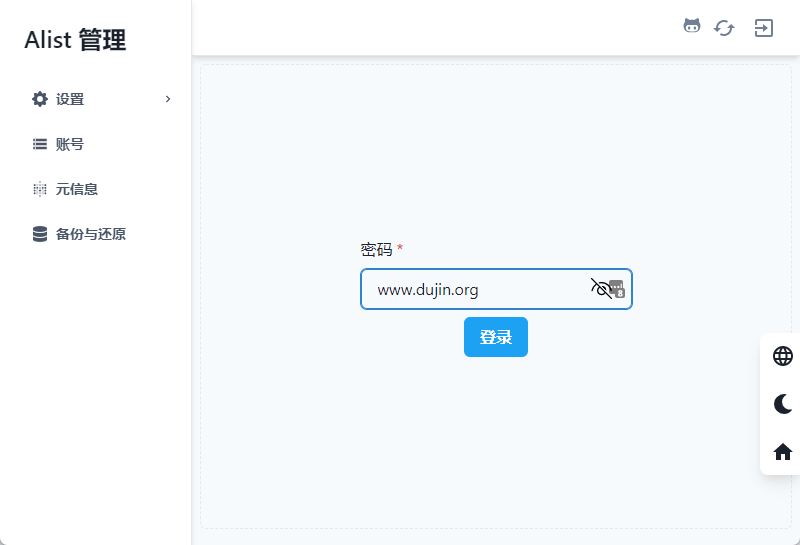
</span><span class="pun" style="box-sizing: border-box; color: rgb(248, 248, 242);">初始管理密码:</span><span class="pln" style="box-sizing: border-box; color: rgb(102, 217, 239);">www</span><span class="pun" style="box-sizing: border-box; color: rgb(248, 248, 242);">.</span><span class="pln" style="box-sizing: border-box; color: rgb(102, 217, 239);">dujin</span><span class="pun" style="box-sizing: border-box; color: rgb(248, 248, 242);">.</span><span class="pln" style="box-sizing: border-box; color: rgb(102, 217, 239);">org
</span><span class="pun" style="box-sizing: border-box; color: rgb(248, 248, 242);">查看状态:</span><span class="pln" style="box-sizing: border-box; color: rgb(102, 217, 239);">systemctl status alist
</span><span class="pun" style="box-sizing: border-box; color: rgb(248, 248, 242);">启动服务:</span><span class="pln" style="box-sizing: border-box; color: rgb(102, 217, 239);">systemctl start alist
</span><span class="pun" style="box-sizing: border-box; color: rgb(248, 248, 242);">重启服务:</span><span class="pln" style="box-sizing: border-box; color: rgb(102, 217, 239);">systemctl restart alist
</span><span class="pun" style="box-sizing: border-box; color: rgb(248, 248, 242);">停止服务:</span><span class="pln" style="box-sizing: border-box; color: rgb(102, 217, 239);">systemctl stop alist
</span><span class="pun" style="box-sizing: border-box; color: rgb(248, 248, 242);">温馨提示:如果端口无法正常访问,请检查</span><span class="pln" style="box-sizing: border-box; color: rgb(102, 217, 239);"> </span><span class="pun" style="box-sizing: border-box; color: rgb(248, 248, 242);">服务器安全组、本机防火墙、</span><span class="typ" style="box-sizing: border-box; color: rgb(166, 226, 46);">Alist</span><span class="pun" style="box-sizing: border-box; color: rgb(248, 248, 242);">状态</span></code></pre><p style="box-sizing: border-box; margin-bottom: 20px; overflow-wrap: break-word; color: rgb(51, 51, 51); font-family: "Helvetica Neue", Helvetica, Arial, sans-serif; font-size: 16px; text-align: justify; background-color: rgb(255, 255, 255);">这里我们要记住 Alist 初始管理密码。所以,你如果是使用阿里云、腾讯云、华为云之类的服务器,就要把这个 5244 端口给开一下,同时在<code style="box-sizing: border-box; font-family: Menlo, Monaco, Consolas, "Courier New", monospace; font-size: 14.4px; padding: 2px 4px; color: rgb(199, 37, 78); background-color: rgb(249, 242, 244); border-radius: 4px;">宝塔</code>→<code style="box-sizing: border-box; font-family: Menlo, Monaco, Consolas, "Courier New", monospace; font-size: 14.4px; padding: 2px 4px; color: rgb(199, 37, 78); background-color: rgb(249, 242, 244); border-radius: 4px;">安全</code>里面也对 5244 端口放行一下。</p><div class="wp-block-image" style="box-sizing: border-box; margin: 0px 0px 20px; overflow: hidden; text-align: center; color: rgb(51, 51, 51); font-family: "Helvetica Neue", Helvetica, Arial, sans-serif; font-size: 16px; background-color: rgb(255, 255, 255);"><figure class="aligncenter size-full" style="box-sizing: border-box; margin: 0px auto; clear: both;">
 <br /></figure></div><h2 style="box-sizing: border-box; font-family: "Helvetica Neue", Helvetica, Arial, sans-serif; line-height: 1.4; color: rgb(51, 51, 51); margin: 20px 0px; font-size: 22px; padding: 0px; text-align: justify; background-color: rgb(255, 255, 255);">给 Alist 程序添加反向代理</h2><p style="box-sizing: border-box; margin-bottom: 20px; overflow-wrap: break-word; color: rgb(51, 51, 51); font-family: "Helvetica Neue", Helvetica, Arial, sans-serif; font-size: 16px; text-align: justify; background-color: rgb(255, 255, 255);">点击宝塔→<code style="box-sizing: border-box; font-family: Menlo, Monaco, Consolas, "Courier New", monospace; font-size: 14.4px; padding: 2px 4px; color: rgb(199, 37, 78); background-color: rgb(249, 242, 244); border-radius: 4px;">网站</code>菜单→对应网站<code style="box-sizing: border-box; font-family: Menlo, Monaco, Consolas, "Courier New", monospace; font-size: 14.4px; padding: 2px 4px; color: rgb(199, 37, 78); background-color: rgb(249, 242, 244); border-radius: 4px;">设置</code>→反向代理→添加反向代理。</p><figure class="wp-block-image size-full" style="box-sizing: border-box; margin: 0px 0px 20px; overflow: hidden; text-align: center; color: rgb(51, 51, 51); font-family: "Helvetica Neue", Helvetica, Arial, sans-serif; font-size: 16px; background-color: rgb(255, 255, 255);">
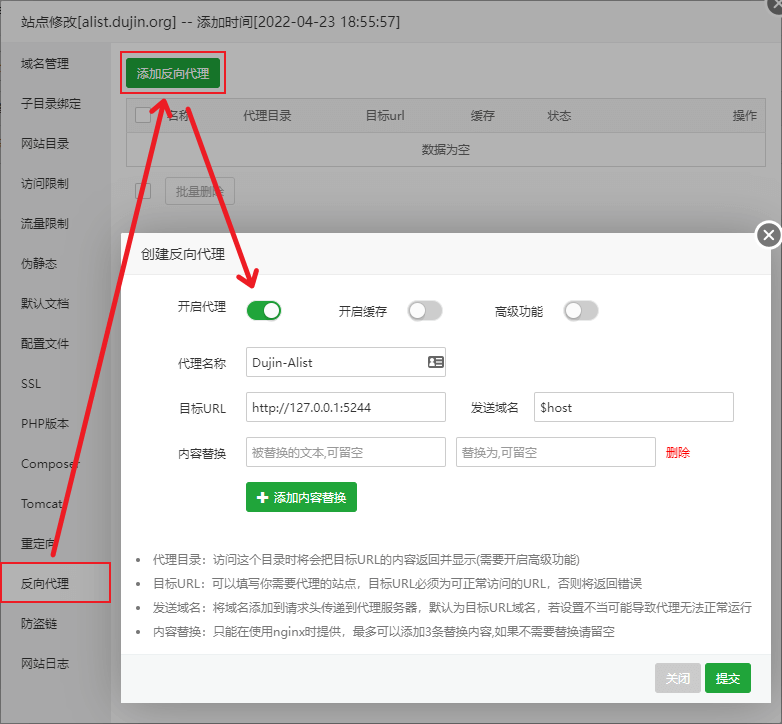 <br /></figure><p style="box-sizing: border-box; margin-bottom: 20px; overflow-wrap: break-word; color: rgb(51, 51, 51); font-family: "Helvetica Neue", Helvetica, Arial, sans-serif; font-size: 16px; text-align: justify; background-color: rgb(255, 255, 255);">点击开启代理,代理名称随意,目标URL设置为:</p><pre class="wp-block-code prettyprint" style="box-sizing: border-box; overflow: auto; font-family: Menlo, Monaco, Consolas, "Courier New", monospace; font-size: 13px; padding: 10px 15px; margin-top: 20px; margin-bottom: 20px; line-height: 1.42857; color: rgb(248, 248, 212); word-break: break-all; overflow-wrap: break-word; background-color: rgb(39, 40, 34); border-width: initial; border-style: none; border-color: initial; border-radius: 4px; max-height: 637px; text-align: justify;"><code style="box-sizing: border-box; font-family: inherit; font-size: inherit; padding: 0px; color: inherit; background-color: transparent; border-radius: 0px; white-space: pre-wrap; display: block; overflow-wrap: break-word;"><span class="pln" style="box-sizing: border-box; color: rgb(102, 217, 239);">http</span><span class="pun" style="box-sizing: border-box; color: rgb(248, 248, 242);">:</span><span class="com" style="box-sizing: border-box; color: rgb(147, 161, 161);">//127.0.0.1:5244</span></code></pre><p style="box-sizing: border-box; margin-bottom: 20px; overflow-wrap: break-word; color: rgb(51, 51, 51); font-family: "Helvetica Neue", Helvetica, Arial, sans-serif; font-size: 16px; text-align: justify; background-color: rgb(255, 255, 255);">其余保持默认即可,点击<code style="box-sizing: border-box; font-family: Menlo, Monaco, Consolas, "Courier New", monospace; font-size: 14.4px; padding: 2px 4px; color: rgb(199, 37, 78); background-color: rgb(249, 242, 244); border-radius: 4px;">提交</code>按钮。</p><h2 style="box-sizing: border-box; font-family: "Helvetica Neue", Helvetica, Arial, sans-serif; line-height: 1.4; color: rgb(51, 51, 51); margin: 20px 0px; font-size: 22px; padding: 0px; text-align: justify; background-color: rgb(255, 255, 255);">其他终端管理命令</h2><pre class="wp-block-code prettyprint" style="box-sizing: border-box; overflow: auto; font-family: Menlo, Monaco, Consolas, "Courier New", monospace; font-size: 13px; padding: 10px 15px; margin-top: 20px; margin-bottom: 20px; line-height: 1.42857; color: rgb(248, 248, 212); word-break: break-all; overflow-wrap: break-word; background-color: rgb(39, 40, 34); border-width: initial; border-style: none; border-color: initial; border-radius: 4px; max-height: 637px; text-align: justify;"><code style="box-sizing: border-box; font-family: inherit; font-size: inherit; padding: 0px; color: inherit; background-color: transparent; border-radius: 0px; white-space: pre-wrap; display: block; overflow-wrap: break-word;"><span class="pun" style="box-sizing: border-box; color: rgb(248, 248, 242);">启动:</span><span class="pln" style="box-sizing: border-box; color: rgb(102, 217, 239);"> systemctl start alist
</span><span class="pun" style="box-sizing: border-box; color: rgb(248, 248, 242);">关闭:</span><span class="pln" style="box-sizing: border-box; color: rgb(102, 217, 239);"> systemctl stop alist
</span><span class="pun" style="box-sizing: border-box; color: rgb(248, 248, 242);">自启:</span><span class="pln" style="box-sizing: border-box; color: rgb(102, 217, 239);"> systemctl enable alist
</span><span class="pun" style="box-sizing: border-box; color: rgb(248, 248, 242);">状态:</span><span class="pln" style="box-sizing: border-box; color: rgb(102, 217, 239);"> systemctl status alist
</span><span class="pun" style="box-sizing: border-box; color: rgb(248, 248, 242);">重启:</span><span class="pln" style="box-sizing: border-box; color: rgb(102, 217, 239);"> systemctl restart alist</span></code></pre><p style="box-sizing: border-box; margin-bottom: 20px; overflow-wrap: break-word; color: rgb(51, 51, 51); font-family: "Helvetica Neue", Helvetica, Arial, sans-serif; font-size: 16px; text-align: justify; background-color: rgb(255, 255, 255);">输入你的前端域名就可以访问,这里的密码就是最开始通过 ssh 安装成功显示的密码</p><figure class="wp-block-image size-full" style="box-sizing: border-box; margin: 0px 0px 20px; overflow: hidden; text-align: center; color: rgb(51, 51, 51); font-family: "Helvetica Neue", Helvetica, Arial, sans-serif; font-size: 16px; background-color: rgb(255, 255, 255);">
 <br /></figure><p style="box-sizing: border-box; margin-bottom: 20px; overflow-wrap: break-word; color: rgb(51, 51, 51); font-family: "Helvetica Neue", Helvetica, Arial, sans-serif; font-size: 16px; text-align: justify; background-color: rgb(255, 255, 255);">至于如何添加各种网盘这种事,官方说明都写的很清楚了,这里就不再赘述了。</p><h2 style="box-sizing: border-box; font-family: "Helvetica Neue", Helvetica, Arial, sans-serif; line-height: 1.4; color: rgb(51, 51, 51); margin: 20px 0px; font-size: 22px; padding: 0px; text-align: justify; background-color: rgb(255, 255, 255);">个人建议</h2><p style="box-sizing: border-box; margin-bottom: 20px; overflow-wrap: break-word; color: rgb(51, 51, 51); font-family: "Helvetica Neue", Helvetica, Arial, sans-serif; font-size: 16px; text-align: justify; background-color: rgb(255, 255, 255);">如果是自己一个人用用,那么可以选择一款网络较好的服务器,尤其是海外服务器,还可以对接谷歌云盘、海外版 OneDrive 等。</p><p style="box-sizing: border-box; margin-bottom: 20px; overflow-wrap: break-word; color: rgb(51, 51, 51); font-family: "Helvetica Neue", Helvetica, Arial, sans-serif; font-size: 16px; text-align: justify; background-color: rgb(255, 255, 255);">如果是公开给大伙儿用,那么建议套一个 CloudFlare,避免被频繁扫描或者胡乱调用导致 API 阈值过高而账号被黑。</p>
 |
 |Archiver|手机版|小黑屋|腾飞在线
( 冀ICP备05002530号 )
|Archiver|手机版|小黑屋|腾飞在线
( 冀ICP备05002530号 )


 发表于 2022-8-16 20:52:49
 发表于 2022-8-23 16:49:50