|
|
<div><p style="box-sizing: border-box; margin-bottom: 16px; color: rgb(21, 21, 21); font-size: 16px; line-height: 30px; font-family: -apple-system, BlinkMacSystemFont, opensans, Optima, "Microsoft Yahei", sans-serif; background-color: rgb(255, 255, 255);">DDNSTO内网穿透是面向于小白用户的一款内网穿透应用,更简单,更快速,更便宜,小白也能 10 秒上手,满足大部分人需要在外网控制内网设备的需求。DDNSTO适用于需要在外网控制内网设备并且没有公网IP的用户,本文以OpenWRT为例讲解DDNSTO的使用方式。</p><div class="lwptoc lwptoc-baseItems lwptoc-transparent lwptoc-notInherit" data-smooth-scroll="1" data-smooth-scroll-offset="10" data-lwptoc-initialized="1" style="box-sizing: border-box; margin: 32px 0px; color: rgb(33, 37, 41); font-family: -apple-system, BlinkMacSystemFont, opensans, Optima, "Microsoft Yahei", sans-serif; font-size: 16px; background-color: rgb(255, 255, 255);"><div class="lwptoc_i" style="box-sizing: border-box; padding: 14px 18px 18px; border: 1px solid rgb(238, 238, 238);"><div class="lwptoc_header" style="box-sizing: border-box; margin-bottom: 6px;"><span class="lwptoc_title" style="box-sizing: border-box; font-weight: 600;">文章目录</span> <span class="lwptoc_toggle" style="box-sizing: border-box; white-space: nowrap; margin-left: 4px; font-size: 12.8px;"> <a href="https://blog.qiaohewei.cc/2021/03/15/openwrt_ddnsto/#" class="lwptoc_toggle_label" data-label="显示" style="box-sizing: border-box; color: rgb(63, 224, 213); background-color: transparent; transition: all 0.3s ease 0s; margin: 0px 1px; text-decoration-line: none !important; box-shadow: none !important; border: none !important;">隐藏</a> </span></div><div class="lwptoc_items lwptoc_items-visible" style="box-sizing: border-box; font-size: 14.4px;"><div class="lwptoc_itemWrap" style="box-sizing: border-box;"><div class="lwptoc_item" style="box-sizing: border-box; margin-top: 0px;"><a href="https://blog.qiaohewei.cc/2021/03/15/openwrt_ddnsto/#yiDDNSTO_you_shi" style="box-sizing: border-box; color: rgb(63, 224, 213); background-color: transparent; transition: all 0.3s ease 0s; text-decoration-line: none !important; box-shadow: none !important; border: none !important;">一、DDNSTO优势</a></div><div class="lwptoc_item" style="box-sizing: border-box; margin-top: 2px;"><a href="https://blog.qiaohewei.cc/2021/03/15/openwrt_ddnsto/#erOpenWRT_an_zhuangDDNSTO" style="box-sizing: border-box; color: rgb(63, 224, 213); background-color: transparent; transition: all 0.3s ease 0s; text-decoration-line: none !important; box-shadow: none !important; border: none !important;">二、OpenWRT安装DDNSTO</a></div><div class="lwptoc_item" style="box-sizing: border-box; margin-top: 2px;"><a href="https://blog.qiaohewei.cc/2021/03/15/openwrt_ddnsto/#san_huo_quDDNSTO_token" style="box-sizing: border-box; color: rgb(63, 224, 213); background-color: transparent; transition: all 0.3s ease 0s; text-decoration-line: none !important; box-shadow: none !important; border: none !important;">三、获取DDNSTO token</a></div><div class="lwptoc_item" style="box-sizing: border-box; margin-top: 2px;"><a href="https://blog.qiaohewei.cc/2021/03/15/openwrt_ddnsto/#si_pei_zhiOpenWRT_DDNSTO_cha_jian" style="box-sizing: border-box; color: rgb(63, 224, 213); background-color: transparent; transition: all 0.3s ease 0s; text-decoration-line: none !important; box-shadow: none !important; border: none !important;">四、配置OpenWRT DDNSTO插件</a></div><div class="lwptoc_item" style="box-sizing: border-box; margin-top: 2px;"><a href="https://blog.qiaohewei.cc/2021/03/15/openwrt_ddnsto/#san_tian_jia_yu_ming_ying_she" style="box-sizing: border-box; color: rgb(63, 224, 213); background-color: transparent; transition: all 0.3s ease 0s; text-decoration-line: none !important; box-shadow: none !important; border: none !important;">三、添加域名映射</a></div><div class="lwptoc_item" style="box-sizing: border-box; margin-top: 2px;"><a href="https://blog.qiaohewei.cc/2021/03/15/openwrt_ddnsto/#wu_qi_ta_ying_yong_fu_wu" style="box-sizing: border-box; color: rgb(63, 224, 213); background-color: transparent; transition: all 0.3s ease 0s; text-decoration-line: none !important; box-shadow: none !important; border: none !important;">五、其他应用服务</a></div></div></div></div></div><h3 style="box-sizing: border-box; margin: 24px 0px 16px; font-weight: 500; line-height: 32px; font-size: 18px; color: rgb(51, 51, 51); font-family: -apple-system, BlinkMacSystemFont, opensans, Optima, "Microsoft Yahei", sans-serif; background-color: rgb(255, 255, 255);"><span id="yiDDNSTO_you_shi" style="box-sizing: border-box;">一、DDNSTO优势</span></h3><ul style="box-sizing: border-box; margin: 0px 0px 16px; color: rgb(51, 51, 51); font-size: 16px; padding-left: 16px; font-family: -apple-system, BlinkMacSystemFont, opensans, Optima, "Microsoft Yahei", sans-serif; background-color: rgb(255, 255, 255);"><li style="box-sizing: border-box; margin-bottom: 6px; padding-left: 2px; list-style: circle; line-height: 22px;">无需公网 IP,不被网络环境限制</li><li style="box-sizing: border-box; margin-bottom: 6px; padding-left: 2px; list-style: circle; line-height: 22px;">无需购买域名或服务器,省去了服务器年费和带宽要求以及域名购买、备案等等繁琐操作</li><li style="box-sizing: border-box; margin-bottom: 6px; padding-left: 2px; list-style: circle; line-height: 22px;">全部的安装、配置、使用都在浏览器完成,对小白用户非常友好</li><li style="box-sizing: border-box; margin-bottom: 6px; padding-left: 2px; list-style: circle; line-height: 22px;">支持http2,访问家庭内部网络速度更快</li><li style="box-sizing: border-box; margin-bottom: 6px; padding-left: 2px; list-style: circle; line-height: 22px;">借助独家远程应用中心配合,可以支持远程电脑桌面,远程下载,远程文件管理等更多丰富的功能</li></ul><h3 style="box-sizing: border-box; margin: 24px 0px 16px; font-weight: 500; line-height: 32px; font-size: 18px; color: rgb(51, 51, 51); font-family: -apple-system, BlinkMacSystemFont, opensans, Optima, "Microsoft Yahei", sans-serif; background-color: rgb(255, 255, 255);"><span id="erOpenWRT_an_zhuangDDNSTO" style="box-sizing: border-box;">二、OpenWRT安装DDNSTO</span></h3><p style="box-sizing: border-box; margin-bottom: 16px; color: rgb(21, 21, 21); font-size: 16px; line-height: 30px; font-family: -apple-system, BlinkMacSystemFont, opensans, Optima, "Microsoft Yahei", sans-serif; background-color: rgb(255, 255, 255);"><a href="https://blog.qiaohewei.cc/wp-content/uploads/2021/03/1615778665-iShot2021-03-15-11.24.13.png" data-lbwps-width="2466" data-lbwps-height="1564" data-lbwps-handler="1" style="box-sizing: border-box; color: rgb(63, 224, 213); text-decoration-line: none; background-color: transparent; transition: all 0.3s ease 0s;"><img loading="lazy" class="aligncenter size-large wp-image-766 lazy-loaded" src="https://blog.qiaohewei.cc/wp-content/uploads/2021/03/1615778665-iShot2021-03-15-11.24.13-1024x649.png" data-lazy-type="image" data-src="https://blog.qiaohewei.cc/wp-content/uploads/2021/03/1615778665-iShot2021-03-15-11.24.13-1024x649.png" width="1024" height="649" srcset="https://blog.qiaohewei.cc/wp-content/uploads/2021/03/1615778665-iShot2021-03-15-11.24.13-1024x649.png 1024w, 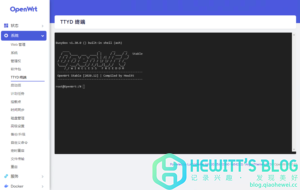 300w, 300w,  768w, 768w,  1536w, 1536w,  2048w\" data-srcset=\"\" sizes=\"(max-width: 1024px) 100vw, 1024px\" title=\"DDNSTO内网穿透,无需公网IP,实现内网远程设备控制插图\" alt=\"DDNSTO内网穿透,无需公网IP,实现内网远程设备控制插图\" style=\"box-sizing: border-box; vertical-align: middle; border-style: none; height: auto; max-width: 100%; display: block; margin-right: auto; margin-left: auto;\" /></a></p><p style=\"box-sizing: border-box; margin-bottom: 16px; color: rgb(21, 21, 21); font-size: 16px; line-height: 30px; font-family: -apple-system, BlinkMacSystemFont, opensans, Optima, "Microsoft Yahei", sans-serif; background-color: rgb(255, 255, 255); padding-left: 40px;\">1、登入OpenWRT并进入TTYD终端,复制下方一键安装脚本,并粘贴至终端内执行,安装完毕后刷新页面,插件将出现在服务内,如果安装失败,请使用备用命令安装。</p><div class=\"enlighter-default enlighter-v-standard enlighter-t-dracula enlighter-hover \" style=\"box-sizing: border-box; font-family: "Source Code Pro", "Liberation Mono", "Courier New", Courier, monospace; font-size: 12px; line-height: 1.35em; overflow: hidden; white-space: pre-wrap; overflow-wrap: break-word; margin: 0px 0px 20px; padding: 0px; position: relative; direction: ltr; background-color: rgb(40, 42, 54); color: rgb(33, 37, 41);\"><div class=\"enlighter\" style=\"box-sizing: border-box; display: table; width: 698px; border-collapse: collapse; border-spacing: 0px; empty-cells: show; min-width: 100%; font-size: 1em; margin: 0px; padding: 0px; counter-reset: enlighter 0;\"><div class=\"\" style=\"box-sizing: border-box; display: table-row; margin: 0px; border: 0px solid rgb(255, 255, 255); list-style: none; font-size: inherit; line-height: 1.6em; min-height: 14px; padding: 5px 5px 5px 14px; color: rgb(98, 114, 164);\"><div style=\"box-sizing: border-box; display: table-cell; padding-left: 10px;\"><span class=\"enlighter-text\" style=\"box-sizing: border-box; margin: 0px; padding: 0px; line-height: inherit; font-size: 1.25em; font-family: inherit; color: rgb(248, 248, 242);\">sh -c </span><span class=\"enlighter-s0\" style=\"box-sizing: border-box; margin: 0px; padding: 0px; line-height: inherit; font-size: 1.25em; font-family: inherit; color: rgb(241, 250, 140);\">\"$(curl -sSL http://firmware.koolshar ... l_ddnsto.sh)\"</span></div></div></div></div><div class=\"card border-warning text-white mb-3\" style=\"box-sizing: border-box; position: relative; display: flex; flex-direction: column; min-width: 0px; overflow-wrap: break-word; background-color: rgb(255, 255, 255); background-clip: border-box; border-width: 1px; border-style: solid; border-image: initial; border-radius: 0px; font-family: -apple-system, BlinkMacSystemFont, opensans, Optima, "Microsoft Yahei", sans-serif; font-size: 16px; border-color: rgb(255, 193, 7) !important; margin-bottom: 1rem !important; color: rgb(255, 255, 255) !important;\"><div class=\"card-header bg-warning\" style=\"box-sizing: border-box; padding: 6px 15px; margin-bottom: 0px; background-color: rgb(255, 193, 7) !important; border-bottom: 1px solid rgba(0, 0, 0, 0.125); border-radius: 0px;\">备用命令</div><div class=\"card-body\" style=\"box-sizing: border-box; flex: 1 1 auto; min-height: 1px; padding: 10px 15px;\"><p class=\"card-text\" style=\"box-sizing: border-box; margin-bottom: 16px; color: rgb(21, 21, 21); line-height: 30px;\"></p><div class=\"enlighter-default enlighter-v-standard enlighter-t-dracula enlighter-hover \" style=\"box-sizing: border-box; font-family: "Source Code Pro", "Liberation Mono", "Courier New", Courier, monospace; font-size: 12px; line-height: 1.35em; overflow: hidden; white-space: pre-wrap; overflow-wrap: break-word; margin: 0px 0px 20px; padding: 0px; position: relative; direction: ltr; background-color: rgb(40, 42, 54);\"><div class=\"enlighter\" style=\"box-sizing: border-box; display: table; width: 666px; border-collapse: collapse; border-spacing: 0px; empty-cells: show; min-width: 100%; font-size: 1em; margin: 0px; padding: 0px; counter-reset: enlighter 0;\"><div class=\"\" style=\"box-sizing: border-box; display: table-row; margin: 0px; border: 0px solid rgb(255, 255, 255); list-style: none; font-size: inherit; line-height: 1.6em; min-height: 14px; padding: 5px 5px 5px 14px; color: rgb(98, 114, 164);\"><div style=\"box-sizing: border-box; display: table-cell; padding-left: 10px;\"><span class=\"enlighter-text\" style=\"box-sizing: border-box; margin: 0px; padding: 0px; line-height: inherit; font-size: 1.25em; font-family: inherit; color: rgb(248, 248, 242);\">wget https</span><span class=\"enlighter-c0\" style=\"box-sizing: border-box; margin: 0px; padding: 0px; line-height: inherit; font-size: 1.25em; font-family: inherit;\">://raw.githubusercontent.com/linkease/ddnsto_all_in_one_script/master/install_ddnsto.sh&& sh install_ddnsto.sh</span></div></div></div></div><p style=\"box-sizing: border-box; margin-bottom: 16px; color: rgb(21, 21, 21); line-height: 30px;\"></p></div></div><p style=\"box-sizing: border-box; margin-bottom: 16px; color: rgb(21, 21, 21); font-size: 16px; line-height: 30px; font-family: -apple-system, BlinkMacSystemFont, opensans, Optima, "Microsoft Yahei", sans-serif; background-color: rgb(255, 255, 255);\"><a href=\"https://blog.qiaohewei.cc/wp-content/uploads/2021/03/1615779095-iShot2021-03-15-11.30.37.png\" data-lbwps-width=\"2476\" data-lbwps-height=\"1574\" data-lbwps-handler=\"1\" style=\"box-sizing: border-box; color: rgb(63, 224, 213); text-decoration-line: none; background-color: transparent; transition: all 0.3s ease 0s;\"><img loading=\"lazy\" class=\"aligncenter size-large wp-image-767 lazy-loaded\" src=\"https://blog.qiaohewei.cc/wp-content/uploads/2021/03/1615779095-iShot2021-03-15-11.30.37-1024x651.png\" data-lazy-type=\"image\" data-src=\"https://blog.qiaohewei.cc/wp-content/uploads/2021/03/1615779095-iShot2021-03-15-11.30.37-1024x651.png\" width=\"1024\" height=\"651\" srcset=\"https://blog.qiaohewei.cc/wp-content/uploads/2021/03/1615779095-iShot2021-03-15-11.30.37-1024x651.png 1024w, 2048w\" data-srcset=\"\" sizes=\"(max-width: 1024px) 100vw, 1024px\" title=\"DDNSTO内网穿透,无需公网IP,实现内网远程设备控制插图\" alt=\"DDNSTO内网穿透,无需公网IP,实现内网远程设备控制插图\" style=\"box-sizing: border-box; vertical-align: middle; border-style: none; height: auto; max-width: 100%; display: block; margin-right: auto; margin-left: auto;\" /></a></p><p style=\"box-sizing: border-box; margin-bottom: 16px; color: rgb(21, 21, 21); font-size: 16px; line-height: 30px; font-family: -apple-system, BlinkMacSystemFont, opensans, Optima, "Microsoft Yahei", sans-serif; background-color: rgb(255, 255, 255); padding-left: 40px;\">1、登入OpenWRT并进入TTYD终端,复制下方一键安装脚本,并粘贴至终端内执行,安装完毕后刷新页面,插件将出现在服务内,如果安装失败,请使用备用命令安装。</p><div class=\"enlighter-default enlighter-v-standard enlighter-t-dracula enlighter-hover \" style=\"box-sizing: border-box; font-family: "Source Code Pro", "Liberation Mono", "Courier New", Courier, monospace; font-size: 12px; line-height: 1.35em; overflow: hidden; white-space: pre-wrap; overflow-wrap: break-word; margin: 0px 0px 20px; padding: 0px; position: relative; direction: ltr; background-color: rgb(40, 42, 54); color: rgb(33, 37, 41);\"><div class=\"enlighter\" style=\"box-sizing: border-box; display: table; width: 698px; border-collapse: collapse; border-spacing: 0px; empty-cells: show; min-width: 100%; font-size: 1em; margin: 0px; padding: 0px; counter-reset: enlighter 0;\"><div class=\"\" style=\"box-sizing: border-box; display: table-row; margin: 0px; border: 0px solid rgb(255, 255, 255); list-style: none; font-size: inherit; line-height: 1.6em; min-height: 14px; padding: 5px 5px 5px 14px; color: rgb(98, 114, 164);\"><div style=\"box-sizing: border-box; display: table-cell; padding-left: 10px;\"><span class=\"enlighter-text\" style=\"box-sizing: border-box; margin: 0px; padding: 0px; line-height: inherit; font-size: 1.25em; font-family: inherit; color: rgb(248, 248, 242);\">sh -c </span><span class=\"enlighter-s0\" style=\"box-sizing: border-box; margin: 0px; padding: 0px; line-height: inherit; font-size: 1.25em; font-family: inherit; color: rgb(241, 250, 140);\">\"$(curl -sSL http://firmware.koolshar ... l_ddnsto.sh)\"</span></div></div></div></div><div class=\"card border-warning text-white mb-3\" style=\"box-sizing: border-box; position: relative; display: flex; flex-direction: column; min-width: 0px; overflow-wrap: break-word; background-color: rgb(255, 255, 255); background-clip: border-box; border-width: 1px; border-style: solid; border-image: initial; border-radius: 0px; font-family: -apple-system, BlinkMacSystemFont, opensans, Optima, "Microsoft Yahei", sans-serif; font-size: 16px; border-color: rgb(255, 193, 7) !important; margin-bottom: 1rem !important; color: rgb(255, 255, 255) !important;\"><div class=\"card-header bg-warning\" style=\"box-sizing: border-box; padding: 6px 15px; margin-bottom: 0px; background-color: rgb(255, 193, 7) !important; border-bottom: 1px solid rgba(0, 0, 0, 0.125); border-radius: 0px;\">备用命令</div><div class=\"card-body\" style=\"box-sizing: border-box; flex: 1 1 auto; min-height: 1px; padding: 10px 15px;\"><p class=\"card-text\" style=\"box-sizing: border-box; margin-bottom: 16px; color: rgb(21, 21, 21); line-height: 30px;\"></p><div class=\"enlighter-default enlighter-v-standard enlighter-t-dracula enlighter-hover \" style=\"box-sizing: border-box; font-family: "Source Code Pro", "Liberation Mono", "Courier New", Courier, monospace; font-size: 12px; line-height: 1.35em; overflow: hidden; white-space: pre-wrap; overflow-wrap: break-word; margin: 0px 0px 20px; padding: 0px; position: relative; direction: ltr; background-color: rgb(40, 42, 54);\"><div class=\"enlighter\" style=\"box-sizing: border-box; display: table; width: 666px; border-collapse: collapse; border-spacing: 0px; empty-cells: show; min-width: 100%; font-size: 1em; margin: 0px; padding: 0px; counter-reset: enlighter 0;\"><div class=\"\" style=\"box-sizing: border-box; display: table-row; margin: 0px; border: 0px solid rgb(255, 255, 255); list-style: none; font-size: inherit; line-height: 1.6em; min-height: 14px; padding: 5px 5px 5px 14px; color: rgb(98, 114, 164);\"><div style=\"box-sizing: border-box; display: table-cell; padding-left: 10px;\"><span class=\"enlighter-text\" style=\"box-sizing: border-box; margin: 0px; padding: 0px; line-height: inherit; font-size: 1.25em; font-family: inherit; color: rgb(248, 248, 242);\">wget https</span><span class=\"enlighter-c0\" style=\"box-sizing: border-box; margin: 0px; padding: 0px; line-height: inherit; font-size: 1.25em; font-family: inherit;\">://raw.githubusercontent.com/linkease/ddnsto_all_in_one_script/master/install_ddnsto.sh&& sh install_ddnsto.sh</span></div></div></div></div><p style=\"box-sizing: border-box; margin-bottom: 16px; color: rgb(21, 21, 21); line-height: 30px;\"></p></div></div><p style=\"box-sizing: border-box; margin-bottom: 16px; color: rgb(21, 21, 21); font-size: 16px; line-height: 30px; font-family: -apple-system, BlinkMacSystemFont, opensans, Optima, "Microsoft Yahei", sans-serif; background-color: rgb(255, 255, 255);\"><a href=\"https://blog.qiaohewei.cc/wp-content/uploads/2021/03/1615779095-iShot2021-03-15-11.30.37.png\" data-lbwps-width=\"2476\" data-lbwps-height=\"1574\" data-lbwps-handler=\"1\" style=\"box-sizing: border-box; color: rgb(63, 224, 213); text-decoration-line: none; background-color: transparent; transition: all 0.3s ease 0s;\"><img loading=\"lazy\" class=\"aligncenter size-large wp-image-767 lazy-loaded\" src=\"https://blog.qiaohewei.cc/wp-content/uploads/2021/03/1615779095-iShot2021-03-15-11.30.37-1024x651.png\" data-lazy-type=\"image\" data-src=\"https://blog.qiaohewei.cc/wp-content/uploads/2021/03/1615779095-iShot2021-03-15-11.30.37-1024x651.png\" width=\"1024\" height=\"651\" srcset=\"https://blog.qiaohewei.cc/wp-content/uploads/2021/03/1615779095-iShot2021-03-15-11.30.37-1024x651.png 1024w, 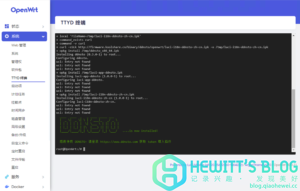 300w, 300w,  768w, 768w,  1536w, 1536w,  2048w\" data-srcset=\"\" sizes=\"(max-width: 1024px) 100vw, 1024px\" title=\"DDNSTO内网穿透,无需公网IP,实现内网远程设备控制插图2\" alt=\"DDNSTO内网穿透,无需公网IP,实现内网远程设备控制插图2\" style=\"box-sizing: border-box; vertical-align: middle; border-style: none; height: auto; max-width: 100%; display: block; margin-right: auto; margin-left: auto;\" /></a></p><h3 style=\"box-sizing: border-box; margin: 24px 0px 16px; font-weight: 500; line-height: 32px; font-size: 18px; color: rgb(51, 51, 51); font-family: -apple-system, BlinkMacSystemFont, opensans, Optima, "Microsoft Yahei", sans-serif; background-color: rgb(255, 255, 255);\"><span id=\"san_huo_quDDNSTO_token\" style=\"box-sizing: border-box;\">三、获取DDNSTO token</span></h3><p style=\"box-sizing: border-box; margin-bottom: 16px; color: rgb(21, 21, 21); font-size: 16px; line-height: 30px; font-family: -apple-system, BlinkMacSystemFont, opensans, Optima, "Microsoft Yahei", sans-serif; background-color: rgb(255, 255, 255); padding-left: 40px;\">1、访问 <a href=\"https://blog.qiaohewei.cc/go/?url=https://www.ddnsto.com/\" target=\"_blank\" rel=\"noopener noreferrer\" style=\"box-sizing: border-box; color: rgb(63, 224, 213); text-decoration-line: none; background-color: transparent; transition: all 0.3s ease 0s;\">DDNSTO官网</a> 并登录,登录后可在右上角看到令牌,复制此令牌备用。</p><p style=\"box-sizing: border-box; margin-bottom: 16px; color: rgb(21, 21, 21); font-size: 16px; line-height: 30px; font-family: -apple-system, BlinkMacSystemFont, opensans, Optima, "Microsoft Yahei", sans-serif; background-color: rgb(255, 255, 255);\"><a href=\"https://blog.qiaohewei.cc/wp-content/uploads/2021/03/1615779344-iShot2021-03-15-11.35.20.png\" data-lbwps-width=\"2332\" data-lbwps-height=\"564\" data-lbwps-handler=\"1\" style=\"box-sizing: border-box; color: rgb(63, 224, 213); text-decoration-line: none; background-color: transparent; transition: all 0.3s ease 0s;\"><img loading=\"lazy\" class=\"aligncenter size-large wp-image-768 lazy-loaded\" src=\"https://blog.qiaohewei.cc/wp-content/uploads/2021/03/1615779344-iShot2021-03-15-11.35.20-1024x248.png\" data-lazy-type=\"image\" data-src=\"https://blog.qiaohewei.cc/wp-content/uploads/2021/03/1615779344-iShot2021-03-15-11.35.20-1024x248.png\" width=\"1024\" height=\"248\" srcset=\"https://blog.qiaohewei.cc/wp-content/uploads/2021/03/1615779344-iShot2021-03-15-11.35.20-1024x248.png 1024w, 2048w\" data-srcset=\"\" sizes=\"(max-width: 1024px) 100vw, 1024px\" title=\"DDNSTO内网穿透,无需公网IP,实现内网远程设备控制插图2\" alt=\"DDNSTO内网穿透,无需公网IP,实现内网远程设备控制插图2\" style=\"box-sizing: border-box; vertical-align: middle; border-style: none; height: auto; max-width: 100%; display: block; margin-right: auto; margin-left: auto;\" /></a></p><h3 style=\"box-sizing: border-box; margin: 24px 0px 16px; font-weight: 500; line-height: 32px; font-size: 18px; color: rgb(51, 51, 51); font-family: -apple-system, BlinkMacSystemFont, opensans, Optima, "Microsoft Yahei", sans-serif; background-color: rgb(255, 255, 255);\"><span id=\"san_huo_quDDNSTO_token\" style=\"box-sizing: border-box;\">三、获取DDNSTO token</span></h3><p style=\"box-sizing: border-box; margin-bottom: 16px; color: rgb(21, 21, 21); font-size: 16px; line-height: 30px; font-family: -apple-system, BlinkMacSystemFont, opensans, Optima, "Microsoft Yahei", sans-serif; background-color: rgb(255, 255, 255); padding-left: 40px;\">1、访问 <a href=\"https://blog.qiaohewei.cc/go/?url=https://www.ddnsto.com/\" target=\"_blank\" rel=\"noopener noreferrer\" style=\"box-sizing: border-box; color: rgb(63, 224, 213); text-decoration-line: none; background-color: transparent; transition: all 0.3s ease 0s;\">DDNSTO官网</a> 并登录,登录后可在右上角看到令牌,复制此令牌备用。</p><p style=\"box-sizing: border-box; margin-bottom: 16px; color: rgb(21, 21, 21); font-size: 16px; line-height: 30px; font-family: -apple-system, BlinkMacSystemFont, opensans, Optima, "Microsoft Yahei", sans-serif; background-color: rgb(255, 255, 255);\"><a href=\"https://blog.qiaohewei.cc/wp-content/uploads/2021/03/1615779344-iShot2021-03-15-11.35.20.png\" data-lbwps-width=\"2332\" data-lbwps-height=\"564\" data-lbwps-handler=\"1\" style=\"box-sizing: border-box; color: rgb(63, 224, 213); text-decoration-line: none; background-color: transparent; transition: all 0.3s ease 0s;\"><img loading=\"lazy\" class=\"aligncenter size-large wp-image-768 lazy-loaded\" src=\"https://blog.qiaohewei.cc/wp-content/uploads/2021/03/1615779344-iShot2021-03-15-11.35.20-1024x248.png\" data-lazy-type=\"image\" data-src=\"https://blog.qiaohewei.cc/wp-content/uploads/2021/03/1615779344-iShot2021-03-15-11.35.20-1024x248.png\" width=\"1024\" height=\"248\" srcset=\"https://blog.qiaohewei.cc/wp-content/uploads/2021/03/1615779344-iShot2021-03-15-11.35.20-1024x248.png 1024w,  300w, 300w,  768w, 768w,  1536w, 1536w,  2048w\" data-srcset=\"\" sizes=\"(max-width: 1024px) 100vw, 1024px\" title=\"DDNSTO内网穿透,无需公网IP,实现内网远程设备控制插图4\" alt=\"DDNSTO内网穿透,无需公网IP,实现内网远程设备控制插图4\" style=\"box-sizing: border-box; vertical-align: middle; border-style: none; height: auto; max-width: 100%; display: block; margin-right: auto; margin-left: auto;\" /></a></p><h3 style=\"box-sizing: border-box; margin: 24px 0px 16px; font-weight: 500; line-height: 32px; font-size: 18px; color: rgb(51, 51, 51); font-family: -apple-system, BlinkMacSystemFont, opensans, Optima, "Microsoft Yahei", sans-serif; background-color: rgb(255, 255, 255);\"><span id=\"si_pei_zhiOpenWRT_DDNSTO_cha_jian\" style=\"box-sizing: border-box;\">四、配置OpenWRT DDNSTO插件</span></h3><p style=\"box-sizing: border-box; margin-bottom: 16px; color: rgb(21, 21, 21); font-size: 16px; line-height: 30px; font-family: -apple-system, BlinkMacSystemFont, opensans, Optima, "Microsoft Yahei", sans-serif; background-color: rgb(255, 255, 255);\"><a href=\"https://blog.qiaohewei.cc/wp-content/uploads/2021/03/1615779584-iShot2021-03-15-11.39.30.png\" data-lbwps-width=\"2468\" data-lbwps-height=\"1572\" data-lbwps-handler=\"1\" style=\"box-sizing: border-box; color: rgb(63, 224, 213); text-decoration-line: none; background-color: transparent; transition: all 0.3s ease 0s;\"><img loading=\"lazy\" class=\"aligncenter size-large wp-image-769 lazy-loaded\" src=\"https://blog.qiaohewei.cc/wp-content/uploads/2021/03/1615779584-iShot2021-03-15-11.39.30-1024x652.png\" data-lazy-type=\"image\" data-src=\"https://blog.qiaohewei.cc/wp-content/uploads/2021/03/1615779584-iShot2021-03-15-11.39.30-1024x652.png\" width=\"1024\" height=\"652\" srcset=\"https://blog.qiaohewei.cc/wp-content/uploads/2021/03/1615779584-iShot2021-03-15-11.39.30-1024x652.png 1024w, 2048w\" data-srcset=\"\" sizes=\"(max-width: 1024px) 100vw, 1024px\" title=\"DDNSTO内网穿透,无需公网IP,实现内网远程设备控制插图4\" alt=\"DDNSTO内网穿透,无需公网IP,实现内网远程设备控制插图4\" style=\"box-sizing: border-box; vertical-align: middle; border-style: none; height: auto; max-width: 100%; display: block; margin-right: auto; margin-left: auto;\" /></a></p><h3 style=\"box-sizing: border-box; margin: 24px 0px 16px; font-weight: 500; line-height: 32px; font-size: 18px; color: rgb(51, 51, 51); font-family: -apple-system, BlinkMacSystemFont, opensans, Optima, "Microsoft Yahei", sans-serif; background-color: rgb(255, 255, 255);\"><span id=\"si_pei_zhiOpenWRT_DDNSTO_cha_jian\" style=\"box-sizing: border-box;\">四、配置OpenWRT DDNSTO插件</span></h3><p style=\"box-sizing: border-box; margin-bottom: 16px; color: rgb(21, 21, 21); font-size: 16px; line-height: 30px; font-family: -apple-system, BlinkMacSystemFont, opensans, Optima, "Microsoft Yahei", sans-serif; background-color: rgb(255, 255, 255);\"><a href=\"https://blog.qiaohewei.cc/wp-content/uploads/2021/03/1615779584-iShot2021-03-15-11.39.30.png\" data-lbwps-width=\"2468\" data-lbwps-height=\"1572\" data-lbwps-handler=\"1\" style=\"box-sizing: border-box; color: rgb(63, 224, 213); text-decoration-line: none; background-color: transparent; transition: all 0.3s ease 0s;\"><img loading=\"lazy\" class=\"aligncenter size-large wp-image-769 lazy-loaded\" src=\"https://blog.qiaohewei.cc/wp-content/uploads/2021/03/1615779584-iShot2021-03-15-11.39.30-1024x652.png\" data-lazy-type=\"image\" data-src=\"https://blog.qiaohewei.cc/wp-content/uploads/2021/03/1615779584-iShot2021-03-15-11.39.30-1024x652.png\" width=\"1024\" height=\"652\" srcset=\"https://blog.qiaohewei.cc/wp-content/uploads/2021/03/1615779584-iShot2021-03-15-11.39.30-1024x652.png 1024w, 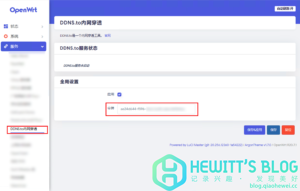 300w, 300w,  768w, 768w,  1536w, 1536w,  2048w\" data-srcset=\"\" sizes=\"(max-width: 1024px) 100vw, 1024px\" title=\"DDNSTO内网穿透,无需公网IP,实现内网远程设备控制插图6\" alt=\"DDNSTO内网穿透,无需公网IP,实现内网远程设备控制插图6\" style=\"box-sizing: border-box; vertical-align: middle; border-style: none; height: auto; max-width: 100%; display: block; margin-right: auto; margin-left: auto;\" /></a></p><p style=\"box-sizing: border-box; margin-bottom: 16px; color: rgb(21, 21, 21); font-size: 16px; line-height: 30px; font-family: -apple-system, BlinkMacSystemFont, opensans, Optima, "Microsoft Yahei", sans-serif; background-color: rgb(255, 255, 255); padding-left: 40px;\">1、进入OpenWRT--》服务DDNS.to内网穿透,勾选启用,并将令牌粘贴,保存并应用。</p><p style=\"box-sizing: border-box; margin-bottom: 16px; color: rgb(21, 21, 21); font-size: 16px; line-height: 30px; font-family: -apple-system, BlinkMacSystemFont, opensans, Optima, "Microsoft Yahei", sans-serif; background-color: rgb(255, 255, 255);\"><a href=\"https://blog.qiaohewei.cc/wp-content/uploads/2021/03/1615779963-iShot2021-03-15-11.45.47.png\" data-lbwps-width=\"3834\" data-lbwps-height=\"1000\" data-lbwps-handler=\"1\" style=\"box-sizing: border-box; color: rgb(63, 224, 213); text-decoration-line: none; background-color: transparent; transition: all 0.3s ease 0s;\"><img loading=\"lazy\" class=\"aligncenter size-large wp-image-770 lazy-loaded\" src=\"https://blog.qiaohewei.cc/wp-content/uploads/2021/03/1615779963-iShot2021-03-15-11.45.47-1024x267.png\" data-lazy-type=\"image\" data-src=\"https://blog.qiaohewei.cc/wp-content/uploads/2021/03/1615779963-iShot2021-03-15-11.45.47-1024x267.png\" width=\"1024\" height=\"267\" srcset=\"https://blog.qiaohewei.cc/wp-content/uploads/2021/03/1615779963-iShot2021-03-15-11.45.47-1024x267.png 1024w, 2048w\" data-srcset=\"\" sizes=\"(max-width: 1024px) 100vw, 1024px\" title=\"DDNSTO内网穿透,无需公网IP,实现内网远程设备控制插图6\" alt=\"DDNSTO内网穿透,无需公网IP,实现内网远程设备控制插图6\" style=\"box-sizing: border-box; vertical-align: middle; border-style: none; height: auto; max-width: 100%; display: block; margin-right: auto; margin-left: auto;\" /></a></p><p style=\"box-sizing: border-box; margin-bottom: 16px; color: rgb(21, 21, 21); font-size: 16px; line-height: 30px; font-family: -apple-system, BlinkMacSystemFont, opensans, Optima, "Microsoft Yahei", sans-serif; background-color: rgb(255, 255, 255); padding-left: 40px;\">1、进入OpenWRT--》服务DDNS.to内网穿透,勾选启用,并将令牌粘贴,保存并应用。</p><p style=\"box-sizing: border-box; margin-bottom: 16px; color: rgb(21, 21, 21); font-size: 16px; line-height: 30px; font-family: -apple-system, BlinkMacSystemFont, opensans, Optima, "Microsoft Yahei", sans-serif; background-color: rgb(255, 255, 255);\"><a href=\"https://blog.qiaohewei.cc/wp-content/uploads/2021/03/1615779963-iShot2021-03-15-11.45.47.png\" data-lbwps-width=\"3834\" data-lbwps-height=\"1000\" data-lbwps-handler=\"1\" style=\"box-sizing: border-box; color: rgb(63, 224, 213); text-decoration-line: none; background-color: transparent; transition: all 0.3s ease 0s;\"><img loading=\"lazy\" class=\"aligncenter size-large wp-image-770 lazy-loaded\" src=\"https://blog.qiaohewei.cc/wp-content/uploads/2021/03/1615779963-iShot2021-03-15-11.45.47-1024x267.png\" data-lazy-type=\"image\" data-src=\"https://blog.qiaohewei.cc/wp-content/uploads/2021/03/1615779963-iShot2021-03-15-11.45.47-1024x267.png\" width=\"1024\" height=\"267\" srcset=\"https://blog.qiaohewei.cc/wp-content/uploads/2021/03/1615779963-iShot2021-03-15-11.45.47-1024x267.png 1024w,  300w, 300w,  768w, 768w,  1536w, 1536w,  2048w\" data-srcset=\"\" sizes=\"(max-width: 1024px) 100vw, 1024px\" title=\"DDNSTO内网穿透,无需公网IP,实现内网远程设备控制插图8\" alt=\"DDNSTO内网穿透,无需公网IP,实现内网远程设备控制插图8\" style=\"box-sizing: border-box; vertical-align: middle; border-style: none; height: auto; max-width: 100%; display: block; margin-right: auto; margin-left: auto;\" /></a></p><p style=\"box-sizing: border-box; margin-bottom: 16px; color: rgb(21, 21, 21); font-size: 16px; line-height: 30px; font-family: -apple-system, BlinkMacSystemFont, opensans, Optima, "Microsoft Yahei", sans-serif; background-color: rgb(255, 255, 255); padding-left: 40px;\">2、服务启动成功后,进入DDNSTO后台会显示已绑定的设备</p><h3 style=\"box-sizing: border-box; margin: 24px 0px 16px; font-weight: 500; line-height: 32px; font-size: 18px; color: rgb(51, 51, 51); font-family: -apple-system, BlinkMacSystemFont, opensans, Optima, "Microsoft Yahei", sans-serif; background-color: rgb(255, 255, 255);\"><span id=\"san_tian_jia_yu_ming_ying_she\" style=\"box-sizing: border-box;\">三、添加域名映射</span></h3><p style=\"box-sizing: border-box; margin-bottom: 16px; color: rgb(21, 21, 21); font-size: 16px; line-height: 30px; font-family: -apple-system, BlinkMacSystemFont, opensans, Optima, "Microsoft Yahei", sans-serif; background-color: rgb(255, 255, 255);\"><a href=\"https://blog.qiaohewei.cc/wp-content/uploads/2021/03/1615780258-iShot2021-03-15-11.50.38.png\" data-lbwps-width=\"1876\" data-lbwps-height=\"884\" data-lbwps-handler=\"1\" style=\"box-sizing: border-box; color: rgb(63, 224, 213); text-decoration-line: none; background-color: transparent; transition: all 0.3s ease 0s;\"><img loading=\"lazy\" class=\"aligncenter size-large wp-image-771 lazy-loaded\" src=\"https://blog.qiaohewei.cc/wp-content/uploads/2021/03/1615780258-iShot2021-03-15-11.50.38-1024x483.png\" data-lazy-type=\"image\" data-src=\"https://blog.qiaohewei.cc/wp-content/uploads/2021/03/1615780258-iShot2021-03-15-11.50.38-1024x483.png\" width=\"1024\" height=\"483\" srcset=\"https://blog.qiaohewei.cc/wp-content/uploads/2021/03/1615780258-iShot2021-03-15-11.50.38-1024x483.png 1024w, 2048w\" data-srcset=\"\" sizes=\"(max-width: 1024px) 100vw, 1024px\" title=\"DDNSTO内网穿透,无需公网IP,实现内网远程设备控制插图8\" alt=\"DDNSTO内网穿透,无需公网IP,实现内网远程设备控制插图8\" style=\"box-sizing: border-box; vertical-align: middle; border-style: none; height: auto; max-width: 100%; display: block; margin-right: auto; margin-left: auto;\" /></a></p><p style=\"box-sizing: border-box; margin-bottom: 16px; color: rgb(21, 21, 21); font-size: 16px; line-height: 30px; font-family: -apple-system, BlinkMacSystemFont, opensans, Optima, "Microsoft Yahei", sans-serif; background-color: rgb(255, 255, 255); padding-left: 40px;\">2、服务启动成功后,进入DDNSTO后台会显示已绑定的设备</p><h3 style=\"box-sizing: border-box; margin: 24px 0px 16px; font-weight: 500; line-height: 32px; font-size: 18px; color: rgb(51, 51, 51); font-family: -apple-system, BlinkMacSystemFont, opensans, Optima, "Microsoft Yahei", sans-serif; background-color: rgb(255, 255, 255);\"><span id=\"san_tian_jia_yu_ming_ying_she\" style=\"box-sizing: border-box;\">三、添加域名映射</span></h3><p style=\"box-sizing: border-box; margin-bottom: 16px; color: rgb(21, 21, 21); font-size: 16px; line-height: 30px; font-family: -apple-system, BlinkMacSystemFont, opensans, Optima, "Microsoft Yahei", sans-serif; background-color: rgb(255, 255, 255);\"><a href=\"https://blog.qiaohewei.cc/wp-content/uploads/2021/03/1615780258-iShot2021-03-15-11.50.38.png\" data-lbwps-width=\"1876\" data-lbwps-height=\"884\" data-lbwps-handler=\"1\" style=\"box-sizing: border-box; color: rgb(63, 224, 213); text-decoration-line: none; background-color: transparent; transition: all 0.3s ease 0s;\"><img loading=\"lazy\" class=\"aligncenter size-large wp-image-771 lazy-loaded\" src=\"https://blog.qiaohewei.cc/wp-content/uploads/2021/03/1615780258-iShot2021-03-15-11.50.38-1024x483.png\" data-lazy-type=\"image\" data-src=\"https://blog.qiaohewei.cc/wp-content/uploads/2021/03/1615780258-iShot2021-03-15-11.50.38-1024x483.png\" width=\"1024\" height=\"483\" srcset=\"https://blog.qiaohewei.cc/wp-content/uploads/2021/03/1615780258-iShot2021-03-15-11.50.38-1024x483.png 1024w, 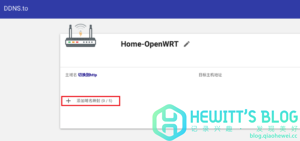 300w, 300w,  768w, 768w,  1536w, 1536w, 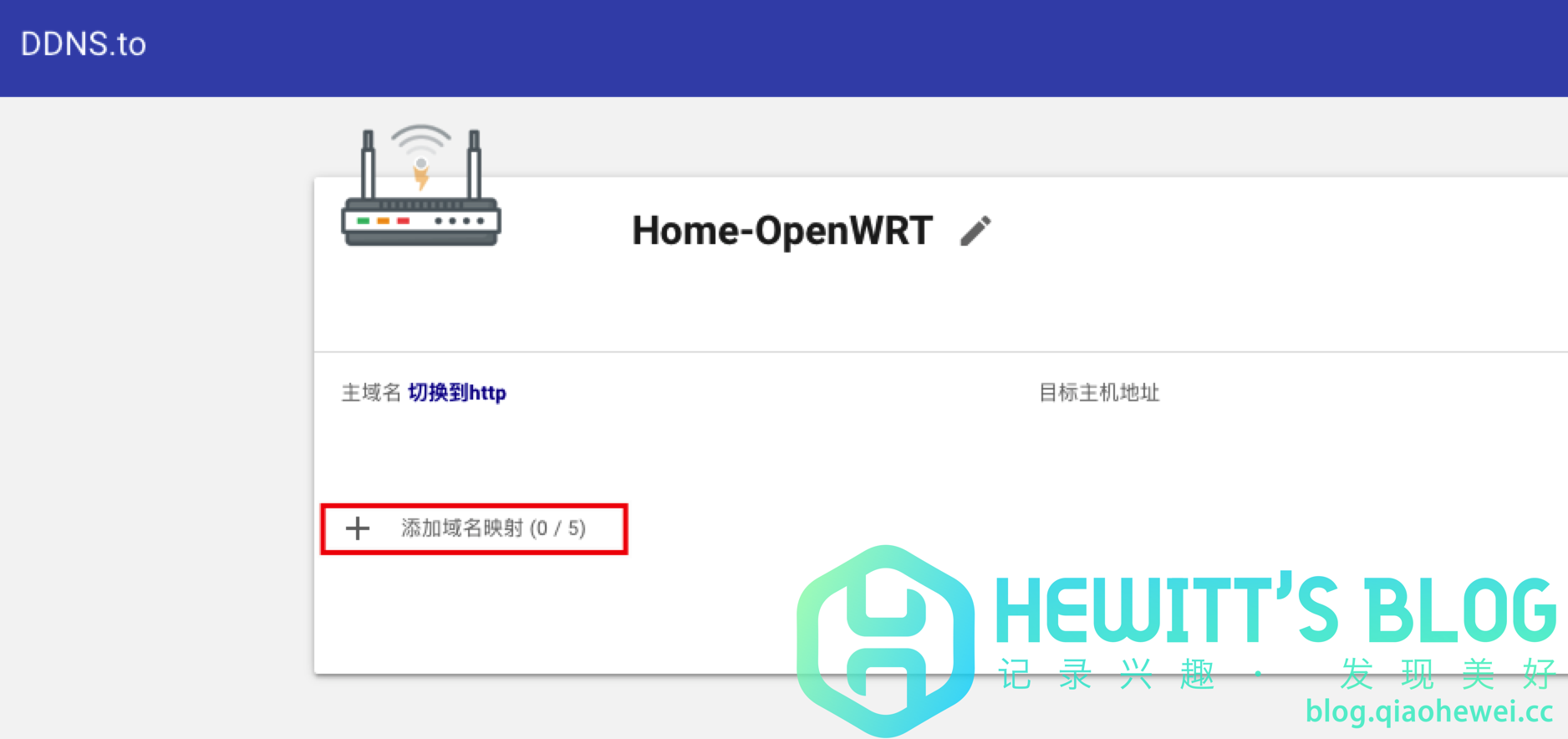 1876w\" data-srcset=\"\" sizes=\"(max-width: 1024px) 100vw, 1024px\" title=\"DDNSTO内网穿透,无需公网IP,实现内网远程设备控制插图10\" alt=\"DDNSTO内网穿透,无需公网IP,实现内网远程设备控制插图10\" style=\"box-sizing: border-box; vertical-align: middle; border-style: none; height: auto; max-width: 100%; display: block; margin-right: auto; margin-left: auto;\" /></a></p><p style=\"box-sizing: border-box; margin-bottom: 16px; color: rgb(21, 21, 21); font-size: 16px; line-height: 30px; font-family: -apple-system, BlinkMacSystemFont, opensans, Optima, "Microsoft Yahei", sans-serif; background-color: rgb(255, 255, 255); padding-left: 40px;\">1、点击添加域名映射并填入想要的域名前缀。</p><div class=\"card border-danger text-white mb-3\" style=\"box-sizing: border-box; position: relative; display: flex; flex-direction: column; min-width: 0px; overflow-wrap: break-word; background-color: rgb(255, 255, 255); background-clip: border-box; border-width: 1px; border-style: solid; border-image: initial; border-radius: 0px; font-family: -apple-system, BlinkMacSystemFont, opensans, Optima, "Microsoft Yahei", sans-serif; font-size: 16px; border-color: rgb(220, 53, 69) !important; margin-bottom: 1rem !important; color: rgb(255, 255, 255) !important;\"><div class=\"card-header bg-danger\" style=\"box-sizing: border-box; padding: 6px 15px; margin-bottom: 0px; background-color: rgb(220, 53, 69) !important; border-bottom: 1px solid rgba(0, 0, 0, 0.125); border-radius: 0px;\">域名前缀注意事项</div><div class=\"card-body\" style=\"box-sizing: border-box; flex: 1 1 auto; min-height: 1px; padding: 10px 15px;\"><p class=\"card-text\" style=\"box-sizing: border-box; margin-bottom: 16px; color: rgb(21, 21, 21); line-height: 30px;\"></p><p style=\"box-sizing: border-box; margin-bottom: 16px; color: rgb(21, 21, 21); line-height: 30px;\">1、请勿输入\"http://\"前缀!</p><p style=\"box-sizing: border-box; margin-bottom: 16px; color: rgb(21, 21, 21); line-height: 30px;\">2、请勿带有任何后缀!</p><p style=\"box-sizing: border-box; margin-bottom: 16px; color: rgb(21, 21, 21); line-height: 30px;\">3、请勿重复添加相同域名!</p><p style=\"box-sizing: border-box; margin-bottom: 16px; color: rgb(21, 21, 21); line-height: 30px;\">4、输入的英文,下划线,数字,中划线均可(长度大 于6个字符),但不可输入其他特殊符号。</p><p style=\"box-sizing: border-box; margin-bottom: 16px; color: rgb(21, 21, 21); line-height: 30px;\"></p></div></div><p style=\"box-sizing: border-box; margin-bottom: 16px; color: rgb(21, 21, 21); font-size: 16px; line-height: 30px; font-family: -apple-system, BlinkMacSystemFont, opensans, Optima, "Microsoft Yahei", sans-serif; background-color: rgb(255, 255, 255);\"><a href=\"https://blog.qiaohewei.cc/wp-content/uploads/2021/03/1615780669-iShot2021-03-15-11.57.36.png\" data-lbwps-width=\"2522\" data-lbwps-height=\"1008\" data-lbwps-handler=\"1\" style=\"box-sizing: border-box; color: rgb(63, 224, 213); text-decoration-line: none; background-color: transparent; transition: all 0.3s ease 0s;\"><img loading=\"lazy\" class=\"aligncenter size-large wp-image-773 lazy-loaded\" src=\"https://blog.qiaohewei.cc/wp-content/uploads/2021/03/1615780669-iShot2021-03-15-11.57.36-1024x409.png\" data-lazy-type=\"image\" data-src=\"https://blog.qiaohewei.cc/wp-content/uploads/2021/03/1615780669-iShot2021-03-15-11.57.36-1024x409.png\" width=\"1024\" height=\"409\" srcset=\"https://blog.qiaohewei.cc/wp-content/uploads/2021/03/1615780669-iShot2021-03-15-11.57.36-1024x409.png 1024w, 1876w\" data-srcset=\"\" sizes=\"(max-width: 1024px) 100vw, 1024px\" title=\"DDNSTO内网穿透,无需公网IP,实现内网远程设备控制插图10\" alt=\"DDNSTO内网穿透,无需公网IP,实现内网远程设备控制插图10\" style=\"box-sizing: border-box; vertical-align: middle; border-style: none; height: auto; max-width: 100%; display: block; margin-right: auto; margin-left: auto;\" /></a></p><p style=\"box-sizing: border-box; margin-bottom: 16px; color: rgb(21, 21, 21); font-size: 16px; line-height: 30px; font-family: -apple-system, BlinkMacSystemFont, opensans, Optima, "Microsoft Yahei", sans-serif; background-color: rgb(255, 255, 255); padding-left: 40px;\">1、点击添加域名映射并填入想要的域名前缀。</p><div class=\"card border-danger text-white mb-3\" style=\"box-sizing: border-box; position: relative; display: flex; flex-direction: column; min-width: 0px; overflow-wrap: break-word; background-color: rgb(255, 255, 255); background-clip: border-box; border-width: 1px; border-style: solid; border-image: initial; border-radius: 0px; font-family: -apple-system, BlinkMacSystemFont, opensans, Optima, "Microsoft Yahei", sans-serif; font-size: 16px; border-color: rgb(220, 53, 69) !important; margin-bottom: 1rem !important; color: rgb(255, 255, 255) !important;\"><div class=\"card-header bg-danger\" style=\"box-sizing: border-box; padding: 6px 15px; margin-bottom: 0px; background-color: rgb(220, 53, 69) !important; border-bottom: 1px solid rgba(0, 0, 0, 0.125); border-radius: 0px;\">域名前缀注意事项</div><div class=\"card-body\" style=\"box-sizing: border-box; flex: 1 1 auto; min-height: 1px; padding: 10px 15px;\"><p class=\"card-text\" style=\"box-sizing: border-box; margin-bottom: 16px; color: rgb(21, 21, 21); line-height: 30px;\"></p><p style=\"box-sizing: border-box; margin-bottom: 16px; color: rgb(21, 21, 21); line-height: 30px;\">1、请勿输入\"http://\"前缀!</p><p style=\"box-sizing: border-box; margin-bottom: 16px; color: rgb(21, 21, 21); line-height: 30px;\">2、请勿带有任何后缀!</p><p style=\"box-sizing: border-box; margin-bottom: 16px; color: rgb(21, 21, 21); line-height: 30px;\">3、请勿重复添加相同域名!</p><p style=\"box-sizing: border-box; margin-bottom: 16px; color: rgb(21, 21, 21); line-height: 30px;\">4、输入的英文,下划线,数字,中划线均可(长度大 于6个字符),但不可输入其他特殊符号。</p><p style=\"box-sizing: border-box; margin-bottom: 16px; color: rgb(21, 21, 21); line-height: 30px;\"></p></div></div><p style=\"box-sizing: border-box; margin-bottom: 16px; color: rgb(21, 21, 21); font-size: 16px; line-height: 30px; font-family: -apple-system, BlinkMacSystemFont, opensans, Optima, "Microsoft Yahei", sans-serif; background-color: rgb(255, 255, 255);\"><a href=\"https://blog.qiaohewei.cc/wp-content/uploads/2021/03/1615780669-iShot2021-03-15-11.57.36.png\" data-lbwps-width=\"2522\" data-lbwps-height=\"1008\" data-lbwps-handler=\"1\" style=\"box-sizing: border-box; color: rgb(63, 224, 213); text-decoration-line: none; background-color: transparent; transition: all 0.3s ease 0s;\"><img loading=\"lazy\" class=\"aligncenter size-large wp-image-773 lazy-loaded\" src=\"https://blog.qiaohewei.cc/wp-content/uploads/2021/03/1615780669-iShot2021-03-15-11.57.36-1024x409.png\" data-lazy-type=\"image\" data-src=\"https://blog.qiaohewei.cc/wp-content/uploads/2021/03/1615780669-iShot2021-03-15-11.57.36-1024x409.png\" width=\"1024\" height=\"409\" srcset=\"https://blog.qiaohewei.cc/wp-content/uploads/2021/03/1615780669-iShot2021-03-15-11.57.36-1024x409.png 1024w,  300w, 300w,  768w, 768w,  1536w, 1536w, 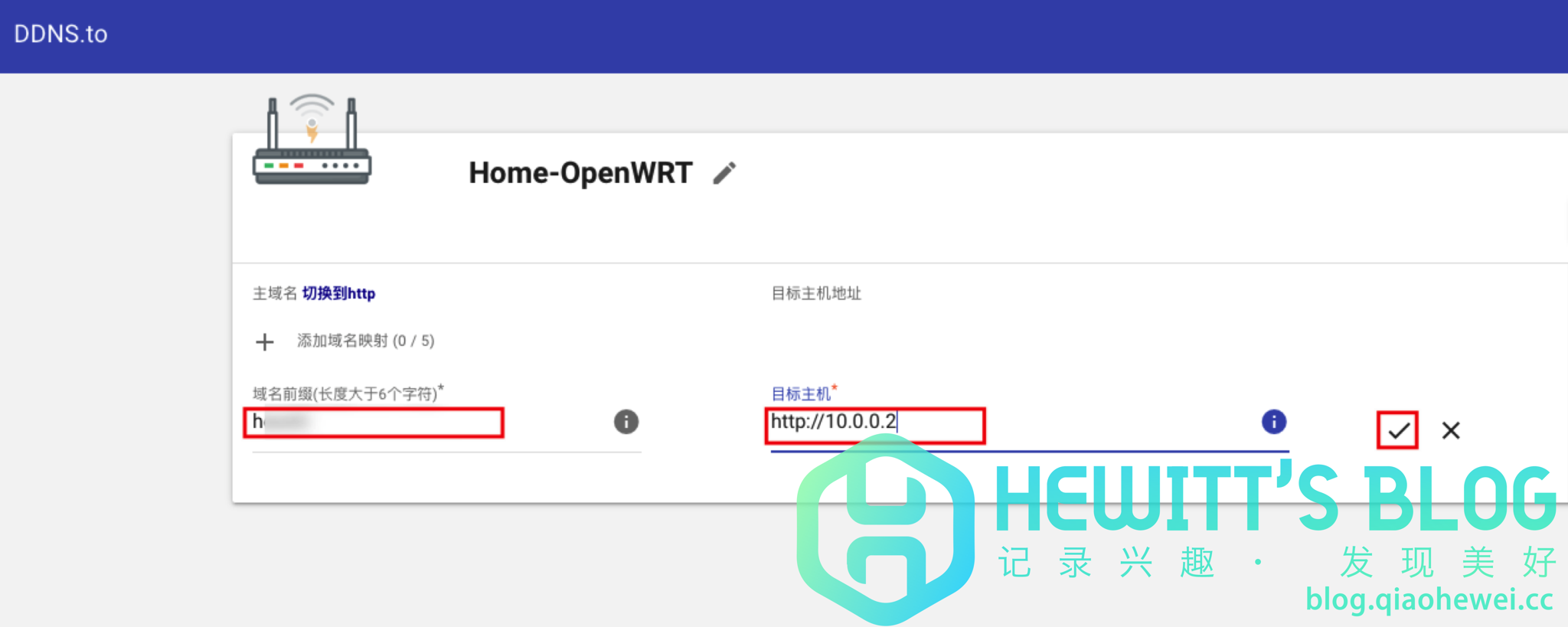 2048w\" data-srcset=\"\" sizes=\"(max-width: 1024px) 100vw, 1024px\" title=\"DDNSTO内网穿透,无需公网IP,实现内网远程设备控制插图12\" alt=\"DDNSTO内网穿透,无需公网IP,实现内网远程设备控制插图12\" style=\"box-sizing: border-box; vertical-align: middle; border-style: none; height: auto; max-width: 100%; display: block; margin-right: auto; margin-left: auto;\" /></a></p><p style=\"box-sizing: border-box; margin-bottom: 16px; color: rgb(21, 21, 21); font-size: 16px; line-height: 30px; font-family: -apple-system, BlinkMacSystemFont, opensans, Optima, "Microsoft Yahei", sans-serif; background-color: rgb(255, 255, 255); padding-left: 40px;\">3、添加目标主机地址(内网设备地址),设置完成后提交。</p><div class=\"card border-danger text-white mb-3\" style=\"box-sizing: border-box; position: relative; display: flex; flex-direction: column; min-width: 0px; overflow-wrap: break-word; background-color: rgb(255, 255, 255); background-clip: border-box; border-width: 1px; border-style: solid; border-image: initial; border-radius: 0px; font-family: -apple-system, BlinkMacSystemFont, opensans, Optima, "Microsoft Yahei", sans-serif; font-size: 16px; border-color: rgb(220, 53, 69) !important; margin-bottom: 1rem !important; color: rgb(255, 255, 255) !important;\"><div class=\"card-header bg-danger\" style=\"box-sizing: border-box; padding: 6px 15px; margin-bottom: 0px; background-color: rgb(220, 53, 69) !important; border-bottom: 1px solid rgba(0, 0, 0, 0.125); border-radius: 0px;\">目标主机地址注意事项</div><div class=\"card-body\" style=\"box-sizing: border-box; flex: 1 1 auto; min-height: 1px; padding: 10px 15px;\"><p class=\"card-text\" style=\"box-sizing: border-box; margin-bottom: 16px; color: rgb(21, 21, 21); line-height: 30px;\"></p><p style=\"box-sizing: border-box; margin-bottom: 16px; color: rgb(21, 21, 21); line-height: 30px;\">添加目标主机地址时,必须输入 http:// 或 https://前缀</p><p style=\"box-sizing: border-box; margin-bottom: 16px; color: rgb(21, 21, 21); line-height: 30px;\">正确示例:http://192.168.88.2.1:8000 或 https://www.host.com</p><p style=\"box-sizing: border-box; margin-bottom: 16px; color: rgb(21, 21, 21); line-height: 30px;\">错误示例:192.168.88.2.1:8000 或 http://abc.cс/bcd</p><p style=\"box-sizing: border-box; margin-bottom: 16px; color: rgb(21, 21, 21); line-height: 30px;\"></p></div></div><p style=\"box-sizing: border-box; margin-bottom: 16px; color: rgb(21, 21, 21); font-size: 16px; line-height: 30px; font-family: -apple-system, BlinkMacSystemFont, opensans, Optima, "Microsoft Yahei", sans-serif; background-color: rgb(255, 255, 255);\"><a href=\"https://blog.qiaohewei.cc/wp-content/uploads/2021/03/1615780831-iShot2021-03-15-11.59.37.png\" data-lbwps-width=\"2310\" data-lbwps-height=\"964\" data-lbwps-handler=\"1\" style=\"box-sizing: border-box; color: rgb(63, 224, 213); text-decoration-line: none; background-color: transparent; transition: all 0.3s ease 0s;\"><img loading=\"lazy\" class=\"aligncenter size-large wp-image-774 lazy-loaded\" src=\"https://blog.qiaohewei.cc/wp-content/uploads/2021/03/1615780831-iShot2021-03-15-11.59.37-1024x427.png\" data-lazy-type=\"image\" data-src=\"https://blog.qiaohewei.cc/wp-content/uploads/2021/03/1615780831-iShot2021-03-15-11.59.37-1024x427.png\" width=\"1024\" height=\"427\" srcset=\"https://blog.qiaohewei.cc/wp-content/uploads/2021/03/1615780831-iShot2021-03-15-11.59.37-1024x427.png 1024w, 2048w\" data-srcset=\"\" sizes=\"(max-width: 1024px) 100vw, 1024px\" title=\"DDNSTO内网穿透,无需公网IP,实现内网远程设备控制插图12\" alt=\"DDNSTO内网穿透,无需公网IP,实现内网远程设备控制插图12\" style=\"box-sizing: border-box; vertical-align: middle; border-style: none; height: auto; max-width: 100%; display: block; margin-right: auto; margin-left: auto;\" /></a></p><p style=\"box-sizing: border-box; margin-bottom: 16px; color: rgb(21, 21, 21); font-size: 16px; line-height: 30px; font-family: -apple-system, BlinkMacSystemFont, opensans, Optima, "Microsoft Yahei", sans-serif; background-color: rgb(255, 255, 255); padding-left: 40px;\">3、添加目标主机地址(内网设备地址),设置完成后提交。</p><div class=\"card border-danger text-white mb-3\" style=\"box-sizing: border-box; position: relative; display: flex; flex-direction: column; min-width: 0px; overflow-wrap: break-word; background-color: rgb(255, 255, 255); background-clip: border-box; border-width: 1px; border-style: solid; border-image: initial; border-radius: 0px; font-family: -apple-system, BlinkMacSystemFont, opensans, Optima, "Microsoft Yahei", sans-serif; font-size: 16px; border-color: rgb(220, 53, 69) !important; margin-bottom: 1rem !important; color: rgb(255, 255, 255) !important;\"><div class=\"card-header bg-danger\" style=\"box-sizing: border-box; padding: 6px 15px; margin-bottom: 0px; background-color: rgb(220, 53, 69) !important; border-bottom: 1px solid rgba(0, 0, 0, 0.125); border-radius: 0px;\">目标主机地址注意事项</div><div class=\"card-body\" style=\"box-sizing: border-box; flex: 1 1 auto; min-height: 1px; padding: 10px 15px;\"><p class=\"card-text\" style=\"box-sizing: border-box; margin-bottom: 16px; color: rgb(21, 21, 21); line-height: 30px;\"></p><p style=\"box-sizing: border-box; margin-bottom: 16px; color: rgb(21, 21, 21); line-height: 30px;\">添加目标主机地址时,必须输入 http:// 或 https://前缀</p><p style=\"box-sizing: border-box; margin-bottom: 16px; color: rgb(21, 21, 21); line-height: 30px;\">正确示例:http://192.168.88.2.1:8000 或 https://www.host.com</p><p style=\"box-sizing: border-box; margin-bottom: 16px; color: rgb(21, 21, 21); line-height: 30px;\">错误示例:192.168.88.2.1:8000 或 http://abc.cс/bcd</p><p style=\"box-sizing: border-box; margin-bottom: 16px; color: rgb(21, 21, 21); line-height: 30px;\"></p></div></div><p style=\"box-sizing: border-box; margin-bottom: 16px; color: rgb(21, 21, 21); font-size: 16px; line-height: 30px; font-family: -apple-system, BlinkMacSystemFont, opensans, Optima, "Microsoft Yahei", sans-serif; background-color: rgb(255, 255, 255);\"><a href=\"https://blog.qiaohewei.cc/wp-content/uploads/2021/03/1615780831-iShot2021-03-15-11.59.37.png\" data-lbwps-width=\"2310\" data-lbwps-height=\"964\" data-lbwps-handler=\"1\" style=\"box-sizing: border-box; color: rgb(63, 224, 213); text-decoration-line: none; background-color: transparent; transition: all 0.3s ease 0s;\"><img loading=\"lazy\" class=\"aligncenter size-large wp-image-774 lazy-loaded\" src=\"https://blog.qiaohewei.cc/wp-content/uploads/2021/03/1615780831-iShot2021-03-15-11.59.37-1024x427.png\" data-lazy-type=\"image\" data-src=\"https://blog.qiaohewei.cc/wp-content/uploads/2021/03/1615780831-iShot2021-03-15-11.59.37-1024x427.png\" width=\"1024\" height=\"427\" srcset=\"https://blog.qiaohewei.cc/wp-content/uploads/2021/03/1615780831-iShot2021-03-15-11.59.37-1024x427.png 1024w,  300w, 300w,  768w, 768w, 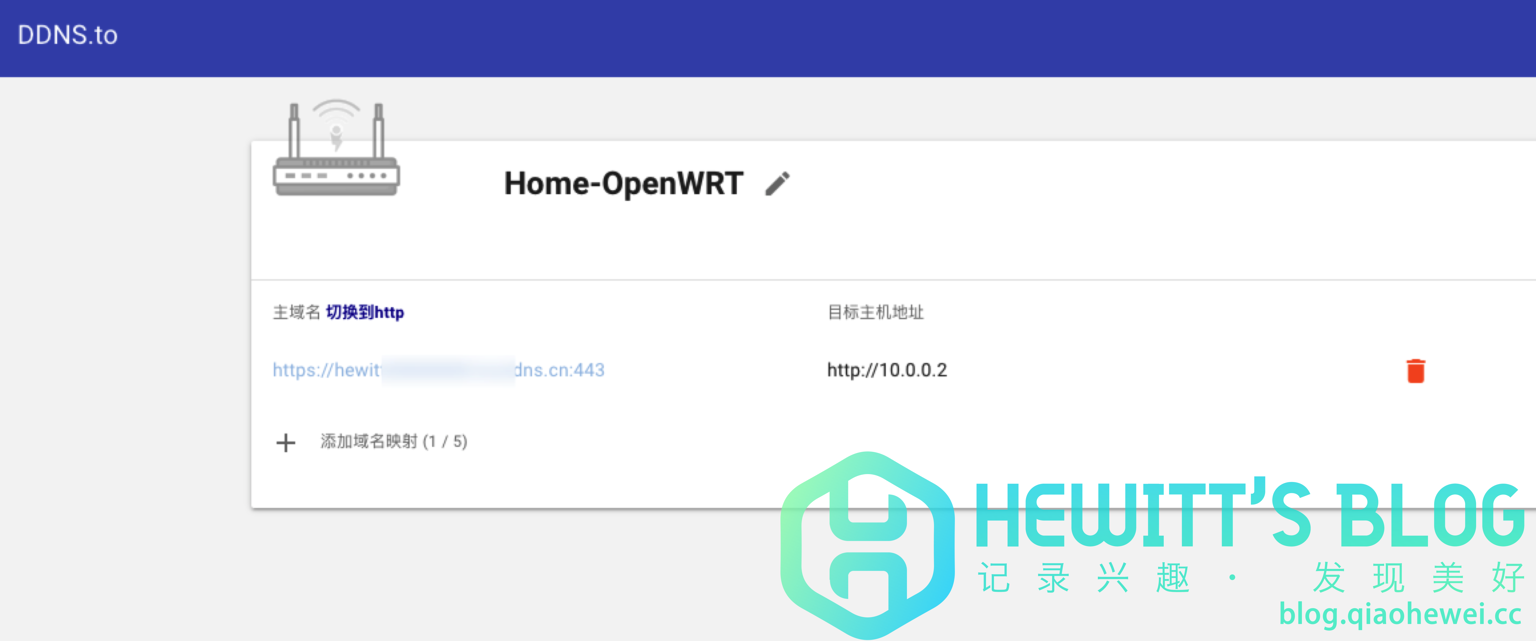 1536w, 1536w, 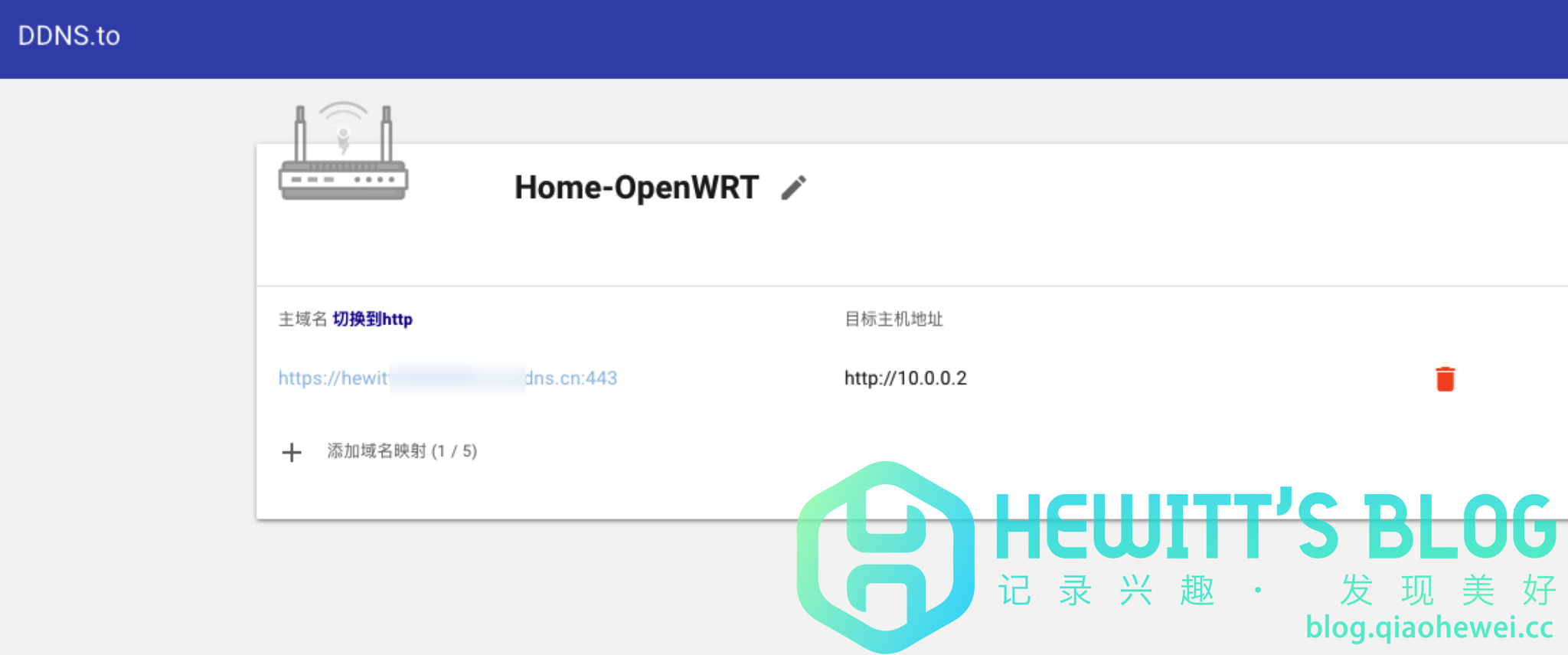 2048w\" data-srcset=\"\" sizes=\"(max-width: 1024px) 100vw, 1024px\" title=\"DDNSTO内网穿透,无需公网IP,实现内网远程设备控制插图14\" alt=\"DDNSTO内网穿透,无需公网IP,实现内网远程设备控制插图14\" style=\"box-sizing: border-box; vertical-align: middle; border-style: none; height: auto; max-width: 100%; display: block; margin-right: auto; margin-left: auto;\" /></a></p><p style=\"box-sizing: border-box; margin-bottom: 16px; color: rgb(21, 21, 21); font-size: 16px; line-height: 30px; font-family: -apple-system, BlinkMacSystemFont, opensans, Optima, "Microsoft Yahei", sans-serif; background-color: rgb(255, 255, 255); padding-left: 40px;\">4、提交完毕后DDNSTO将反馈一个二级域名用于外网远程访问,访问此域名并经过验证后即可进行远程管理。</p><p style=\"box-sizing: border-box; margin-bottom: 16px; color: rgb(21, 21, 21); font-size: 16px; line-height: 30px; font-family: -apple-system, BlinkMacSystemFont, opensans, Optima, "Microsoft Yahei", sans-serif; background-color: rgb(255, 255, 255);\"><a href=\"https://blog.qiaohewei.cc/wp-content/uploads/2021/03/1615781120-iShot2021-03-15-12.04.47.png\" data-lbwps-width=\"2462\" data-lbwps-height=\"1718\" data-lbwps-handler=\"1\" style=\"box-sizing: border-box; color: rgb(63, 224, 213); text-decoration-line: none; background-color: transparent; transition: all 0.3s ease 0s;\"><img loading=\"lazy\" class=\"aligncenter size-large wp-image-775 lazy-loaded\" src=\"https://blog.qiaohewei.cc/wp-content/uploads/2021/03/1615781120-iShot2021-03-15-12.04.47-1024x715.png\" data-lazy-type=\"image\" data-src=\"https://blog.qiaohewei.cc/wp-content/uploads/2021/03/1615781120-iShot2021-03-15-12.04.47-1024x715.png\" width=\"1024\" height=\"715\" srcset=\"https://blog.qiaohewei.cc/wp-content/uploads/2021/03/1615781120-iShot2021-03-15-12.04.47-1024x715.png 1024w, 2048w\" data-srcset=\"\" sizes=\"(max-width: 1024px) 100vw, 1024px\" title=\"DDNSTO内网穿透,无需公网IP,实现内网远程设备控制插图14\" alt=\"DDNSTO内网穿透,无需公网IP,实现内网远程设备控制插图14\" style=\"box-sizing: border-box; vertical-align: middle; border-style: none; height: auto; max-width: 100%; display: block; margin-right: auto; margin-left: auto;\" /></a></p><p style=\"box-sizing: border-box; margin-bottom: 16px; color: rgb(21, 21, 21); font-size: 16px; line-height: 30px; font-family: -apple-system, BlinkMacSystemFont, opensans, Optima, "Microsoft Yahei", sans-serif; background-color: rgb(255, 255, 255); padding-left: 40px;\">4、提交完毕后DDNSTO将反馈一个二级域名用于外网远程访问,访问此域名并经过验证后即可进行远程管理。</p><p style=\"box-sizing: border-box; margin-bottom: 16px; color: rgb(21, 21, 21); font-size: 16px; line-height: 30px; font-family: -apple-system, BlinkMacSystemFont, opensans, Optima, "Microsoft Yahei", sans-serif; background-color: rgb(255, 255, 255);\"><a href=\"https://blog.qiaohewei.cc/wp-content/uploads/2021/03/1615781120-iShot2021-03-15-12.04.47.png\" data-lbwps-width=\"2462\" data-lbwps-height=\"1718\" data-lbwps-handler=\"1\" style=\"box-sizing: border-box; color: rgb(63, 224, 213); text-decoration-line: none; background-color: transparent; transition: all 0.3s ease 0s;\"><img loading=\"lazy\" class=\"aligncenter size-large wp-image-775 lazy-loaded\" src=\"https://blog.qiaohewei.cc/wp-content/uploads/2021/03/1615781120-iShot2021-03-15-12.04.47-1024x715.png\" data-lazy-type=\"image\" data-src=\"https://blog.qiaohewei.cc/wp-content/uploads/2021/03/1615781120-iShot2021-03-15-12.04.47-1024x715.png\" width=\"1024\" height=\"715\" srcset=\"https://blog.qiaohewei.cc/wp-content/uploads/2021/03/1615781120-iShot2021-03-15-12.04.47-1024x715.png 1024w,  300w, 300w, 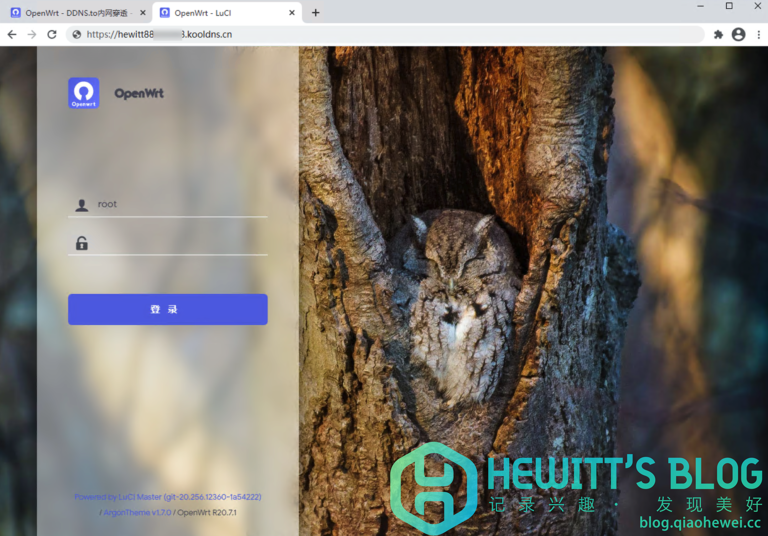 768w, 768w, 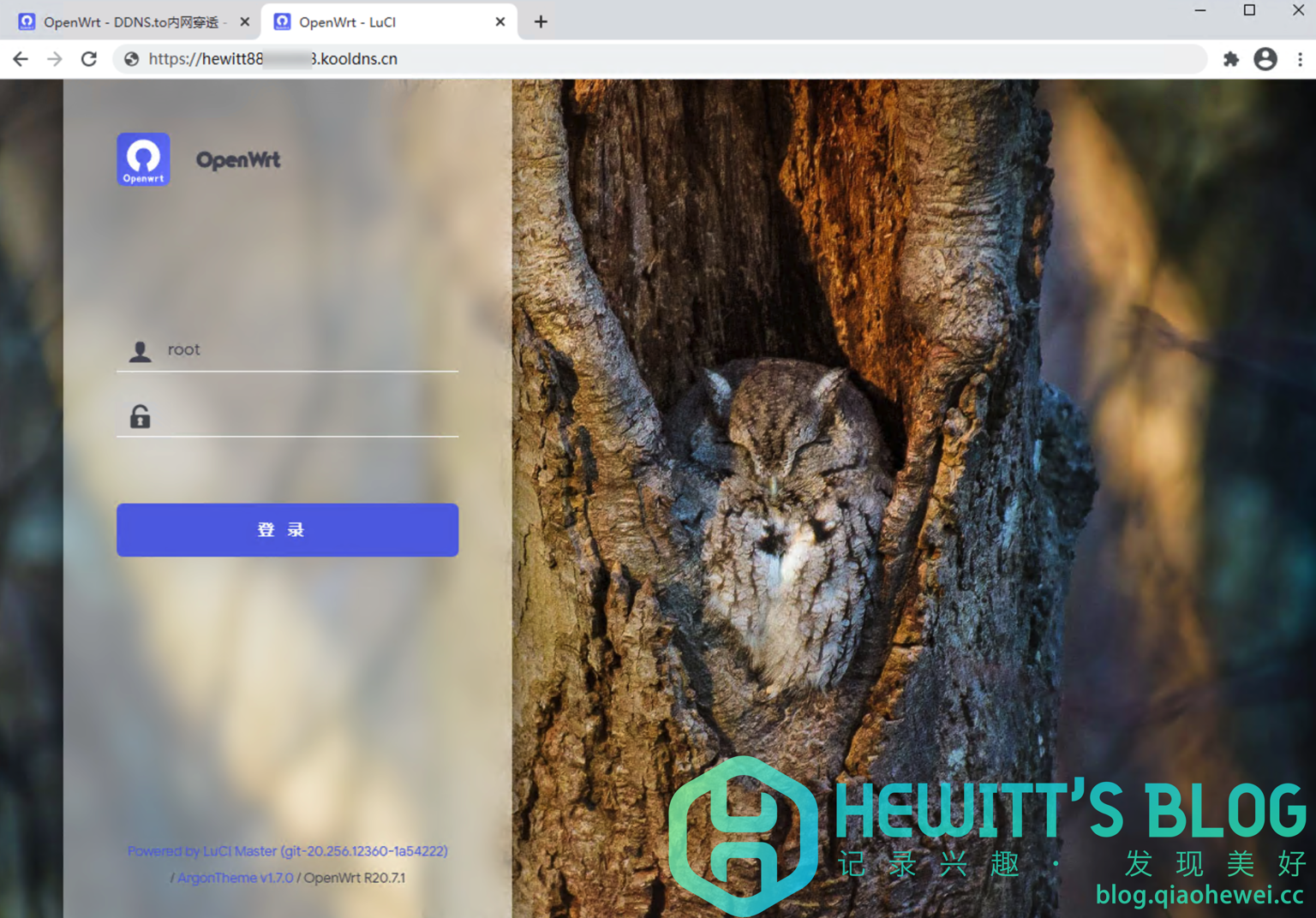 1536w, 1536w, 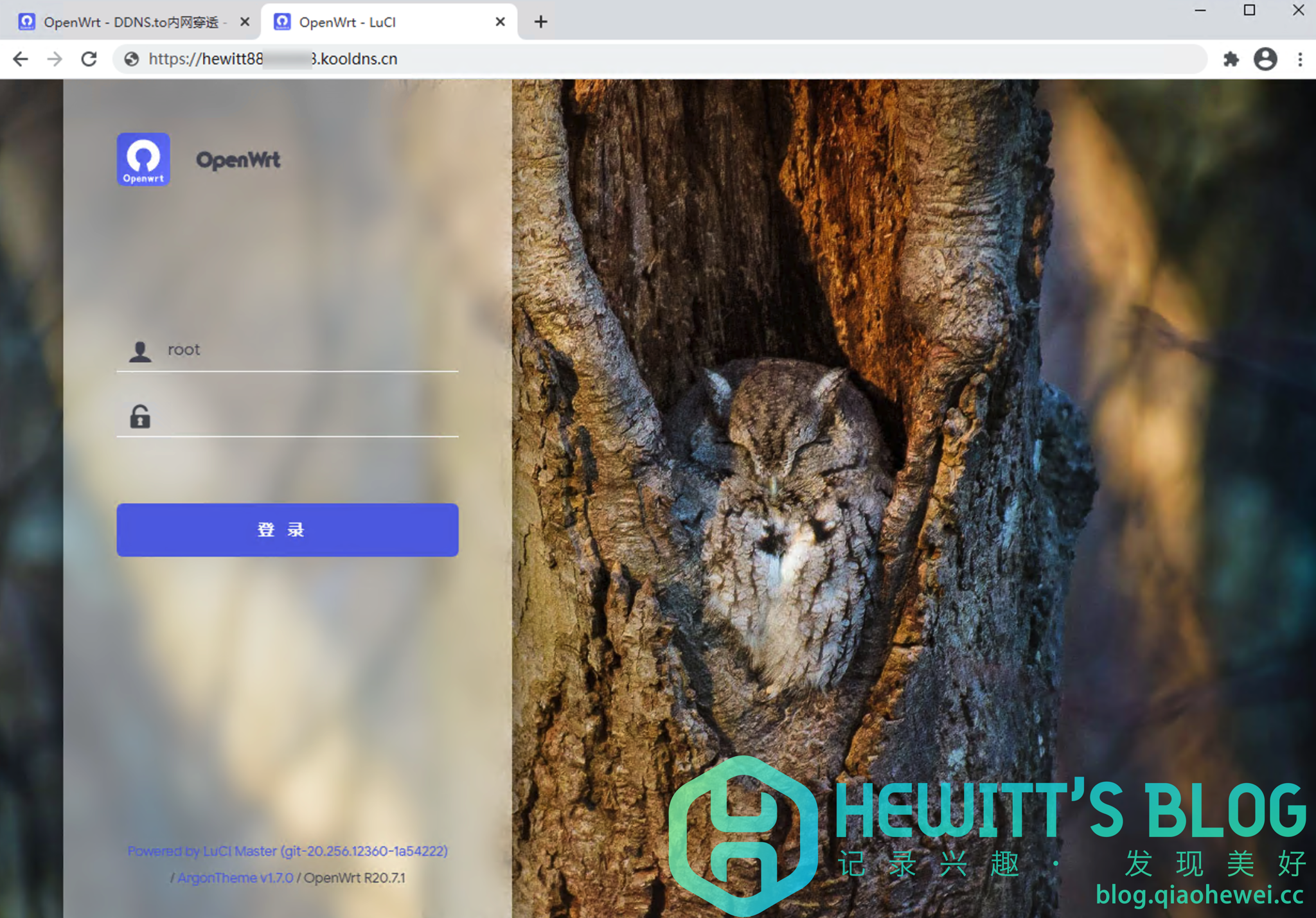 2048w\" data-srcset=\"\" sizes=\"(max-width: 1024px) 100vw, 1024px\" title=\"DDNSTO内网穿透,无需公网IP,实现内网远程设备控制插图16\" alt=\"DDNSTO内网穿透,无需公网IP,实现内网远程设备控制插图16\" style=\"box-sizing: border-box; vertical-align: middle; border-style: none; height: auto; max-width: 100%; display: block; margin-right: auto; margin-left: auto;\" /></a></p><h3 style=\"box-sizing: border-box; margin: 24px 0px 16px; font-weight: 500; line-height: 32px; font-size: 18px; color: rgb(51, 51, 51); font-family: -apple-system, BlinkMacSystemFont, opensans, Optima, "Microsoft Yahei", sans-serif; background-color: rgb(255, 255, 255);\"><span id=\"wu_qi_ta_ying_yong_fu_wu\" style=\"box-sizing: border-box;\">五、其他应用服务</span></h3><p style=\"box-sizing: border-box; margin-bottom: 16px; color: rgb(21, 21, 21); font-size: 16px; line-height: 30px; font-family: -apple-system, BlinkMacSystemFont, opensans, Optima, "Microsoft Yahei", sans-serif; background-color: rgb(255, 255, 255);\"><a href=\"https://blog.qiaohewei.cc/wp-content/uploads/2021/03/1615781284-iShot2021-03-15-12.05.59.png\" data-lbwps-width=\"2882\" data-lbwps-height=\"1244\" data-lbwps-handler=\"1\" style=\"box-sizing: border-box; color: rgb(63, 224, 213); text-decoration-line: none; background-color: transparent; transition: all 0.3s ease 0s;\"><img loading=\"lazy\" class=\"aligncenter size-large wp-image-776 lazy-loaded\" src=\"https://blog.qiaohewei.cc/wp-content/uploads/2021/03/1615781284-iShot2021-03-15-12.05.59-1024x442.png\" data-lazy-type=\"image\" data-src=\"https://blog.qiaohewei.cc/wp-content/uploads/2021/03/1615781284-iShot2021-03-15-12.05.59-1024x442.png\" width=\"1024\" height=\"442\" srcset=\"https://blog.qiaohewei.cc/wp-content/uploads/2021/03/1615781284-iShot2021-03-15-12.05.59-1024x442.png 1024w, 2048w\" data-srcset=\"\" sizes=\"(max-width: 1024px) 100vw, 1024px\" title=\"DDNSTO内网穿透,无需公网IP,实现内网远程设备控制插图16\" alt=\"DDNSTO内网穿透,无需公网IP,实现内网远程设备控制插图16\" style=\"box-sizing: border-box; vertical-align: middle; border-style: none; height: auto; max-width: 100%; display: block; margin-right: auto; margin-left: auto;\" /></a></p><h3 style=\"box-sizing: border-box; margin: 24px 0px 16px; font-weight: 500; line-height: 32px; font-size: 18px; color: rgb(51, 51, 51); font-family: -apple-system, BlinkMacSystemFont, opensans, Optima, "Microsoft Yahei", sans-serif; background-color: rgb(255, 255, 255);\"><span id=\"wu_qi_ta_ying_yong_fu_wu\" style=\"box-sizing: border-box;\">五、其他应用服务</span></h3><p style=\"box-sizing: border-box; margin-bottom: 16px; color: rgb(21, 21, 21); font-size: 16px; line-height: 30px; font-family: -apple-system, BlinkMacSystemFont, opensans, Optima, "Microsoft Yahei", sans-serif; background-color: rgb(255, 255, 255);\"><a href=\"https://blog.qiaohewei.cc/wp-content/uploads/2021/03/1615781284-iShot2021-03-15-12.05.59.png\" data-lbwps-width=\"2882\" data-lbwps-height=\"1244\" data-lbwps-handler=\"1\" style=\"box-sizing: border-box; color: rgb(63, 224, 213); text-decoration-line: none; background-color: transparent; transition: all 0.3s ease 0s;\"><img loading=\"lazy\" class=\"aligncenter size-large wp-image-776 lazy-loaded\" src=\"https://blog.qiaohewei.cc/wp-content/uploads/2021/03/1615781284-iShot2021-03-15-12.05.59-1024x442.png\" data-lazy-type=\"image\" data-src=\"https://blog.qiaohewei.cc/wp-content/uploads/2021/03/1615781284-iShot2021-03-15-12.05.59-1024x442.png\" width=\"1024\" height=\"442\" srcset=\"https://blog.qiaohewei.cc/wp-content/uploads/2021/03/1615781284-iShot2021-03-15-12.05.59-1024x442.png 1024w,  300w, 300w, 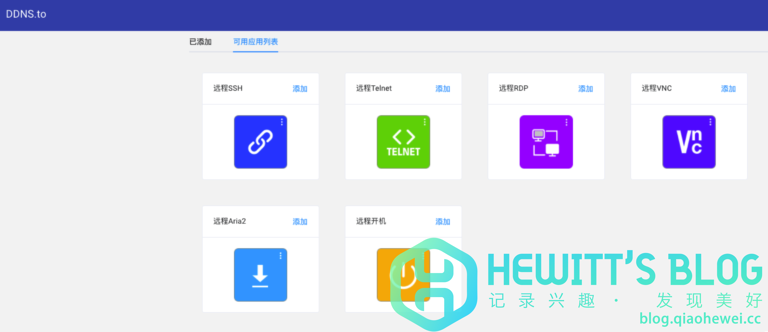 768w, 768w, 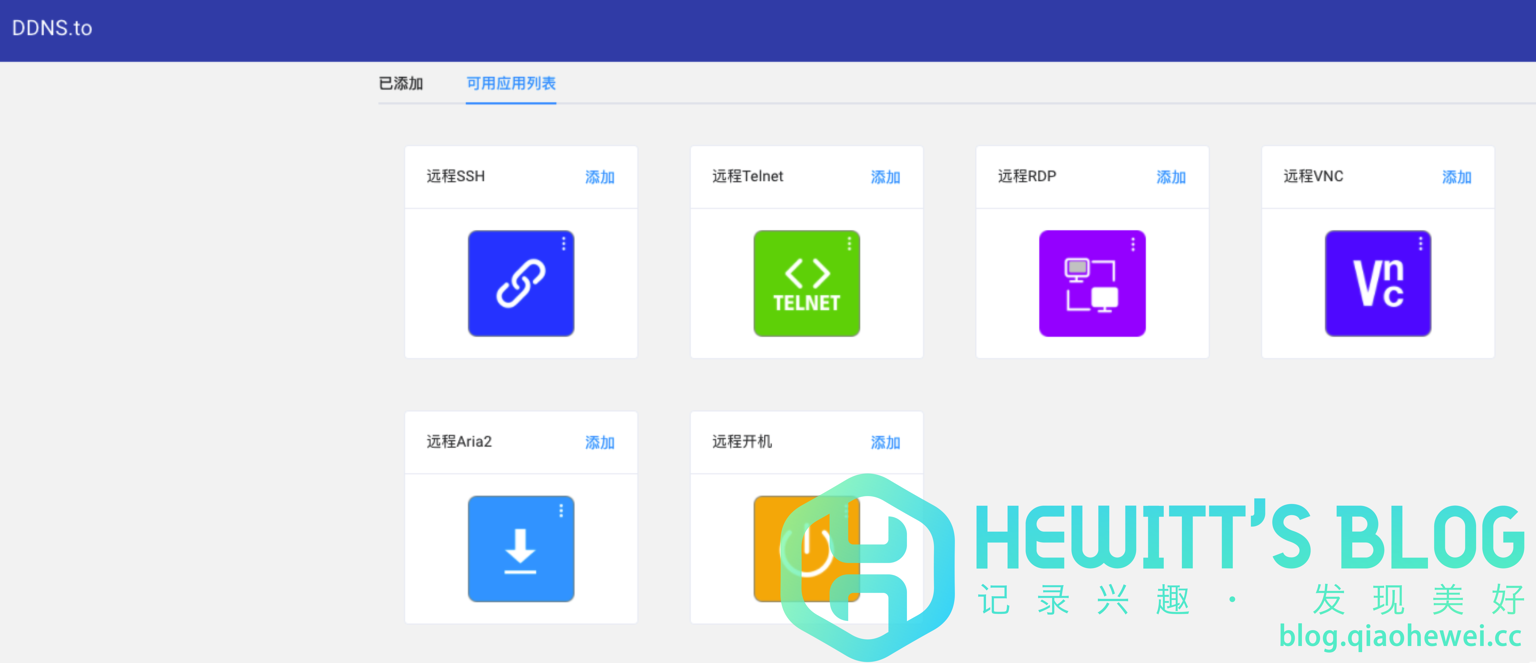 1536w, 1536w, 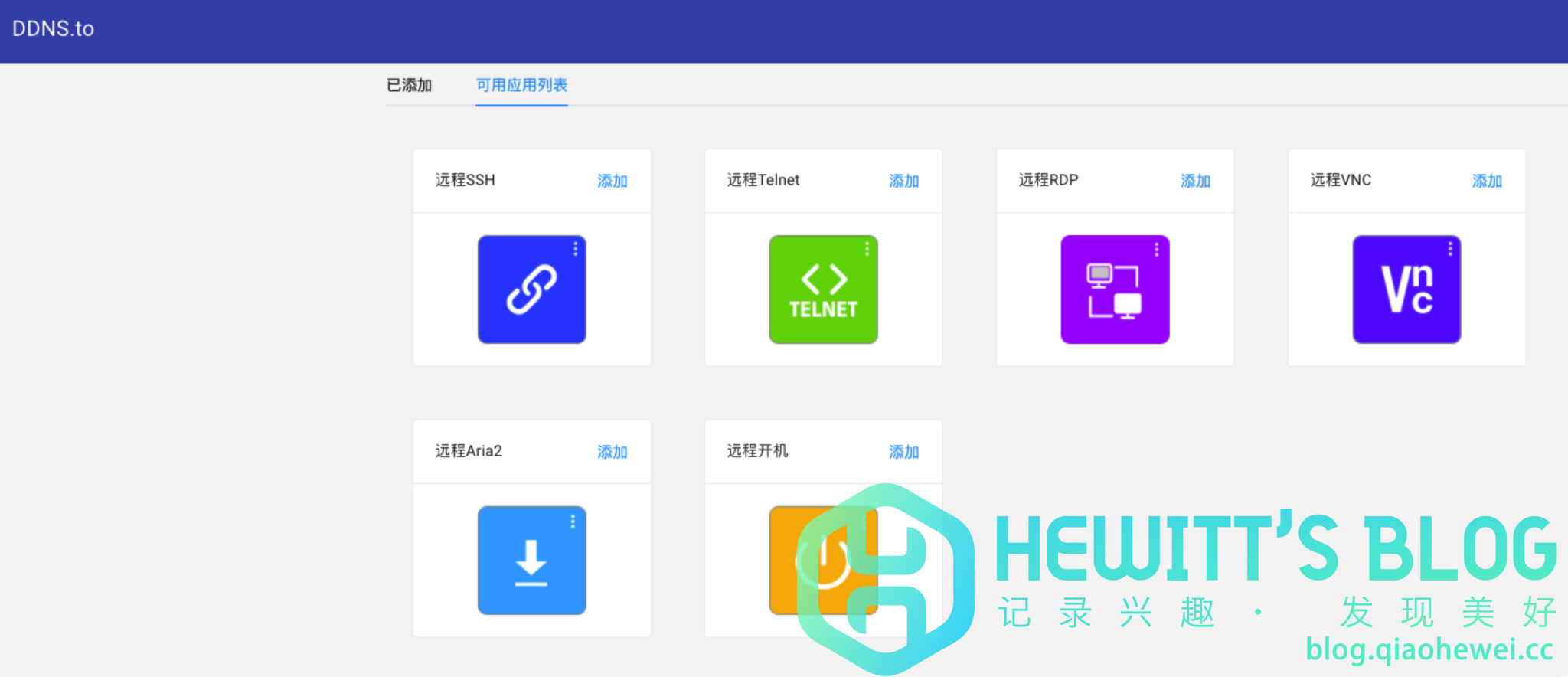 2048w" data-srcset="" sizes="(max-width: 1024px) 100vw, 1024px" title="DDNSTO内网穿透,无需公网IP,实现内网远程设备控制插图18" alt="DDNSTO内网穿透,无需公网IP,实现内网远程设备控制插图18" style="box-sizing: border-box; vertical-align: middle; border-style: none; height: auto; max-width: 100%; display: block; margin-right: auto; margin-left: auto;" /></a></p><p style="box-sizing: border-box; margin-bottom: 16px; color: rgb(21, 21, 21); font-size: 16px; line-height: 30px; font-family: -apple-system, BlinkMacSystemFont, opensans, Optima, "Microsoft Yahei", sans-serif; background-color: rgb(255, 255, 255); padding-left: 40px;">1、也可以根据自己的使用需求新增其他类型内网穿透服务,根据引导配置即可。</p></div> 2048w" data-srcset="" sizes="(max-width: 1024px) 100vw, 1024px" title="DDNSTO内网穿透,无需公网IP,实现内网远程设备控制插图18" alt="DDNSTO内网穿透,无需公网IP,实现内网远程设备控制插图18" style="box-sizing: border-box; vertical-align: middle; border-style: none; height: auto; max-width: 100%; display: block; margin-right: auto; margin-left: auto;" /></a></p><p style="box-sizing: border-box; margin-bottom: 16px; color: rgb(21, 21, 21); font-size: 16px; line-height: 30px; font-family: -apple-system, BlinkMacSystemFont, opensans, Optima, "Microsoft Yahei", sans-serif; background-color: rgb(255, 255, 255); padding-left: 40px;">1、也可以根据自己的使用需求新增其他类型内网穿透服务,根据引导配置即可。</p></div> |
|
 |Archiver|手机版|小黑屋|腾飞在线
( 冀ICP备05002530号 )
|Archiver|手机版|小黑屋|腾飞在线
( 冀ICP备05002530号 )


 发表于 2021-10-4 00:30:56
 发表于 2021-10-6 19:14:40
 发表于 2021-10-6 21:11:32
 发表于 2021-10-7 14:43:28
